The error message is something like "unable to complete mission", but I cant remember exactly now. Do you think it would have anything to do with flying close to (but within) the orange "takeoff area in specific area"?
Hi Sean. A couple comments for future missions. You don’t need to enlarge the “Specific Area” orange circle that big. What that is for is when using specific area as reference the drone needs to be within that area to launch the mission. Default is 30’ so as long as the drone is within that orange circle it will launch. No need to enlarge to cover the flight area.
Are you shooting in JPEG+RAW ? If so you will need to increase the intervals to at least 3 secs, possibly longer. It takes longer to process the additional RAW photos. Also can depend on whether your using the internal storage or an SD card. If an SD card then it should be a V30 rated card at minimum to read and write fast enough to not lag behind. Very common when shooting in both JPEG+RAW. If your shooting in only JPEG then I’d still try at least 3 secs and try it again. In general the App can only perform camera functions which the drones is capable of such as 3, 5, 7 sec intervals. However, I’ve seen it work at 2 secs and not sure why since I don’t understand how the software works. This may not be why it stopped but without knowing the message it’s hard to say. In the future try to get a screen shot if possible. Just something to consider for future plans. Good luck. Hope this helps.
P.S. I may be able to test the flight a bit later with my MA2 if winds calm down a bit. If I do I’ll let you know.
Flew the mission today just as you set it up with no altercations and it ran without any issues with my MA2 and iPad Mini. Maybe try another device. Not sure what else to try other than the links I sent. Are you using the current version of DL ? We’re there any other apps running ?
Thanks very much for the tips and comments Mike and Martin! Greatly appreciated! I check the error notice and it said this: "the drone must remain in P-GPS mode". Does anyone know what this means?
Mike I'll check and update my Dronelink App version if out of date - Was using a Google Pixel 6. And very useful tip to check Jpeg+raw, I'll check that again and see what it's on!
This happens when virtual stick is disabled (either via the RC flight mode switch) or because the drone temporarily loses GPS signal, or when the drone enters an NFZ.
I often get a random stop, perhaps 50% of map missions. Not sure of the reason but if I go back & repeat the next day I may get lucky. Could be the phone, flying near a restricted zone, signal interference or the software. I am using latest version of everything with MA2 & Iphone 8, & no other apps running. Also I get a 'mission running slow' message typically before the stop. A work around requires me to bring the drone RTH then start again. Just as well the drone goes back to the last point of stop on re-start, otherwise it would be a real time-waster. I am elite class and expert mission planner mode if that makes a difference.
I went out to run a mapping mission and experienced odd pauses in my flights yesterday.
What I experienced was that the drone would correctly fly for some time, then hit a particular checkpoint and just hover. No warnings or errors were displayed. However, when I expanded the details for the drone's path it showed both a desired horizontal and vertical velocity but no actual velocity for the drone along the bottom of the screen.
In practice, it seemed like the app was trying to move the drone along the path but the commands weren't actually being sent.
I tried to debug this by pausing and immediately resuming. When I did this, the 'pause point' would be slightly ahead of the drone's current location -- as if the plan was still executing in the background while the drone was hovering in midair.
When I resumed, the drone would fly up to the pause point, showing the 'Approaching checkpoint' details, then the waiting at point details (the short countdown that confirmed the drone was positioned correctly), then it would either resume the flight and actually fly OR 'resume' the flight in the background but hover in place.
For what it's worth, this behavior seems to be related to enabling terrain following. When I run a mission that does not adjust for terrain heights, the drone flies perfectly.
I'm flying a Mavic Air 2S. I've got clear, uninhibited lines of sight and excellent signal out where I'm flying.
I will typically receive a "You must be in P GPS mode" message when I first take off as the drone is acquiring signal, but after that one time message, I don't receive other errors.
Edit 1: I'm considering trying splitting my mapping mission into smaller missions, but it's a bit of a pain to manually set them up. Currently, the flight covers about 50 acres out of ~200 acres of area I want to map. I could further subdivide and have 10 acre flights, but lining them all up would take a lot of manual effort. (Aside, a feature to create multiple sub-flightplans from one large plan would be awesome.)
TotallyGatsby That link is invalid. A couple ways to share the mission. You can go to share and highlight the link then copy and paste here, or just click on the URL/ Web address at top and copy then paste here. May as well state which device your using with your A2S.
TotallyGatsby What device are you using ? A 42 acre map with grid pattern will need a more a powerful device. As David stated, when he switched to a more powerful device it solved his issues.
I'm using a One Plus 8 Pro, it has a Qualcomm Snapdragon 865 8 core processor and 12GB of RAM. It's not cutting edge, I suppose, but I don't think it's *that* out of date. :D

Comments
20 comments
Can you post a link to one of these missions, also what drone and phone
Its a Mavic air2s - using android phone
https://app.dronelink.com/sean-herd-hoare/mitchells/plan/wnlVJX9OWu7FluI1aGTy
Can't see anything obvious, is the drone firmware and Dronelink up to date
What is the exact error message?
The error message is something like "unable to complete mission", but I cant remember exactly now. Do you think it would have anything to do with flying close to (but within) the orange "takeoff area in specific area"?
Hi Sean. A couple comments for future missions. You don’t need to enlarge the “Specific Area” orange circle that big. What that is for is when using specific area as reference the drone needs to be within that area to launch the mission. Default is 30’ so as long as the drone is within that orange circle it will launch. No need to enlarge to cover the flight area.
Are you shooting in JPEG+RAW ? If so you will need to increase the intervals to at least 3 secs, possibly longer. It takes longer to process the additional RAW photos. Also can depend on whether your using the internal storage or an SD card. If an SD card then it should be a V30 rated card at minimum to read and write fast enough to not lag behind. Very common when shooting in both JPEG+RAW. If your shooting in only JPEG then I’d still try at least 3 secs and try it again. In general the App can only perform camera functions which the drones is capable of such as 3, 5, 7 sec intervals. However, I’ve seen it work at 2 secs and not sure why since I don’t understand how the software works. This may not be why it stopped but without knowing the message it’s hard to say. In the future try to get a screen shot if possible. Just something to consider for future plans. Good luck. Hope this helps.
P.S. I may be able to test the flight a bit later with my MA2 if winds calm down a bit. If I do I’ll let you know.
Sean Herd-Hoare, if you go to the web app, click on the aircraft logo
you'll see all completed and aborted missions, click on a failed one and you'll see the message
Also which Android device and DL version are you using ?
Check this link for additional info and direct install of APK for your device.
https://support.dronelink.com/hc/en-us/articles/360035825593-How-do-I-install-the-native-app-
Since your not sure about the error check this link also.
https://support.dronelink.com/hc/en-us/articles/360056104694-Why-do-I-see-Unable-to-Take-Control-or-Control-Override-during-missions-
Flew the mission today just as you set it up with no altercations and it ran without any issues with my MA2 and iPad Mini. Maybe try another device. Not sure what else to try other than the links I sent. Are you using the current version of DL ? We’re there any other apps running ?
Thanks very much for the tips and comments Mike and Martin! Greatly appreciated! I check the error notice and it said this: "the drone must remain in P-GPS mode". Does anyone know what this means?
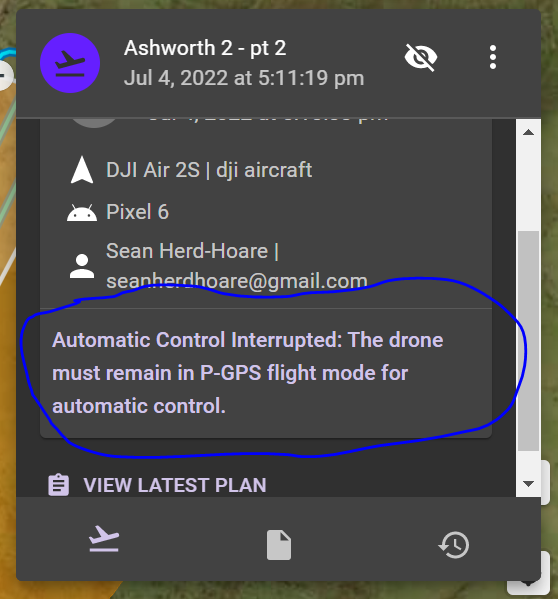
Mike I'll check and update my Dronelink App version if out of date - Was using a Google Pixel 6. And very useful tip to check Jpeg+raw, I'll check that again and see what it's on!
This happens when virtual stick is disabled (either via the RC flight mode switch) or because the drone temporarily loses GPS signal, or when the drone enters an NFZ.
I often get a random stop, perhaps 50% of map missions. Not sure of the reason but if I go back & repeat the next day I may get lucky. Could be the phone, flying near a restricted zone, signal interference or the software. I am using latest version of everything with MA2 & Iphone 8, & no other apps running. Also I get a 'mission running slow' message typically before the stop. A work around requires me to bring the drone RTH then start again. Just as well the drone goes back to the last point of stop on re-start, otherwise it would be a real time-waster. I am elite class and expert mission planner mode if that makes a difference.
If you follow the instructions above, you can go back and find the reason and post it here.
This is explained here.
I went out to run a mapping mission and experienced odd pauses in my flights yesterday.
What I experienced was that the drone would correctly fly for some time, then hit a particular checkpoint and just hover. No warnings or errors were displayed. However, when I expanded the details for the drone's path it showed both a desired horizontal and vertical velocity but no actual velocity for the drone along the bottom of the screen.
In practice, it seemed like the app was trying to move the drone along the path but the commands weren't actually being sent.
I tried to debug this by pausing and immediately resuming. When I did this, the 'pause point' would be slightly ahead of the drone's current location -- as if the plan was still executing in the background while the drone was hovering in midair.
When I resumed, the drone would fly up to the pause point, showing the 'Approaching checkpoint' details, then the waiting at point details (the short countdown that confirmed the drone was positioned correctly), then it would either resume the flight and actually fly OR 'resume' the flight in the background but hover in place.
https://app.dronelink.com/totallygatsby/mission/cfgRBt0ogrLlMe6Jw6Jg is one example mission.
For what it's worth, this behavior seems to be related to enabling terrain following. When I run a mission that does not adjust for terrain heights, the drone flies perfectly.
I'm flying a Mavic Air 2S. I've got clear, uninhibited lines of sight and excellent signal out where I'm flying.
I will typically receive a "You must be in P GPS mode" message when I first take off as the drone is acquiring signal, but after that one time message, I don't receive other errors.
Edit 1: I'm considering trying splitting my mapping mission into smaller missions, but it's a bit of a pain to manually set them up. Currently, the flight covers about 50 acres out of ~200 acres of area I want to map. I could further subdivide and have 10 acre flights, but lining them all up would take a lot of manual effort. (Aside, a feature to create multiple sub-flightplans from one large plan would be awesome.)
TotallyGatsby That link is invalid. A couple ways to share the mission. You can go to share and highlight the link then copy and paste here, or just click on the URL/ Web address at top and copy then paste here. May as well state which device your using with your A2S.
Sorry about that, let's try this link instead: https://app.dronelink.com/totallygatsby/mountainlands/plan/m2M16cwOqL6JIaJaSe5o/W5chgHx59CiGaPrrxbPL
I was getting something similar, until I switched from iPhone 8 to iPhone 12, problem solved
I believe you already found the reason here:
https://support.dronelink.com/hc/en-us/community/posts/6478830941715
TotallyGatsby What device are you using ? A 42 acre map with grid pattern will need a more a powerful device. As David stated, when he switched to a more powerful device it solved his issues.
I'm using a One Plus 8 Pro, it has a Qualcomm Snapdragon 865 8 core processor and 12GB of RAM. It's not cutting edge, I suppose, but I don't think it's *that* out of date. :D
Please sign in to leave a comment.