Terrain following going through the hills

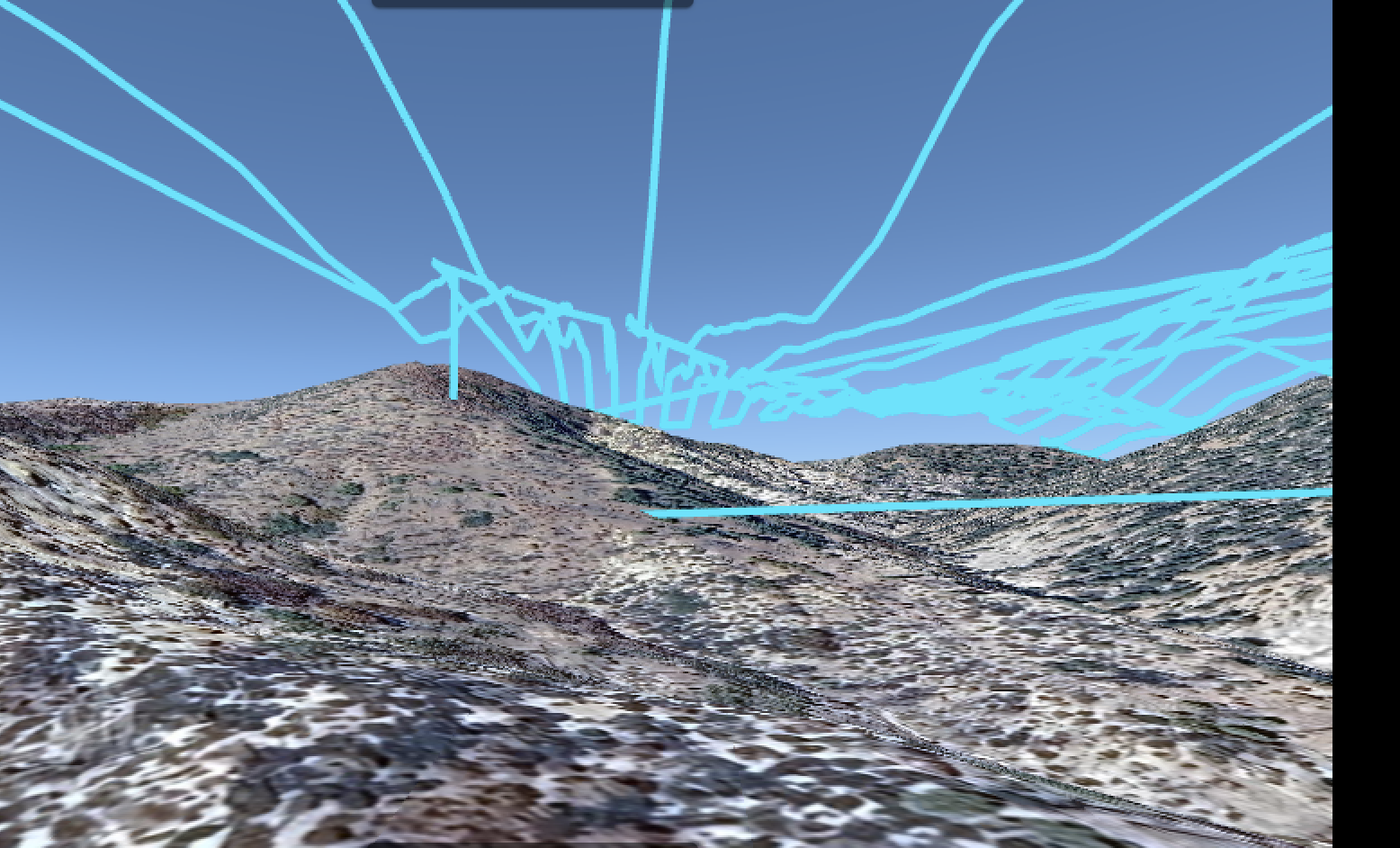
I'm new to Dronelink and I have been playing with terrain following. I have a couple of maps next to each other and I get the path going through a hill. Can someone help me understand what I am doing wrong? I certainly don't want the drone to crash.
Comments
11 comments
Please share the mission plan.
As best I can tell from the screenshot it’s the approach to the mapping component which is going through the hillside. You said you have two maps next to each other so I believe it’s due to the approach from the first component flying to the second map. I’m fairly sure it’s due to the altitude at the last point of the first map which cannot calculate the proper AGL as it would from a take-off location on the ground. Jim can answer specifically why. I made one up with two separate small mapping components close to each and the approach to the second map goes through the hillside as well. I’d run two separate missions.
Here is another terrain following map I did, same problem, this time it's only a single map, not multiple maps together.
How do I share the mission plan?
https://support.dronelink.com/hc/en-us/articles/7912083943059-Sharing-Mission-Plans
https://app.dronelink.com/scott-cook/missing-man-enterpeise/plan/KaixugdKRebDQWbL72P0/Ur2rkOtAhsFE1ChnHMXd
It's like Mike said, the approach to your map is too low and that part doesn't include terrain following. You need to click into the map start and set a higher altitude. If you must have terrain follow on the way to the map, use a Waypoint component with terrain follow enabled.
If I set the map start at a higher altitude, how do I ensure it returns home without hitting the hill as well? Does the drone lift to the start altitude after it finishes the map route and returns to home?
Pre set your return to home height so that it will clear the highest obstruction at the flying site, this is standard pre flight practice
The RTH altitude is determine by what is set in the drones firmware. I’d set the RTH altitude to much higher then needed to not run into obstacles. As always you can cancel the return home and fly it back manually to h make sure. You can always take manual control of the aircraft at anytime during the mission or once the mission is complete you can take manual control.
Scott. As Jim mentioned probably the best way in your situation is to add a path at the start of the mission so it flys to the mapping component and will clear the hills. Once it gets to the mapping component it will run at the set altitude. The waypoint path can now be set to Terrain Follow as well so there should be no issue.
Your shared mission link is not working now so maybe you removed it. If you want to try sharing it again I can set up your actual plan and send it back with just a path added. If you want to do this yourself then take a look at the basic plan I’m sending to get an idea of how to do it. You can clearly see it follows the Terrain while flying the path to the map. Hope this helps.
https://app.dronelink.com/wyldwestaz/arizona-wyldwest/plan/3ibJkGu8FKclTpHKIoGv/8WYK98a9Dv4yjexPGU7r
Please sign in to leave a comment.