Auto Control Interrupted - The drone must stay in P-GPS flight mode for auto control.

Good evening,
When I launch a mission I systematically have this message after a few seconds of flight, which I did not before: "Auto Control Interrupted - The drone must stay in P-GPS flight mode for auto control".
Do you have a solution to my problem ?
Thanks in advance.
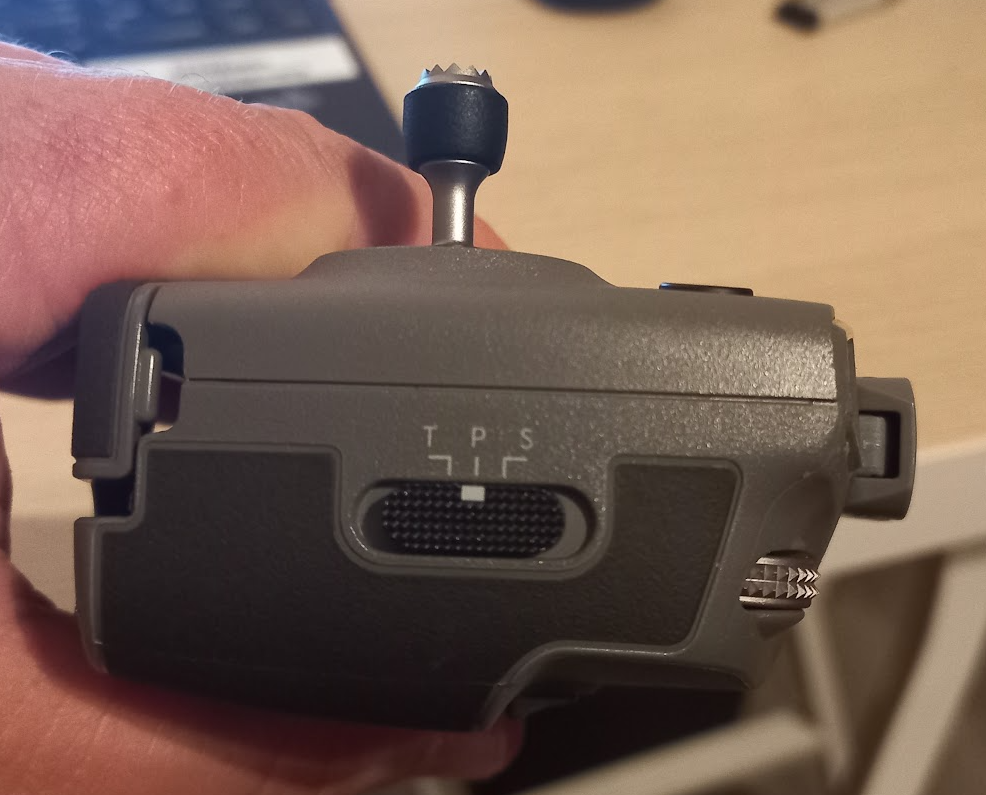
PS: My remote control is set according to the photo below :
Comments
14 comments
Usually one or more of these. Double check all of them. Also did this just happen once or is it not working at all ? Sometimes powering down everything and restarting will correct the issue.
https://support.dronelink.com/hc/en-us/articles/360056104694-Why-do-I-see-Unable-to-Take-Control-or-Automatic-Control-Interrupted-during-missions-
Thank you for your prompt response !
Previously it worked perfectly and for 3-4 missions I have encountered this problem on 2 different sites. On the other hand I asked myself the question if it was not a problem with a DJI Fly zone? I use a mavic 2 pro. But what is surprising is that I still manage to get the drone to take off and systematically in the same place the drone stabilizes and I have to do an RTH. Unable to continue the mission?
Hi Cyril Bertholom. Yeah if it does execute the mission but fails at roughly the same point it may be GEO fenced by DJI. Frustrating I’m sure. One thing to try is fly manually using the DJI app and see if it hits a wall. If it does then that is more then likely the issue. You also could go to DJI Fly Safe website and look at the map to see if that area has restrictions. If so it could be GEO fenced. At least that should give an idea if it’s that and not something else c
Hello Mike thank you for this feedback. Indeed I had thought but unfortunately during this flight when I took control I could move the drone so I am skeptical about the FlyZone.
Last night I anticipated the request for this area which I had permission. I'll try the mission again tomorrow evening, fingers crossed. I'll let you know Mike. Thanks again
Wish I could help more but as far as I know this specific issue isn’t being reported elsewhere. If you did get a DJI unlock make sure it is listed under the Safety tab in Unlock GEO Zone. You may already know this but if it isn’t listed then it wasn’t loaded into the drones firmware and won’t work. Once it is in there I believe it is good for up to one year so it can be requested quickly again. Also even if done properly some have reported that sometimes it works and other times it doesn’t. There is no rhyme or reason why but DL has no control over the DJI unlock zones. Just can’t think of any other reason why if all the other suggestion haven’t worked. Good luck sir.
Hello Mike,
For information, I tried the mission again with the nofly zone deactivated but unfortunately the same problem, the drone stabilized in the same place and with the same error message? I have another idea to test if it works I'll let you know.
If it’s working in other areas then I believe there’s must me something interfering with GPS or transmission signal. Also you can go into the mission tab at bottom of card and select that failed mission. Should either be a code and/or some explanation of what the error is. Screen shot may help as well. There must be a reason but I’m not sure how to help much further. If you use a flight log app like Airdata you may want to look at those and see if there is anything which may indicate what is happening.
Can you share the plan ? I doubt there is anything in it which causing this issue but I’m curious to test it here. I’m guessing it will run but you never know.
https://app.dronelink.com/bertholom/o-drone/plan/2zZKNFLgR787O9VdyO1W
The drone stabilizes between point B and C at 30m.
Hello Mike I hope you are well? I would like to come back to you to find out if you had carried out the mission and if the results were conclusive for you?
Hi Cyril. Sorry but It’s been a few weeks and with all the plans I have I can’t remember what the shared plan name was or if I many have flown it. The previous shared link you provided is not valid anymore so I’ll need to look based on the plan name. From what I can remember I saw nothing in the plan which would cause an issue. If you want to share the plan again I’ll fly it soon.
Here is the link Mike : https://app.dronelink.com/bertholom/o-drone/plan/7HwyZDwenO8xrvobQcj4
Hi Cyril Bertholom, the plan looks ok, maybe down to flight restriction zone shown in this screenshot, this was taken from here https://dronesafetymap.com/#loc=47.9295015,-4.0493549,11.202167057291666
Hello Martin, thank you for your feedback. In fact my mission is in an NFZ but I had requested to vacate this area during my mission, a request validated by DJI. The most surprising thing is that my drone takes off and starts to make a 1/4 turn clockwise and then remains frozen, indicating the message "Automatic control interrupted - The drone must remain in P-GPS flight mode for automatic control. "
Please sign in to leave a comment.