No customisation for photos in Orbit mode

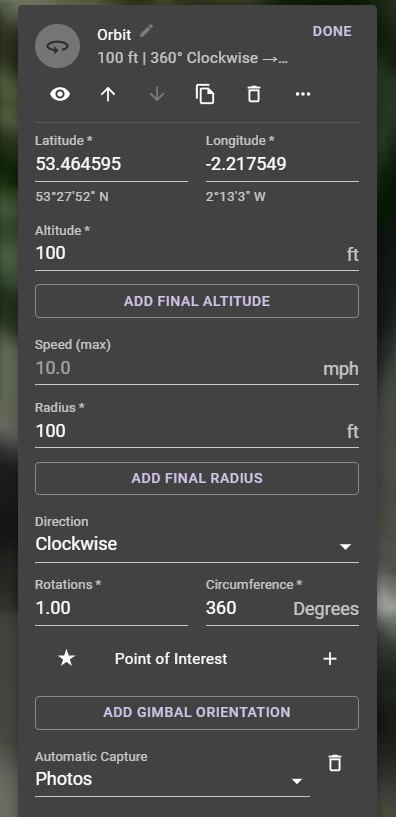
Hi, is there a setting to customise photo timing in an orbit. At the bottom as you can see there is no option for this. For example, I want to set it to take a picture every 1 second. Im using a DJI mini 2.
Thanks
Comments
10 comments
The quickest a mini 2 can take a photo is 2 seconds, you can add a camera photo interval command before the orbit
I’d suggest creating a component list for different needs which is very easy to do for video and photos. This way you can just add from your Repo into any plan quickly without needing to input each camera command on other new plans. Here is one example of a basic photo interval list. You can add, remove or change anything in it. Just remember as Martin stated, your drones firmware will only allow 2 second intervals so 1 second won’t work. You can place a list at beginning of plan or use as a departure or arrival component. As a general rule, if it can’t be done with DJI App then it won’t work with DL. Also if you think you need more photos then just slow down the drones speed. Enjoy.
https://app.dronelink.com/wyldwestaz/components/component/G5wD4yQ53B6y9M7Frp3T/zkd8zRU2IEc9aGD6jFXU
Question: I expect you list is just an example but wondering if you typically run missions using the manual made for camer settings?
Tim B
What you are talking about is what I call Setup Missions - I put a video out about that a long time ago.
You can create missions for different scenarios, test them without flying, and then run them immediately before kicking off the actual flying mission. As long as there is nothing in the mission that will change the settings, your preferences will be used.
Check out the video here: https://youtu.be/18ivyaVGNes
Hey Tim. I almost always use manual exposure and set my camera with a list whether photos or video. In some cases auto could work better but I like more control. Depending on environment before flight all you need to do is open Web app and change one or two of them if needed to set it correctly. Also if for some reason the exposure is too lite or dark you can manually change during the flight. All the camera commands do is set the camera just as if you set it manually before flight. It is not a motion component so it won’t effect the actual flight. You can still stop or start the capture and change from video to photos or back manually. The list can be placed in the plan in different ways at different places along a path just like with adding any component. Even at a path marker which is great if you want to switch between photos and video several times during a flight at specific locations. Just be aware the Modern UI still does not have the ability to change the video Resolution/ FR as well as entering an actual value for white balance manually. So using a list will ensure it is set properly. There are a couple ways to set it manually before flight but for me it’s just much easier and quicker to add a list and this way I won’t forget as well. Enjoy.
Also be aware if changing from video to photo during a mission the camera mode command will fail and stop the mission, hitting the resume button and the mission will continue ok, no problem going from photo to video, you can see what I mean in this video
https://youtu.be/1F4RfQC-X-k
Interested in seeing how you set up the camera list? I don’t recall having any issue either way while flying a mission which switched back and forth either way and a couple times. Can you share that camera component or one similar Martin. There may be a reason why. I’m very curious.
Hi Mike (Arizona Wyldwest), here's the project https://app.dronelink.com/martin-reading/my-first-project/plan/agYubaRaa7rXILs79IqQ and here's a post that I've done on the subject https://support.dronelink.com/hc/en-us/community/posts/16265336700947-Camera-Mode-Failed-when-changing-from-video-to-photo cheers for looking
Yep, I watched that video when you put it out and have made use of Setup Missions as you illustrated often.
Definitely agree
Ah, interesting. I'll keep that in mind when laying out certain future missions. Hope to see whether the cause of the issue Martin Reading described above can be discovered.
Thanks for the input!
Please sign in to leave a comment.