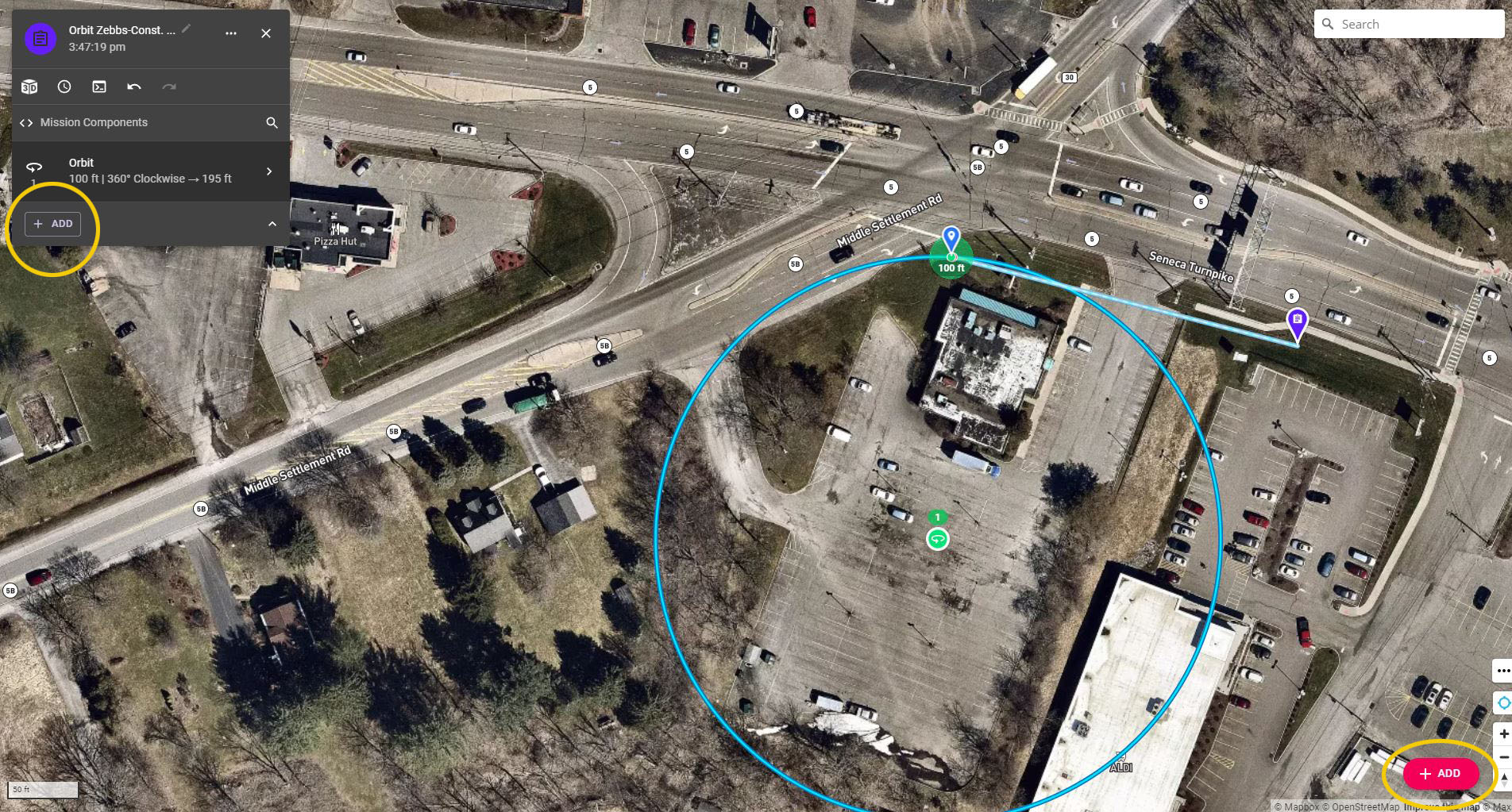
There is no difference. The reason the red one exists is because many people edit the mission plan with the component list hidden. The one at the bottom of the component list is just there for convenience.
“How do you hide the component list? “ Click the upside down v at bottom of card to reduce it down. I Forget what it’s called.
Keeping the current version means it changes the plan as it is at that time. Starting a new version means it keeps the version you have and saves an additional version of that same plan. This way if you made changes and don’t like the way it works you can select another version.
Starting a new version means it keeps the version you have and saves an additional version of that same plan. This way if you made changes and don’t like the way it works you can select another version.
Took me awhile to appreciate just how much flexibility being able to do that provides. For example when there weren't enough "undos" to save the mess I made of things.
You can also just copy the plan as many times as you want then name them like, 1, 2, 3 and so on. You can put information in the description which indicates certain type functions, settings etc. This way you will know which is which with what settings. If you save several different version under the same name you won’t know how it’s set up until you open it. I prefer copying myself.
You can also just copy the plan as many times as you want then name them like, 1, 2, 3 and so on. You can put information in the description which indicates certain type functions, settings etc. This way you will know which is which with what settings. If you save several different version under the same name you won’t know how it’s set up until you open it. I prefer copying myself.
Thanks, will start doing that more myself!
In effect Copy = "Save as". Something I do a LOT, especially with things like fairly complex video edits. I've been known to have dozens of numeric increments.
Side note, as I create more Plans I've started prefixing each play with a "code" of sorts that makes it easy for me to Search and quickly filter Plans, starting with that particular code. Helps a lot in those cases where I'm can't remember exactly what Repo the Plan is in. Of course, the codes only make sense to me!

Comments
9 comments
What is happening when clicking both ?
I use the one on the left hand side essentially.
Looks like they do the same thing. That is confusing to me.
There is no difference. The reason the red one exists is because many people edit the mission plan with the component list hidden. The one at the bottom of the component list is just there for convenience.
How do you hide the component list? Also, what is the difference between using the current version or starting a new version?
Don't forget, you can also add a component by clicking on the map
“How do you hide the component list? “ Click the upside down v at bottom of card to reduce it down. I Forget what it’s called.
Keeping the current version means it changes the plan as it is at that time. Starting a new version means it keeps the version you have and saves an additional version of that same plan. This way if you made changes and don’t like the way it works you can select another version.
Took me awhile to appreciate just how much flexibility being able to do that provides. For example when there weren't enough "undos" to save the mess I made of things.
You can also just copy the plan as many times as you want then name them like, 1, 2, 3 and so on. You can put information in the description which indicates certain type functions, settings etc. This way you will know which is which with what settings. If you save several different version under the same name you won’t know how it’s set up until you open it. I prefer copying myself.
Please sign in to leave a comment.