
Popular Resources
-
<% blocks.forEach(function(block, index) { %>
-
<% if (imageHeight) { %>
<% } %>
<% if (block.name) { %><% if (block.html_url) { %> <%= block.name %> <% } else { %> <%= block.name %> <% } %>
<% } %> <% if (block.description) { %><%= block.description %>
<% } %>
<% }) %>
Comments
32 comments
can you give us more details, such as drone, controller, device an devise OS
Dear Martin,
I have a DJI Mavic air2s with rc n1 controller and I am using a Samsung S22 ultra.
What SD card have you got in the drone (assuming you had put one in, I've left out before now), plenty of space on the card and formatted properly.
Maybe try another card, or reformat it
I have some 256gb samsung.
I formated it. Still doesnt work
Also i have another problem..while flying i dont get live view as the DJI Fly app. There are just some pictures that updates from time to time.
Hello I had the same issue about the live view on my Samsung s22 ultra...that's why I switched to DL on my smartcontroller.
Maybe that is still a issue that some smartphones have problems. Do you have a secondary device?... Ipad ,android tablet another phone to test it?
Dear fellow drone operators,
Thank you for your input.
I think i discovered why it was not taking pictures. I was loading the plan via " Verification mission" option. But I stumbled across another problem. How do I switch from manual flight to automatic g-pac (or how is called) because it doesnt want to switch on its own and when i try to play the mission it says that it will not work
Can you post a screenshot of the message you are getting
I do not have acces to it right now but it says something along the line of : the drone is manually operated and the action has been canceled
https://ibb.co/thjrNjN
How can I turn this into auto?
Try turning apas off
Any updates on this. I'm experiencing the same issue. Latest APK download, latest firmware on RCC Pro controller and latest on Mini pro 3. Flies mission as expected and behaves as though it is taking pictures, but no pictures when I pull SD card. Have tried smaller card and formatting with no luck.
Eu tenho uma Mavic Air 2, utilizo o controle se tela RC N1 se não me engano, com um Motorola edge 30 neo, estou tentando fazer minhas primeiras missões, mudei diversas configuração, e testei diversas as hipóteses, mas não encontrei o motivo dos erros. São 3 os erros, e ou problemas encontrado. 1. "No modo APAS, o interruptor de proibição de voo lateral está ligado". "Não é possível voar lateralmente, Se você precisar voar lateralmente, desligue o interruptor de proibição de voo lateral." Eu não sei se esse erro tem relação com os demais, e não achei local para mudar esse modo APAS. 2 . Quando solicito o início da missão o gimbol fica a 0° , aí passo ele para -90°, ele paralisa a missão, eu dou play novamente, e ele permanece em -90°, porém essa inclinação deve ser automática, e não achei como colocá-la a fazer de modo autônomo, em todas as minhas tentativas foram a mesma situação. 3. Em diversas as tentativas, de vôo e captura automática de mapa, com intenção de gerar o ortomosaico, com diversos cenários testados, ele registrou as fotos. Estou com um cartão de 64 G formatado de classe 10, que poderia ser o motivo exclusivo, porém já solicitei o arquivamento para o armazenamento interno, mesmo assim sem sucesso, imagem registradas manualmente, tanto para o cartão quanto para o armazenamento interno são registradas, mas as imagens do plano de vôo automatizado , nada e registrado. Poderia me ajudar nessas questões ?
Not sure I’m understanding everything but by default the DJI fly app should already have the drone rolling left or right set to on. If it was enabled to restrict rolling then somehow you must have changed it. The DL app does not control this behavior, it’s all controlled in the Fly app. Once any setting is set in the DJI Fly app all settings stick across apps so set it in Fly app and DL will work. The APAS, (fly around) selection is under safety tab in the Fly app as well. You can select fly around, brake or off.
If it starts mission at 0° which is default pitch and then pitches to -90° then there must be a command gimbal command somewhere in the plan to do so. If it is a mapping plan then the default gimbal pitch is always -90° once it starts the mapping component.
Not sure what you mean by photos are not registering. All the DL app does is trigger the photo capture so if you’re not seeing your photos then make sure you have “Capture Mode” set to Photo and “Photo Type” set to Single in the mapping component. You can share your plan so someone can take a look at it.
https://support.dronelink.com/hc/en-us/articles/7912083943059-Sharing-Mission-Plans
Prezados Mike (Arizona Wyldwest)
Agradeço a resposta anterior e as sugestões. Realizei as verificações indicadas no DJI Fly: o modo APAS foi ajustado e o erro correspondente não ocorre mais no Dronelink. Além disso, adquiri um cartão de memória de alta velocidade compatível, e as mensagens de erro relacionadas ao armazenamento também cessaram.
No entanto, o problema principal persiste em relação à execução dos planos de voo para mapeamento. Criei novos planos no modo "Mapa", como pode ser verificado neste link: https://app.dronelink.com/mapagro/meu-primeiro-projeto/plan/raruAhlnPAsQnjMoYrsz/WpatQzG5wF8QMTUA0EYA.
Gostaria de reiterar os seguintes pontos críticos:
Inclinação do Gimbal: Na configuração do plano de voo, a inclinação do gimbal está definida para -90°. No entanto, ao iniciar a missão, o drone realiza todo o percurso de mapeamento com o gimbal em 0°. Se tento ajustar manualmente a inclinação para -90°, a missão é pausada. A inclinação automática para -90° no início do mapeamento não está ocorrendo, contrariando a configuração padrão para planos de mapeamento.
Captura de Fotos: A configuração de captura no plano de voo está definida como "FOTO", com "Tipo de Foto" como "Single". Ao final da missão, o cartão de memória permanece vazio, indicando que as fotos não foram capturadas automaticamente durante o voo de mapeamento, mesmo com o cartão de alta velocidade instalado e selecionado como destino de armazenamento.
Em resumo, necessito de ajuda para solucionar os seguintes problemas:
Agradeço imensamente qualquer orientação ou correção que possam fornecer para solucionar essas questões e permitir o uso adequado do Dronelink para mapeamento com meu Mavic Air 2.
Atenciosamente,
Ícaro G. Pereira
Regarding no photos captured, did you set up the camera for photo intervals in the DJI Fly app first. There is no camera commands in your plan so you will always need to set it up before flying the mission. Otherwise it has no way of knowing what to do and at what interval time. I will try to fly your mission later to see if it pitch’s the gimbal properly.
Bom noite Mike (Arizona Wyldwest)
Estou colocando aqui esse novo plano de vôo, no link abaixo
https://app.dronelink.com/mapagro/meu-primeiro-projeto/plan/bzJPE1VLI76SQy6lNbsK/fvX1HA4AnoEJL72y9V8F
Tambem tirei print de todas as configurações que eu coloquei para esse plano de voô.
No começo da progração do voo é como modelo de mapeamento e nessa parte a unica opção que eu faço alteração é colocar a velocidade do voo para 30 km/h.
Nessa segunda parte vai a maioria das configurações, como o tipo de camera, altitude, e como mostrado na imagem, a captura é Foto e o tipo de foto é Solteiro, e eu não consigo mudar o tipo de foto, para eu mudar o tipo de foto eu tenho que mudar o meu plano. Como tambem está destacado a configuração de gimbal está a -90°.
Você me perguntou se eu configurei a câmera para intervalos de fotos no aplicativo DJI Fly, vou mandar todas as imagens com as configurações que estão no DJI Fly.
Ná imagem abaixo é possivel ver que quanto a missão esta pronta para ser executada, o gimbal está a 0º
a imagem abaixo mostra que o gimbal continual a 0° durante todo o voo
Em alguns teste eu fiz o reestarte do gimbal no proprio dronelink, ai o gimbal vai para 90º em realiza o voo sem mudar a inclinação. conforme imagem abaixo.
Como pode ver na imagem abaixo as missões são finalizadas com sucesso.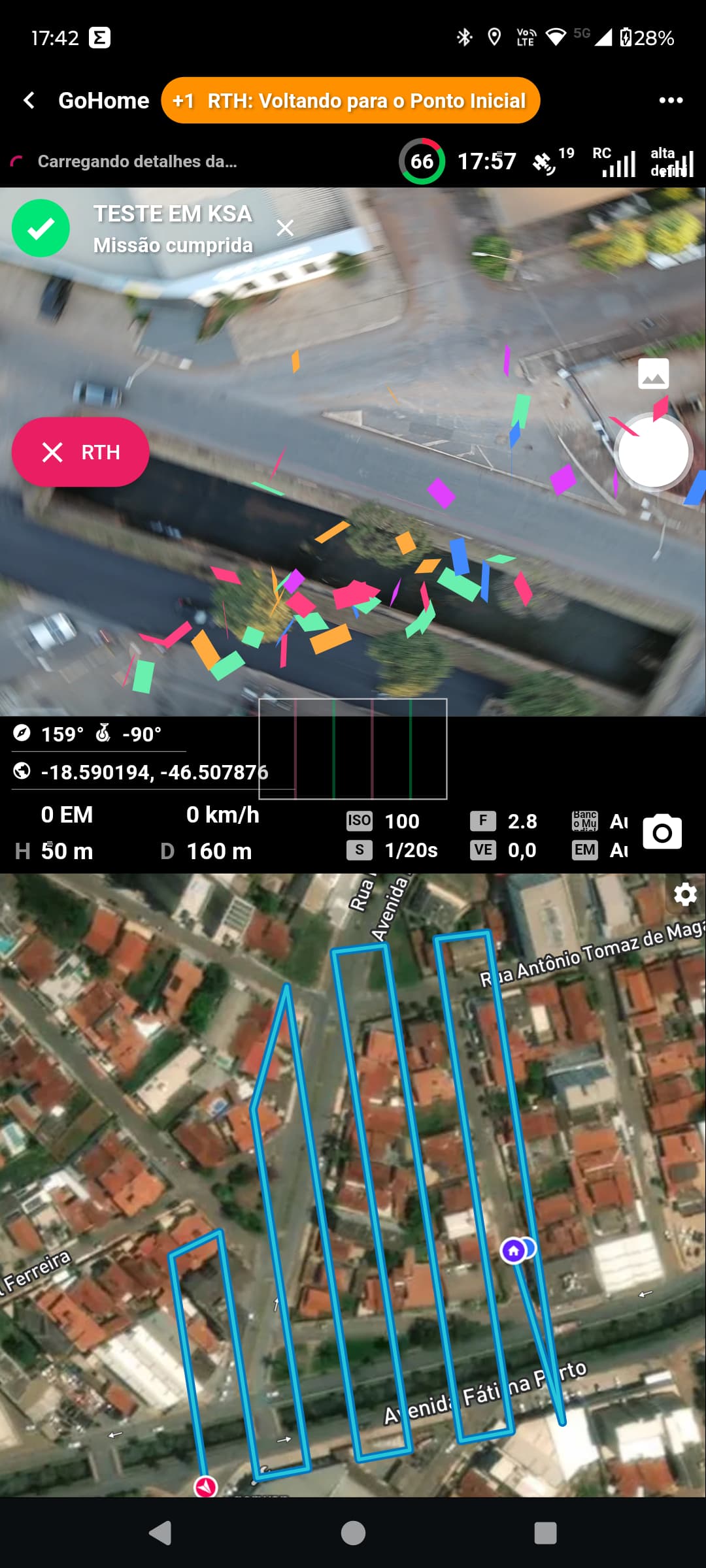
Porem ele não faz captura de nenhuma imagem, conforme pode ver na imagem abaixo.
Na imagem acima, mostra que só tem uma imagem hoje, uma que tirei manualmente, porem eu fiz diversos voos em carater de teste.
E conforme imagem acima, essa missão deveria capturar 107 fotos.
Espero que eu tenha conseguido demonstrar os meus problemas, e gostaria que me ajuda-se.
Mavic Air 2 | 3N3BH6C002037A | 01.01.1600
motorola edge 30 neo Versão 5.1.0 (305) | Núcleo 5.1.0 | Andróide 34 | motorola | Miami
Name Description Tags ID Status Progress Time Elapsed (s) Estimated Time (s) Created Updated Latitude Longitude Kernel Function User ID Device Model Device OS Device Latitude Device Longitude Drone Model Drone Serial Number Drone Battery Drone Latitude Drone Longitude Drone Takeoff Latitude Drone Takeoff Longitude Details URL
TESTE EM KSA tAvvD9mxsvJbXLlfamsE Sucesso 0.9996054573864174 366.655 365.4841990911359 45749.74592047454 45749.75037554398 -18.589271923228566 -46.50672203023885 5.1.0 7pbXZSlud5cGvfyoYW0wvBX7DbD3 motorola edge 30 neo android -18.58930768 -46.50663152 Mavic Air 2 3N3BH6C002037A 0.76 -18.590194332320788 -46.507875235411305 -18.58929152626096 -46.50668701046218 https://app.dronelink.com/mapagro/mission/tAvvD9mxsvJbXLlfamsE
TESTE EM KSA CUVZKat07zb8QkGnjRJK Abortado 0.08755661494222808 32.741 362.7481489657488 45749.74154563657 45749.7432809375 -18.589271923228566 -46.50672203023885 5.1.0 7pbXZSlud5cGvfyoYW0wvBX7DbD3 motorola edge 30 neo android -18.58929955 -46.50663243 Mavic Air 2 3N3BH6C002037A 0.56 -18.58994798594566 -46.50648258162129 -18.589320964667824 -46.50665195523917 https://app.dronelink.com/mapagro/mission/CUVZKat07zb8QkGnjRJK
TESTE EM KSA DfnFKAikD3rcoWhqW4Ek Abortado 45749.74056309028 45749.74098920139 -18.589271923228566 -46.50672203023885 7pbXZSlud5cGvfyoYW0wvBX7DbD3 https://app.dronelink.com/mapagro/mission/DfnFKAikD3rcoWhqW4Ek
TESTE EM KSA MHIdxXJqT5TuhVanesXU Sucesso 1.0030669128287688 367.084 364.8251131801341 45749.733271226854 45749.737728657405 -18.589271923228566 -46.50672203023885 5.1.0 7pbXZSlud5cGvfyoYW0wvBX7DbD3 motorola edge 30 neo android -18.58930239 -46.50662684 Mavic Air 2 3N3BH6C002037A 0.66 -18.590195719131977 -46.507875949323115 -18.589314233335177 -46.50667302928503 https://app.dronelink.com/mapagro/mission/MHIdxXJqT5TuhVanesXU
Ícaro Pereira. I’m using an iPad 11 Pro and I have no way to test it with an Android OS device. I just flew your mission with my MA2 without any issues. Gimbal pitched down to -90° and captured all photos. First thing I’d do is delete and re-install the Dronelink app. That may not be the issues but can’t hurt. If it still doesn’t work I’d refresh the firmware on the drone and controller. Other than that the only other thing I can think of is there may be an issue with the Android SDK. Maybe a DL staff can test with one of their Android devices with a MA2. Good luck.
Mike (Arizona Wyldwest) Quando você diz MA2, você quer dizer Mavic Air 2 ? Uma das primeiras coisas que fiz foi a reinstalação do dronelink, e conferir os firmware, e refiz todas as calibrações. mesmo assim sem sucesso, eu não tenho nenhum iphone ou iphad, vou tentar fazer o voo ligado ao tablet para ver se surge alguma novidade. retorno aqui. diante das minhas pesquisas pode ser que o problema seja o android. mas na decrição, o app e o drone são compativeis com a plataforma android.
Mike (Arizona Wyldwest) , acabei de realizar um novo testes com eu tablet Teclast M40 Pro Android 11, e o resultado foi o mesmo, gimbal não vai para -90° e não é realizado a captura de imagens, mesma coisa do telefone.
I just flew this whole mission without any errors so it seems like there is a hardware or firmware issue with your drone.
Você fez o vôo utilizando um aparelho Android? Ele posicionou o Gimbal em -90°? Ele capturou as imagens normalmente?
Yes
Jim McAndrew e Mike (Arizona Wyldwest) , realizei o voo com diversos aparelho e com duas plataformas para testar e os resultados foram os seguintes.
No aplicativo DroneLink foram testados os seguintes aparelhos:
Tablet Teclast M40 Pro
Samsung Galaxy S20 FE
Motorola edge 30 neo
e Iphone 15
Os mesmos erros foram apresentados, o gimbal não gira sozinho para -90° e não Captura nenhum imagem.
No aplicativo DroneDeploy, foram testados os seguintes aparelhos.
Samsung Galaxy S20 FE
Motorola edge 30 neo
e Iphone 15
No sansung e no motorola não obtive exito, e em resposta a dronedeploy informou que esses aparelhos não estão contemplados na plataforma deles. já no Iphone 15 eu consegui ter exito, a operação foi realizada perfeitamente.
Com esses dados eu consigo descartar que o problema foi no hardware ou firmware com seu drone, pois ele aceitou o comando da dronedeploy com iphone 15.
Posso descartar falha na criação do plano de voo, pois vocês conseguiram executar com exito as missões e eu consegui executar com drone deploy com iphone 15.
Eu acredito que esteja existindo um incompatibilidade do drone link com o MAVIC AIR 2 48MP. é possivel verificar isso?
I flew your exact mission with this hardware and it worked fine, so there is something with your particular hardware that I cannot reproduce, and therefore cannot fix. If you need a refund: https://www.dronelink.com/refund
A minha licença é Amador Premium, é possivel eu testar as licenças Elite e ou um plano profissional para ver se consego realizar a missão com licenças diferentes ?
The license level doesn’t matter.
Estou buscando todas as possibilidades para continuar com vocês, de forma a não trocar o meu drone. a licença pode ser um ponto divergente ! só tentando todas as hipoteses.
Unfortunately, if we can’t reproduce the issue there is no way for us to fix it.
Ícaro Pereira. You said you checked the Firmware but did you do a complete Refresh as I mentioned. You need to use the DJI Assistant 2 (consumer drone series) PC software. That’s the only way you can do a Refresh. Even if it’s up to date you cannot use the DJI Fly app to Refresh it. Can’t hurt to try it and I had one issue with my MA2 a long time ago which nothing worked to fix the issue until I did a Refresh.
Please sign in to leave a comment.