
Popular Resources
-
<% blocks.forEach(function(block, index) { %>
-
<% if (imageHeight) { %>
<% } %>
<% if (block.name) { %><% if (block.html_url) { %> <%= block.name %> <% } else { %> <%= block.name %> <% } %>
<% } %> <% if (block.description) { %><%= block.description %>
<% } %>
<% }) %>
Comments
11 comments
I'm trying to understand the request as it seems you are mixing two different things.
Do you need:
a. A map?
b. A mission that takes photos from different points around a location?
B. Just want photos taken of a poi at each waypoint I set up .
Several ways depending if you want it to stop and take a photo or continue flying while taking the photo using a path. The mapping component will only take photos during the mission based on the intervals as there are no waypoints. More can be done using the mapping component but you will need a business for those functions. Here are a couple articles for both.
https://support.dronelink.com/hc/en-us/articles/6472289691155-Waypoints-Full-Stop-Camera-Actions
https://support.dronelink.com/hc/en-us/articles/4435537380627-Expert-Mapping-Heading-Photo-Type-Capture-Speed-Multiple-Payloads
I would suggest then that you use the photo component as described here
https://support.dronelink.com/hc/en-us/articles/6380731921043
As always many way to set up a plan. It’s the same photo component used in the full stop at waypoint or path action. I think it’s easier since it will place the photo component right on top of each waypoint location. This way you don’t need to adjust or move each one and it eliminates the approach which saves time. Pilots choice. 👍🏼
Only issue it getting the gimbal pitch and drones heading set to focus on each POI. You may try adding a POI on each one and see if the photo component will work in conjunction with it. I think it will work but I haven’t tried it that way. It but it may be easier than adding the heading and pitch at each one. . Enjoy…..
I erased the waypoints mission because it was getting complicated. so i started a blank mission, and did photo components for 16 individual shots each facing in at a POI in the center of the project (all POI's in the same spot ). so ran the mission preview, looks great but i cant set the gimbal position because i picked POI. is there a way to adjust gimbal in doing the mission this way?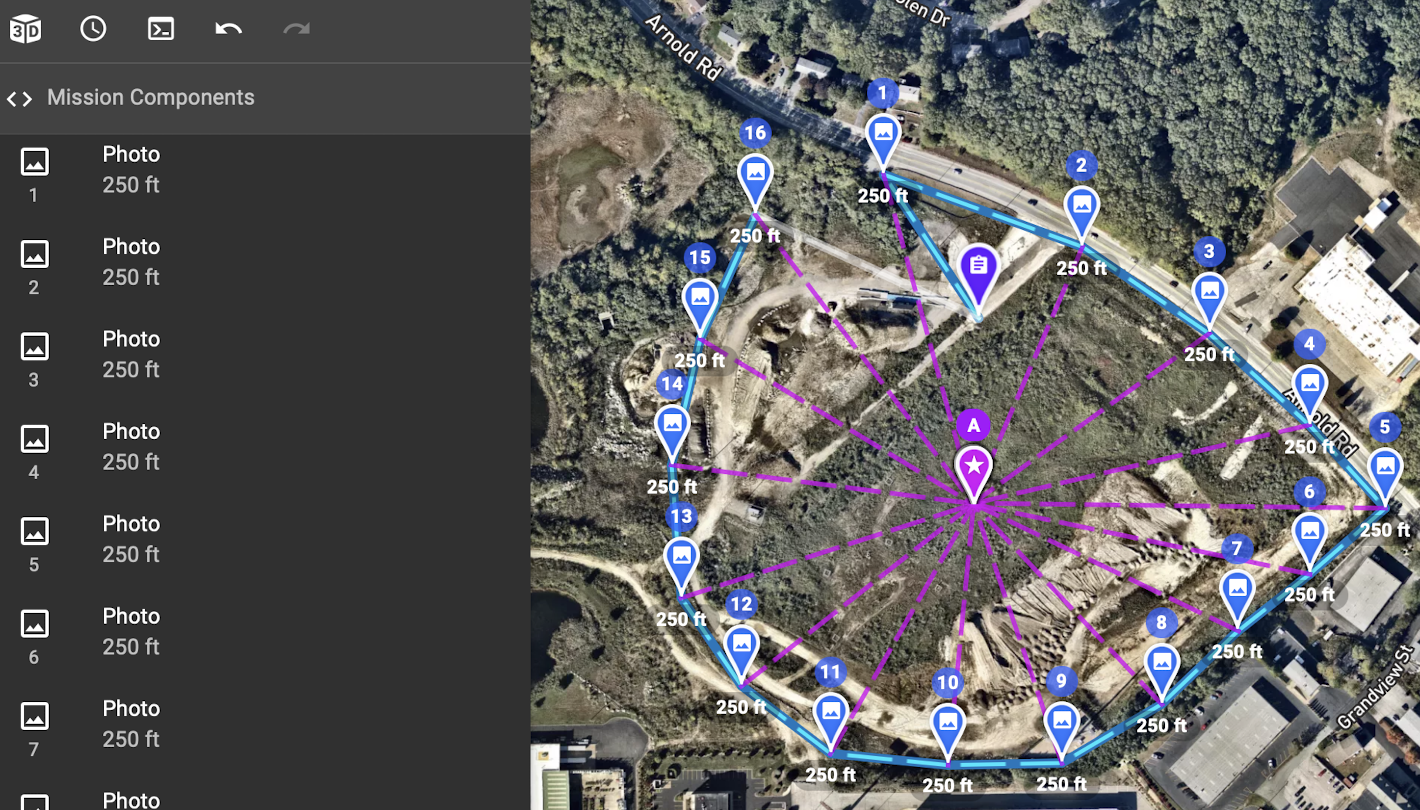
why do you need to change the gimbal position, if you want to focus on the POI, and have the photo component set on the POI the gimbal angle will be correct, and wont require adjustment
I assumed the POI was the direction the drone points towards, I need it to point towards the POI (center of project) and I need the gimbal be at between 15-45 degrees as requested by my client.
Yes that''s correct, but it also effects the gimbal angle as the camera will point at the POI, with your customer requesting the gimbal to be at between -15 and -45 here's what I'd suggest:
Ok Ty, but what if the client wants the altitude specifically 250’ and the gimbal specifically in that 15-45 range?
The altitude offset is the implied altitude of the POI, not the drone. If you need a specific gimbal angle, just run the preview after applying and offset and adjust it until you get the range you want (as displayed at the bottom of the 3d view).
Please sign in to leave a comment.