Can one easily operate Dronelink in an area without cellular connectivity? What might some concerns be?

Greetings--I will be flying some pre-planned missions with a Mavic 2 Pro/iPhone 13 Pro Max/Dronelink in the "middle of nowhere" in New Mexico, an hour or two from a cell signal and cellular connectivity.
Is this easy to do? What might be some of the concerns I should prepare for?
I am using the latest version of the Dronelink app with an iPhone 13 Pro Max with a Mavic 2 Pro.
What would be your favorite/preferred setup for flying without any cell signal? What tablet/phone/ipad would you idally use?
Thank you!
Comments
5 comments
I think all your questions will be answered if you give this a read
https://support.dronelink.com/hc/en-us/articles/4406012655763-Offline-Support-Download-Missions-for-Offline-Use-in-Dronelink-Mobile-App
As Martin’s link will explain how to download a plan for off-line use, once done it should fly without issues. Only problem you may encounter is the map not loading fully. I’ve used a Wi-Fi only my iPad for a couple years and I just load both the DJI & DL app prior to leaving so the map will cache and usually works. It may still not work fully especially when zoomed in on the map though. As long as the plan has been downloaded it will still fly even if the map isn’t fully loading. Enjoy.
I would like to chime in on this one. I use DL off-grid many many times each month. One thing I have learned, is to of course download the mission(s) before heading out. It truly works GREAT!! Donelink is a 100% pro at being able to run missions precisely without a live connection to a cellular network.
Second thing, if you are routinely flying in areas with no data service, you may want to make sure that you have enabled the "Drone Offsets Visible" in your mission parameters.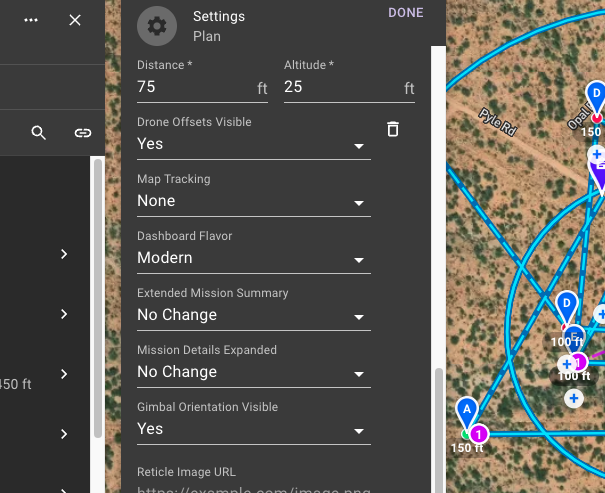
The reason to do this is because you may end up needing to adjust altitudes while running the mission to account for vegetation growth or other unplanned obstacles if this is the first time seeing the site.
And third, I strongly suggest making a slimmed down version of your project as a backup to run. This is because if you cannot connect to data, you cannot easily adjust your mission. I understand you may make components not "required" but being able to eliminate a component on the fly does not appear to be possible to me without a data connection. So...if I have a mission that does a bunch of cinematic moves to capture a parcel of land for example, I may also just make a single mission with several high altitude orbits of the parcel and snap some basic pics. Just to cover me for a project in case I cannot do all the fancy things I had planned.
Full disclosure, just my two cents. There are many better ways to do things, and I often learn about them from 5 Minute Friday videos from members and lots of things from Mike above.
I would suggest not using a takeoff location, or making it very, very large. I've been prevented from taking off before, which wasted 3 hours of driving and nothing could be done about it without cell access. I wish the software would just let you override it while in the field, which reminds me to make it a suggestion.
I have created a mission with a simple spiral, and I have downloaded it onto my cell phone.
I will not have a cellular connection from where I am flying the mission.
Question #1: Suppose that once I arrive, I discover that the center of the orbit is about twenty feet off from where I need it to be. Will I be able to make minor mission adjustments without cell service such as moving the orbit by twenty feet? Will I be able to tap on the orbit in Dronelink and drag the center of it to the better spot that is twenty feet away?
Question #2: Is it enough to just download the mission onto my cell phone, or is there a way to download fuller maps too? Thank you!
Please sign in to leave a comment.