Overlap did not be as planned

Good Afternoon
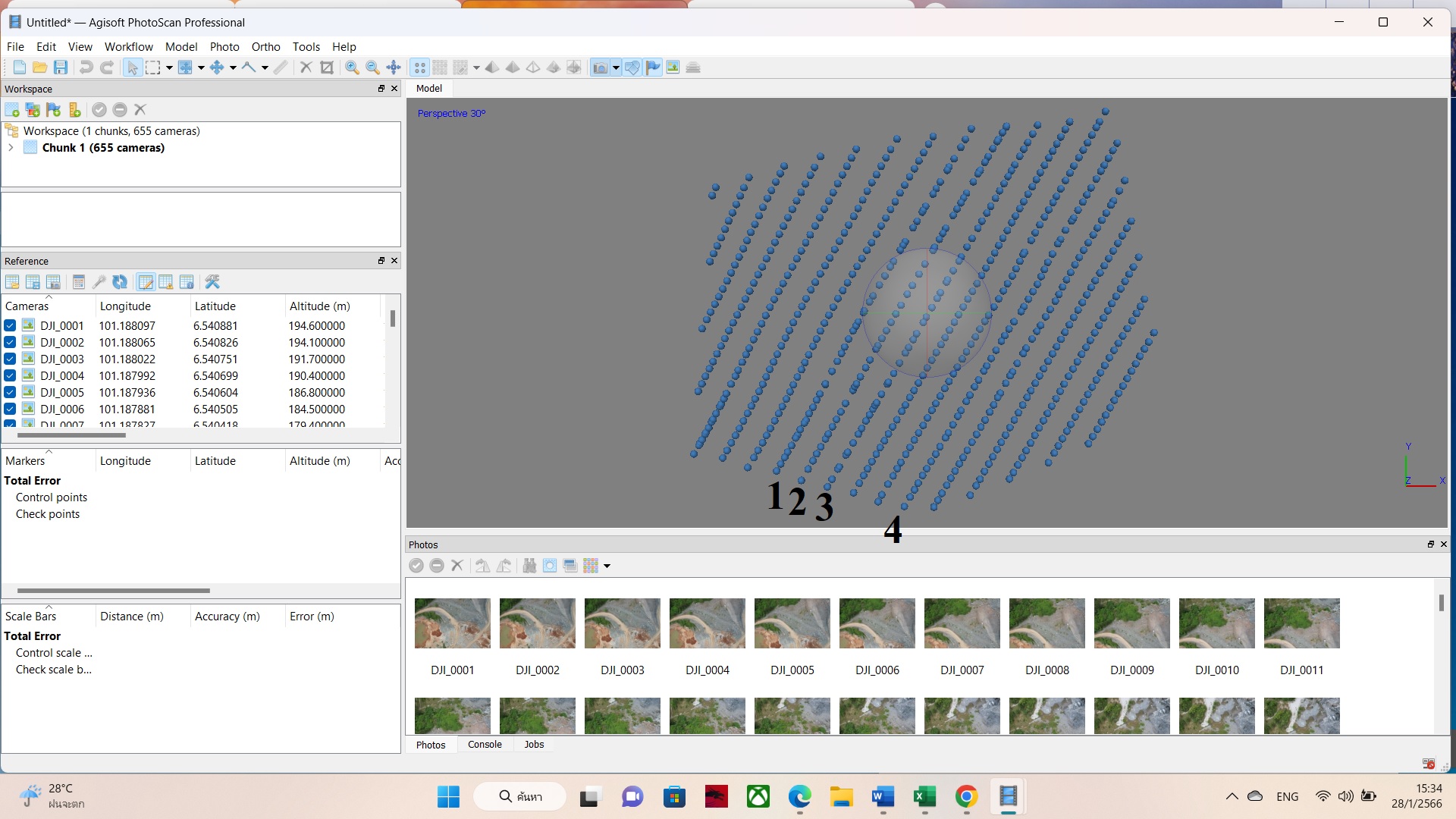
My mission was planned to fly with Front Overlap 90%. When the mission ended, I processed the image with agisoft photoscan professional program for mapping aerial photographs. I found that the drone (Mavic Air2S) was taking pictures irregularly. Especially, The row number 1, 2, 3 and 4 which you can see in the picture. The blue spot is the location where the drone took the pictures. So the overlap did not go as planned. How do I fix it?.
My phone is IPhone 13 Pro Max with iOS 16.2 version. Do you think it's related?

Comments
6 comments
Some of your problems may be that you are using terrain follow, but have not set a take off restriction, if you click on the drop down arrow, select specific area and try the mission again.
By default, maps use distance based camera triggering, which means Dronelink sends individual camera capture commands when the drone has gone a certain distance. If the drone passes through an area of signal interference or is too far away, it is possible that the command is never received or it is delayed, so your only option for these scenarios is to use Time capture priority:
I believe Martin was giving you an answer for the question in this thread. When you switched to terrain follow, the system should have warned you to add a takeoff restriction. It appears that you did take off further up the hill, which will definitely cause the entire mission plan to be shifted up in the real world, but also the mission preview shows that the drone does eventually fly 184m above the takeoff point even if you do takeoff where the mission is planned to takeoff. If the mountain is at 100m MSL, then the drone could definitely reach in the high 200s or even 300m MSL if you took off further up the hill.
Thank you for your advices :). I set a take off restriction is specific area but the problems that still remain. I found that the drone (Mavic Air2S) was taking pictures irregularly.
And the message was always pop up while doing the mission (Aircraft Encoder Error). Which you can see in the picture. Do you think it's related?
If it's necessary. My phone is Vivo V25 with android 12 version.
If you want the highest probability of even spacing (assuming no wind), then you may need to switch to Time based capture (instead of the default, Distance). Distance relies on triggering the camera remotely, which has latency and some % chance of failure, especially in environments with RF interference.
Is the air 2s firmware up to date without any hacks applied
Please sign in to leave a comment.