Panorama: What's the difference?

I've created many panoramas for various virtual tours, but trying to understand how 360 panos work in DL. I copied a public mission that supposedly captured three 360 Panorams. Ran fine in Mission Preview and Google Earth, but "Mission Failed" immediately when I tried to run it in the field. Can't figure out why. Also don't understand why the pano in the DL Repository looks so different than just adding a Pano component, place it on the map, set the Pattern to Spherical (360) and good to go:
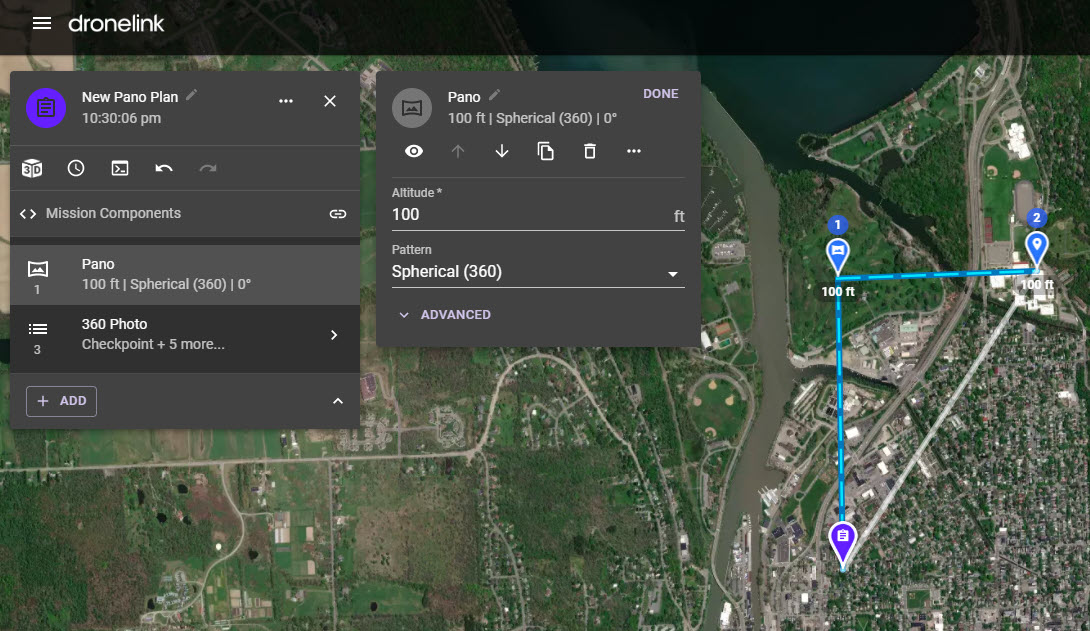
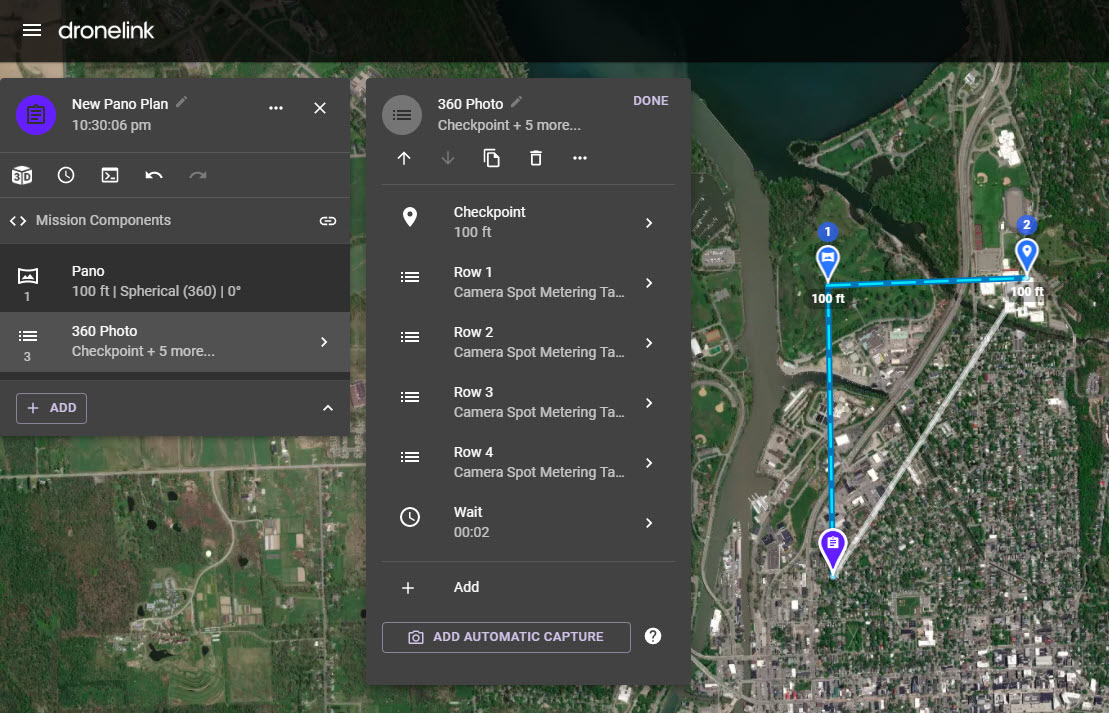
But if I choose to add a pano from the DL Repository it looks like this. Trying to gain some understanding of how each works.
Comments
17 comments
The top one is the one that you should generally be using, some changes were made to pano's some time back, and the lower one is the old style pano, using the old style, it might fail sometimes, due to commands in it that aren't supported by the drone being used, such as spot metering.
The earlier version (bottom one) can come in handy sometimes if you say only want a 270 pano as you can remove rows, or edit the number of photos in each row
Hope this helps
It would help to know the error you are getting in the field - it's likely that there is something in the list that is not compatible with your equipment or the settings you have at the time of running.
Ok, got it-- makes sense. One of the good things about DL is there's obviously a very active development cycle. You have to pay attention to the latest/greatest, but once you understand where things are at, it's all good.
Thanks for the input.
I might have not seen it but I don't recall seeing any specific info the error other than "Mission Failed". But I'm certain you and Martin are correct in that the Mission included an unsupported setting such as spot metering which is not an option here.
I learned about unsupported settings after watching your Camera Setup Mission video. Great idea so I jumped right in setting all kinds of things. Soon discovered, oh... one has to make sure the setting you're adding is supported by your drone! It quickly told me which ones didn't work when I ran the mission.
Possibly something like camera focus failure or shutter a speed. I’ve had that happen as well.
Tim B
Good to hear. Really glad that helped - it's why I put them out there!
BTW - a very interesting 5MF coming tomorrow :)
Ok, 2nd attempt a running a Mission to capture two panoramas using the method suggested here...
Took off fine, flew to the first location, appeared to capture all the images successfully, but after that last image "Mission Failed". Error reported it didn't like a setting for Exposure Compensation. (?).
I didn't realize it but the battery in use was a bit low so I just did a RTH. If it ran the first part successfully and captured the images, where might it be getting this camera setting it didn't like from?
Put a copy with no particular location here:
https://app.dronelink.com/tim-b/share-f1ppaozdyqvomrkqbu8p/plan/8teOTvDtZVXMsGSaMlH1/DK6LUGWQNYDVNEWCUdw5
Further to above, just loaded the SD card to see that no images were captured either.
Hi Tim
Can't see any problem with the plan you attached, so can you do us a favour, in the web app, go to your homescreen
Click on the clock at the bottom, this will show you all your flown missions and what stage they are at, click on the one that you didn't complete, this will then open the mission and over on the right you'll see a pane that will show the exact message
Can you post a screenshot of that, also when you've got a fresh battery in, can you go back on site and try continuing the mission, and let us know what happens
Also...for the missing files. Does that drone have internal memory? If so, check there - it might have been saving to that instead of the SD card.
if it took them, they should be listed under the middle icon in my last picture (ignore the numbering in there, its a long problem that DJI know about, but do nothing about)
The copy of the plan has verify file created so they must be somewhere
Martin Reading
if it took them, they should be listed under the middle icon in my last picture
Yet another lesson learned!
Here comes my two cents worth. It’s a lot to digest but I hope some of it helps. Lol…🤪
As Martin and Barry stated some of the issues with either the 360 public shared component or the newer Pano are due to the drones capabilities. I had the same issue over and over with my MA2 and after many failures and testing I believe I figured out why. I checked one of my previously flown accomplished “Pano” missions. I added one of my camera component lists for photos which I has exposure set to manual. After many failures I changed to Auto and I believe that’s why it works now. I’d suggest either setting the camera manually before flight to Auto exposure or adding a camera command component list at begging to set the camera. It Can’t hurt to try. That’s the only thing I can see which got both to work with my drone. With the 360 shared public component it has all the camera commands listed unlike the new Pano component. In the list of camera commands it has an exposure compensation step set to -3 as the last command. I believe this is why it fails at the very end. This is the only thing I see as a possible issue. I may be wrong but seems to work once I set the camera to Auto exposure on both. I think many have not have had issues because they normally use Auto exposure so the failure doesn’t happen.
As for the other items.
The missions will not be listed unless either fully completed or Aborted. If you are still able to abort that original mission which failed it will be in your flown missions and will indicate as aborted and the error.
The EV at bottom of screen cannot be changed when in Manuel exposure so that’s nothing you did. As stated above this may be one of the reasons why they fail. The displayed EV while in Manual exposure is just showing what the EV value is. When the camera is exposed to either more or less light or when changing the ISO or Shutter it will indicate what the exposure is. The DJI app actually displays it as a “MM” value not EV but same thing. Just some thoughts and suggestions which may help.
One last thing. The Mini 2 doesn’t have internal storage so it will always need to be set to store on the SD card. Once set it should always save to the card though. Otherwise it will saved to your device but in lower quality 720. Maybe check your device for the photos. Good luck.
Mike (Arizona Wyldwest)
Thanks much for the insights-- definitely helps a lot especially considering you've been through similar situations with the same platform.
I will try adding an auto exposure component at start even though, as a photographer for many years, it goes against what I prefer. :-) I wonder if the need to do that could be considered a bug? I expect it might be hard to nail down given all the settings available in all the different models of drones.
Ah, got it. Yet another case of me needing to understand these values actually indicate.
I agree. I use manual exposure about 99% of the time. On something like these Pano’s it seems better since every time it changes direction and drops the gimbal down the exposure changes. I don’t do many photos and I’m sure your better with them then me but when it did fail using manual exposure I remembered some images were way too dark. It could just be me though. lol…
Please sign in to leave a comment.