DroneLink UI - Not Showing Battery Life

So I am new to dronelink and today was my first flight. Sadly could of been my last flight if I didn't check on the battery on my own. For whatever reason Dronelink did not notify me anything or show me any battery information, my drone was almost dead before I swapped out batteries. I am running an Inpsire 2, Zenmuse X7,and 16mm lens, not something thats cheap to have crash on me.
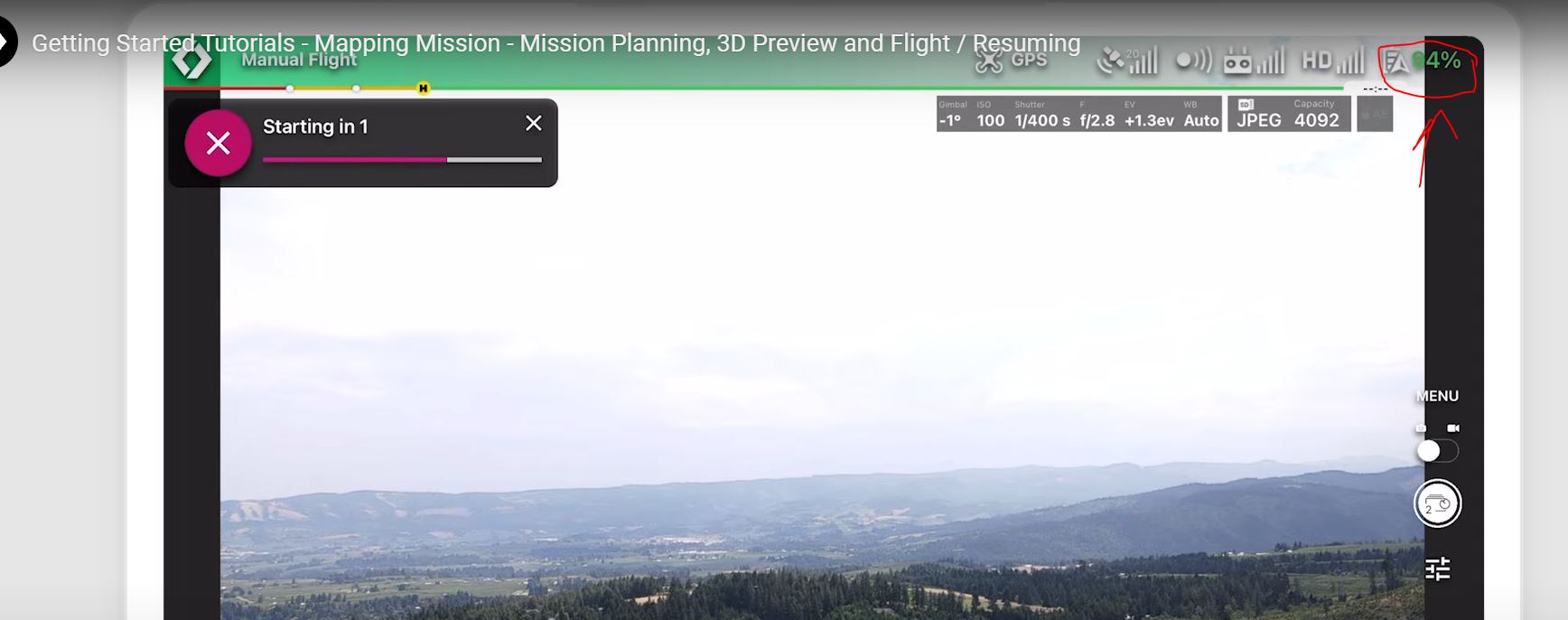
I was watching a tutorial again to make sure I didn't miss anything. In the tutorial about Mapping Mission Planning it shows battery info and says it will return on its own. My UI has absolutely no battery information.
Can you please help me? This is 100% important to me continuing to use this software. Thanks in advance.
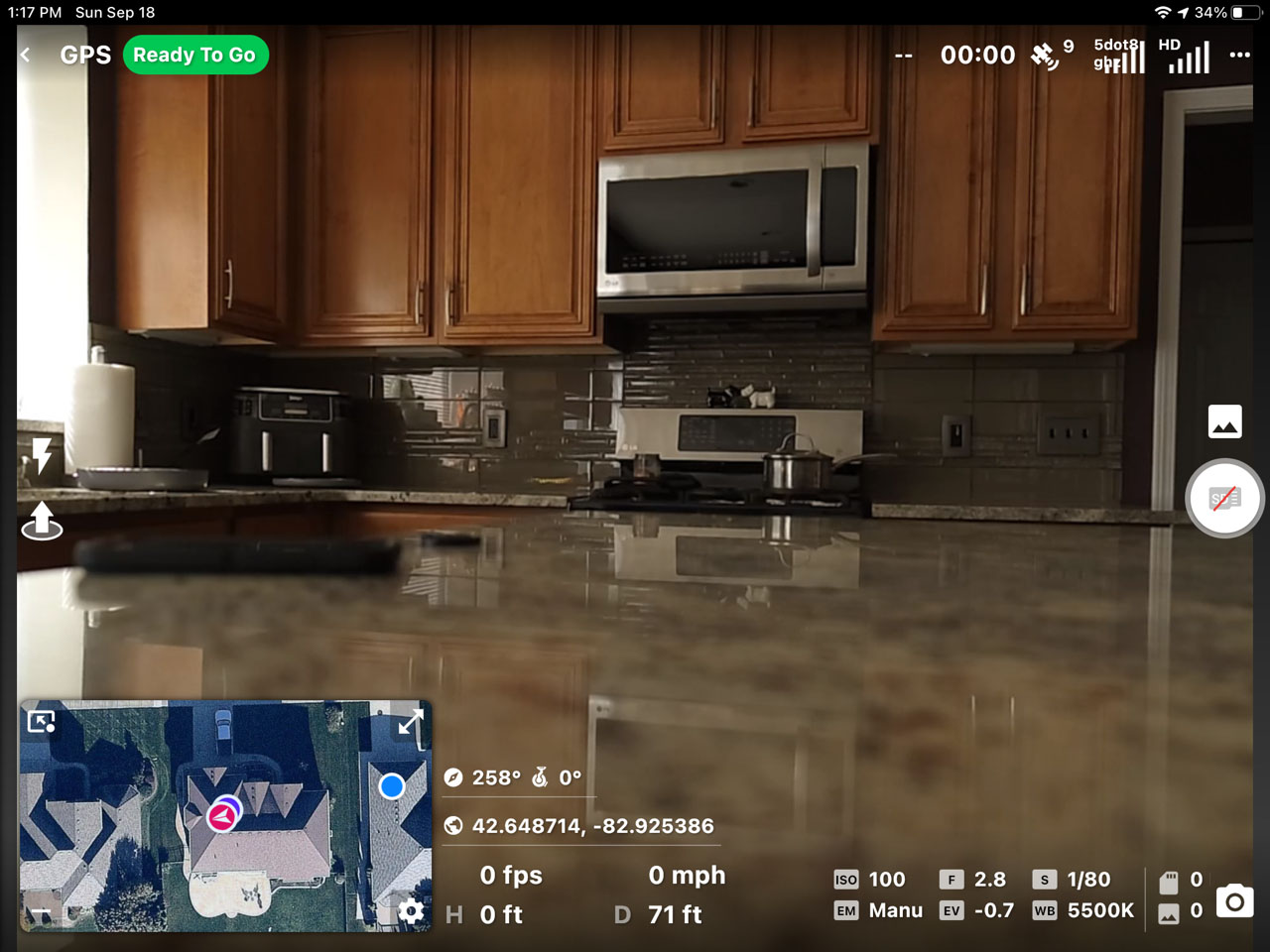
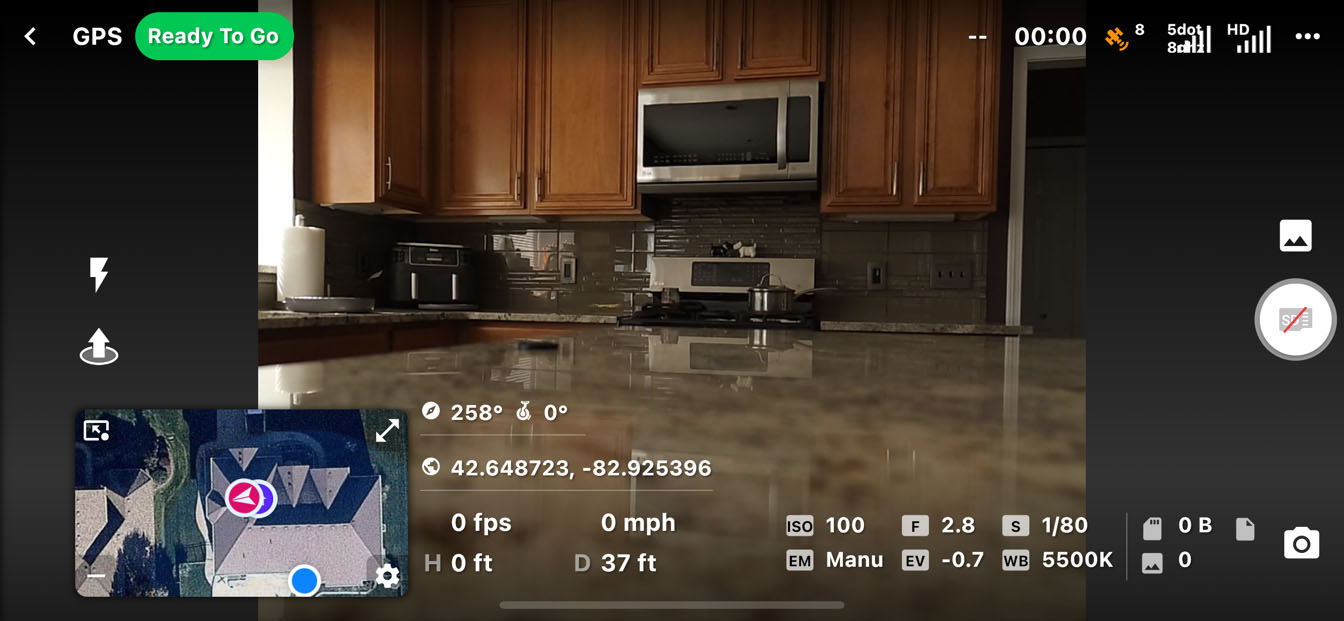
To be honest my whole UI is different. How do I get the UI to match your tutorial UI?
Comments
18 comments
You can use either Classic or Modern Dashboard. The top screen shots are with Modern and your lower screen shot is Classic. It should have the battery percentage either way. I’d delete the app and reinstall to see if it fixes the issue. I see no setting to enable or disable or. Should be displayed and to the left of 00:00. I don’t have a Inspire so unless there is something different I haven’t heard of it should show it.
Also the only reason your drone would crash is if the plan caused it due to improper set up or settings. Two years using DL and I’ve seen no actual crash which DL caused. It’s always been pilot error. Just a bit of information to ease your concerns. DL will take responsibly if the App actually causes a crash and damage after looking at the flight data.
https://support.dronelink.com/hc/en-us/articles/360051772354-Why-should-I-trust-Dronelink-to-fly-my-drone-
Amazing app and they have incredible support. Good Luck and enjoy..
As Martin said, the UI shows the battery percentage in different locations depending on the view you have up and whether you are using the Classic or Modern interface. If you are not seeing it then I suspect the most likely cause is that your device is not using a standard screen size and so things are being displayed and overlapped - can you tell us what device you are using to run the app?
Regardless of the app you are using, your drone should not crash when the battery becomes low. In the DJI Go 4 app (for the Inspire 2) you can set up the percentages that the drone will automatically take action, and what action to take - Land or RTH. By default, these values are set up very conservatively - e.g. RTH at 30%.
The very worst that would have happened would have been that the drone would have automatically landed in a location that was not ideal.
Thank you for the feedback you two.
So here is what scares me. The app was on both Iphone and Ipad. Same visual of the UI on both which is missing the battery.
My next thought now is that the Inspire 2 is not 100 supported, I will try my mavic tonight and see what the UI looks like with Mavic connected.
Another question not quite related to this problem. Do I want to run DJI Go in the background or leave it completely off and focus mainly on dronelink?
@Mike the worry id have of a crash would be to battery value not really the flight, I would take 100% credit for my creating a flight that had obstacles in the way, absolutly not fair to blame app for doing what the operator told it to do.
You need to force close DJI Go when running DL
^ Martin, thank you. Okay this is perfect. I made sure to only run Dronelink and nothing else. I assumed two apps telling drone what to do can cause issues.
As Barry stated, the drone will RTH if set that way in the app which is usually what it is defaulted to. It’s all automatic as long as you have it set to RTH on disconnect and even when the battery gets low and returns for a swap. It’s Very smart app. Even if it’s not indicating the battery percentage it will should still return. You can test it if still not confident by flying the drone manually with DL app with a battery which is not fully charged and see what happens when it triggers.
Since using IOS iPad like me it it should show where those two dots are. If not then as I stated before try deleting and reinstalling DL app. The new UI is supposed to be the same across all devices now but it may still vary. Not really sure about the Inspire 2 but it is supported according to their pricing guide. You can try reducing the font size on your iPad to a smaller font and see if it shows. Easily adjustable in a few seconds. Eliminate the simplest first and go from there.
Are you using a non DJI battery?
I am using 100% everything DJI related. DJI battery, DJI Drone, DJI Camera, DJI Lens. No creative assembly here, everthing as oem as can be. I just checked my firmware and it is and was up to date.
Just tested the app with my Mavic. I see the battery information right away. So it is something to do with Inspire2.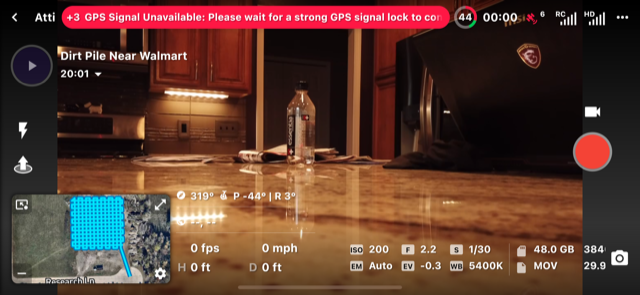
Sergey. If just using the DJI App to check firmware I’d suggest using the DJI Assistant PC software to check. Doesn’t take long and it will eliminate that possibility. I’ve seen updates come out for my drone over the last couple years and the app doesn’t always indicate it is available. When using the PC software it then shows the newer firmware. Can’t hurt to do a refresh even if it shows it’s current. I’m sure Jim will figure it out if nothing else works. Good luck.
Thats actually how I did it. I never trust the app stuff haha.
Thanks for the info - moving to bug reports. Barry Houldsworth, are you seeing this on your I2?
Jim McAndrew
I haven't had a chance to try it yet and I'm currently traveling. I will test it when I get back but I'm out until the end of the month. Once I get a chance I'll let you know.
Jim McAndrew
OK - finally had a chance to connect the I2 today and I can confirm that the battery indicators do not seem to be working correctly. See the following screenshots showing the Modern screen vs the Classic screen.
Modern
Classic
Soooo. Just wanted to bump up this thread to see if there will be a solution made? I switched my app to the Classic mode for now, but would love to make sure it works in either one.
Thanks for your time everyone!
It's on the backlog but lower priority than other things such as M3E support at the moment.
Dear all,
I have readed all this post. At this moment I'm presenting the same problem with the Inspire 2 drone and Dlink.
Any solution to this problem? I'm new Dlink user and would like to use it with Inspire2 drone.
Sergey Poltavskiy
Johan Amador Ledesma from what I have seen the only way to use it properly is in Classic mode. Unless they have finally updated the software to be more compatiable with the Inspire2? But I have not touched the app since this post over a year go so I do not know, sorry cannot be much more help.
Please sign in to leave a comment.