Drone speed fluctuates

Hi folks,
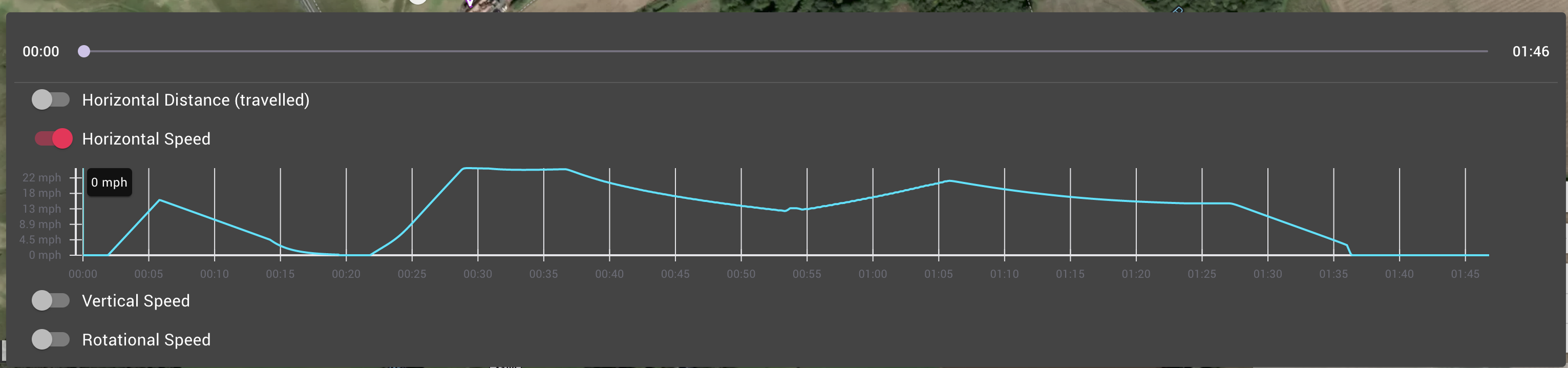
I'm still getting to grips with DL. I've created the mission below and have noticed that the drone slows down around my waypoint marker B, and I am really not sure why, I want to try and keep the speed of the drone consistent. What have I done wrong and what is the best way to achieve a consistent speed?
https://app.dronelink.com/keith-logan/test-missions/plan/Z8HIaUsPaSwY2D3oP0uw
Many thanks
Keith
Comments
13 comments
Hi Keith Logan, can I ask you a question that might help explain what I think is happening, when driving a car and approaching a bend in the road, how do you negotiate the bend, I'm guessing (and i know this is what I do), I slow down to a sensible entry speed for the bend, then accelerate out of it, and looking at the graph, that's exactly what the drone is doing.
Hi Martin Reading, thanks for your comment. Ahh ok, I see what you mean by that. I guess my question would be, how do I achieve a constant speed whilst following a specific path? Cheers
Every drone model has a specific flight performance envelope which dictates what is physically possible in the real world. We chose sensible defaults for the horizontal acceleration and deceleration parameters that work well across most drones, but it is possible to change those values in the plan settings if you want to be more aggressive. Just understand that increasing the accelerations does not change the underlying physics. At some point you will hit the limit and notice the drone fly off course as it tries to take a curve too fast.
Hi Jim McAndrew, thanks for this info. I don't see horizontal acceleration and deceleration parameters in my plan settings, where can I find them? Thanks
We hide these settings in Jim mode because changing them will get most people in trouble. Click the version number in the main menu 7 times if you want to take the risk.
Jim McAndrew Hmm ok I might leave it! In your option, what is the best way to achieve a constant speed on a waypoint mission?
Change the accelerations, or making the corners less sharp so as to not require high accelerations to maintain speed aronud them.
Jim McAndrew Not sure what version number you mean I should click on 7 times if I wanted to make a change? Could you send a screen grab, please?
Keith, when you're in the web app click the hamburger menu top left, scroll right down to the bottom and you'll see the version number, click on it 7 times, and you'll be in Jim mode
I did not see any description of the "Jim mode" in the tutorials.
Where can we find the different features?
Click on the three lines (hamburger button) in top left of DL native app. Scroll all the way down to see the version number. Click on it 7 times. The reason as Jim stated they hide this is due to most pilots not needing to change most of the default settings which work well. If the pilot doesn’t know how it will effect the drones flight they should not be changed. Even if you adjust the settings the drone will still slow down around curves base on the radius and possibly go off course. It will never stay at a constant speed. Think about this: Even a train needs to slow down around sharper curves even though it’s on a track. The speed, weight and forward momentum will cause it to derail. 🤙🏼
Hi Mike, ok, the train example makes me see what you mean, thank you.
👍🏼
Please sign in to leave a comment.