Drone Movements Problems

I make any plan and define the waypoints. When it reaches a changed heading or point of interest it immediately moves very fast when point is reached. I've tried using "gimbal movement" and messed with the "non-linier" to curved, graph is long or short, nothing seems to work during a simulation. It's especially worse entering another component like an orbit.
https://app.dronelink.com/john-s-kress/re-sjwG0luFNuyAz3msP9JH/plan/7RIDwSwpBr9Ifj06sqtg/RD2BU3TnYEO6kasGiaHS
Comments
11 comments
A few things to change. First I’d go into the DJI app under Advanced Gimbal Settings and adjust the Yaw rate all the way down. Also I set the Yaw Smoothness to about 16 which helps it transition smoother instead of hard starting and stopping. This is for the rotation speed and smoothness of the drone. On my MA2 I’ve actually tested this on the same plan several times with different settings. I recorded video and compared them and it makes a big difference. With it turned all the way up it rotates very quickly compared to much slower when turned all the way down. You can adjust to where you think it works best for your needs but I’ve found these settings work great. Second I’d also go into the setup on the DL plan and adjust the Rotation rate to about 15 to 20. Thirdly I’d adjust the Rotation Acceleration rate to about 6. You can adjust the Deceleration rate also if wanted. Those basically change the time it takes to get to the Rotation rate you set. I believe this is at least one of the reason why some pilots comment about rotation movements not being smooth. I have one suggestion on the Orbit. You have the Speed set and actually running at 15 mph. I’d slow down the speed to about 6 to 8 mph. The faster the speed the more chance of the drone yawing back and forth and not staying on the POI. This has been discussed a lot over the last couple years on this Forum and much better results if slower. If no issues at a faster speed then run it. Also the faster speed when transitioning will make make it more difficult but those adjustments should help greatly. I’d slow down the speed a bit before a component like heading or POI etc.
On a separate issue you can also adjust in the Advanced Gimbal settings for the Gimbal pitch speed and smoothness. They make a big difference when changing the gimbal pitch up or down and how smooth it transitions. Since the controllers speed switch using DL should be in Normal mode, I set my normal mode Gimbal settings speed to about 6 with smoothness at about 18. I’ve also tested these Gimbal values with my MA2 and it’s very noticeable. I’ve flown the same overflight plan I created with a -90° Gimbal Pitch and when all the way up it snaps down in about 2 seconds compared to about 4 seconds when slowed down to the 6 value. The smoothness setting really helps with the movement up or down.
Overall my missions have run smoothly without the jerkiness on Paths using POI’s or Drone heading changes. Even Orbits have worked extremely well overall. Hope this helps. Good luck and enjoy.
For the plan settings you have max speed set at 30.5 mph so, unless otherwise indicated, it will attempt to fly fast. Then For waypoints A and B the speed is set at 24 mph. If you want slower speed just lower the speed to what you want.
Also remember the Mission Previewer is just an estimate of how it will look. It will be a bit different when actually flying the mission in the real world due to several factors. Depending on the settings as I stated and the aircraft it will vary. My MM flies a bit differently then my MA2 with the same plan. The MA2 is larger, has more powerful motors and larger props so it fly’s and responds differently. The Previewer is just to check the overall plan to ensure it’s going to fly at the specified altitude and perform how you set up the mission to capture videos or photos. 😃
Thanks. My air 2 flys just like the preview. I set the gimbal to -90% and slam! Maybe the gimbal roll setting adjusts this. I've varied the plan playing with it and it doesn't seem to make much difference. In past versions it used to use markers for all the settings, now waypoints handle a lot of settings. When designing my points of interests link breaks and I have to insert a new one. You used to be able to tilt the plan along the z axis using the control key, that's gone now.
Ok. The mission previewer doesn’t know which drone you are using and how it’s set up. It makes a difference when actually flying a mission. My gimbal and rotation rates are much slower and smoother compared to the previewer. Changing those settings on the drone won’t change the mission preview for reasons stated above. Good luck.
RE: Mike (Arizona Wyldwest)
"you can adjust the Deceleration rate also if wanted. Those basically change the time it takes to get to the Rotation rate you set."
I can't find rotation rate, is it a waypoint setting? A marker or point of interest setting? "DL plan and adjust the Rotation rate to about 15 to 20" Is it in the DJI fly app?
John Kress, to set the rotation rate in Dronelink, you need to be in Expert mode, then you'll find it in plan settings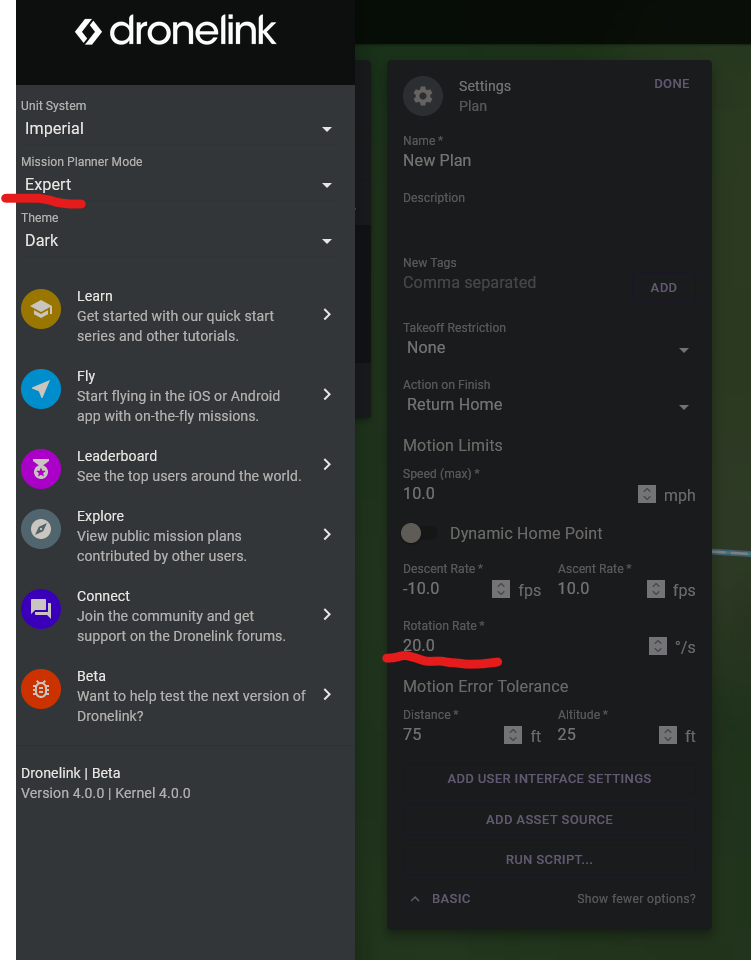
RE: Mike (Arizona Wyldwest)
I found the yaw rotation and smoothness in the dji fly app. Set them as you said - worked well, noticeable difference. The other settings you mentioned I can not find. I use an android galaxy Tab S6 lite. Some heading changes were glitchy, but I thing it's just the Tablet. I would have gotten an apple tab but it was to much money for me. I upgraded my tab from an android tab 8. It works much better and I can run dronelink without any warnings about performance.
Thanks a lot for your help :) !
One last Q... where do I find "Rotation Acceleration rate?"
it's rotation rate, see my post above
One last Q... where do I find "Rotation Acceleration rate?"
The acceleration and deceleration rates are in the plan settings but you need to be in Jim mode or they won’t be available. Expert mode won’t show them. If Jim mode isn’t listed then go to the hamburger button in top left and go down to the version number and click 7 times. Once in Jim mode you will see many other settings just below the rotation rate. Many things are not normally needed to be changed and work great with default values. DL doesn’t want very new users to change stuff which may cause issues they may not understand until they have grasped how it may effect the drone and the mission. I’m sure you will see a noticeable difference once you get the settings dialed in. Most of the time my rotation rate is 15 to 20 and Accel/Decel rates anywhere between 4 to 6. Seems to work good with my MA2. Enjoy.
Please sign in to leave a comment.