4.0.0 (212) Spiral on the fly mission not saving

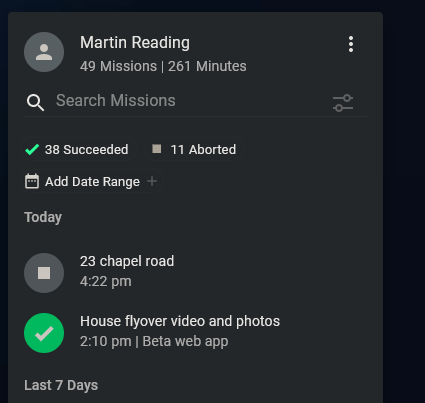
Now that the functions and on the fly missions are available I thought i would give them a try, and everyone i flew, worked fine (focus, orbit, follow and 2 spiral), now I know the first 3 don't save as a plan or completed mission (being red in the menu), however I thought all the blue mission functions were supposed to save as a plan and flow mission (both spiral missions were given names), however when i was looking at the flown missions on PC neither of them show (ignore the aborted mission in the screenshot)
Comments
11 comments
Has the mobile device had a chance to sync with the server?
Hi Jim McAndrew, yeah and I've just checked under the mission tab in the app on the device (galaxy tab s7 fe 5g) and they don't even show there
and we have more of the same today and its not just the spiral it's any of the blue on the fly mission components that i've tried so far, below is the list of what i supposedly flew today, you can add to that a circle, several dronies that recorded as completed rather than aborted (and those 2 weren't aborted but that's another thread)
first mission of the day was a circle
Just confirming this issue Martin described. I Just flew three quick on the fly missions. Circle, Dronie and Spiral. None of them are saved in my missions either using iPad Mini, Beta 4.0.0 (212). Tried waiting a bit and checked again with Firefox and Safari Web app and in the Native app. All indicated mission completed when they were finished and logs are in Airdata. Seems to be with both Android and IOS. 😳
Mike, cheers for confirmation
Thanks for the report.
This will be corrected in the next build.
Cheers Jim👍
Just installed 213, so will check this out and report back later today
I can confirm from the banks off the River Thames that this is fixed for android👍
👍
Please sign in to leave a comment.