Photo mode.

Hi,
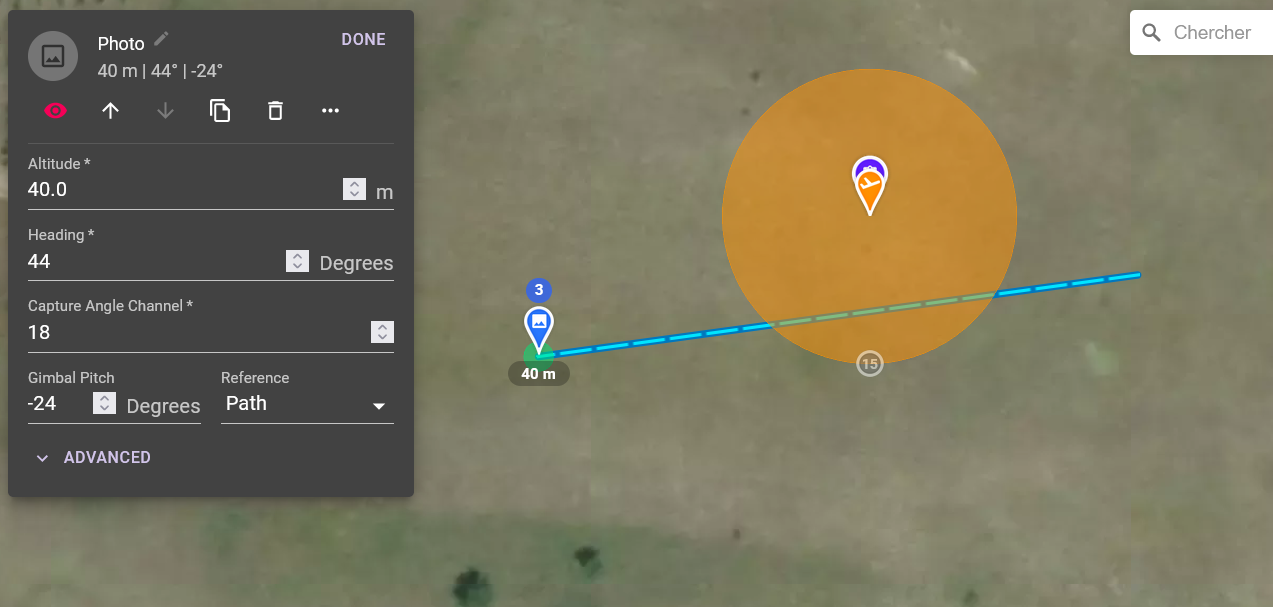
- "Capture angle channel" is not explained in the tutorial. I do not guess the role of this param.
- In addition, I do not really understand "Altitude" as "Gimbal pitch" is modifiable. Isn't it redundant ? (maybe it represents the altitude of the drone ?)
- Moreover some parameters are left blank by default. I suggest to set these params to 0 instead of blank (ex gimbal pitch).
Rgds,
Comments
3 comments
Yeah the altitude is the altitude of the drone when it takes the photo, what would be handy with this would be an indication of the direction the drone is facing
Isn't that the heading? In this case 44°? (from north)
This is available in expert mode only, and part of the reason we put it there is because we are not currently focused on highlighting or documenting features in expert mode as most people do not need or use these features. Having said that, the channel lets you capture photos on drones with multiple cameras / gimbals (such as the M300). Channel 1, for example, woudl be the second camera.
Yep
If you use a POI instead you will get that.
Can’t really do that as blank means “don’t issue a command on that axis” (leave it where it is) whereas 0 would mean “set the gimbal to zero”.
Please sign in to leave a comment.