Waypoint mission - 90 degree turn

Hi guys
I am planning for a drone mission. Every time I want the drone to make a 90 degree turn, the fly path will go out of whack.
I mean it distort the fly path like make one huge curve. Is there a way to resolve this? Thanks.
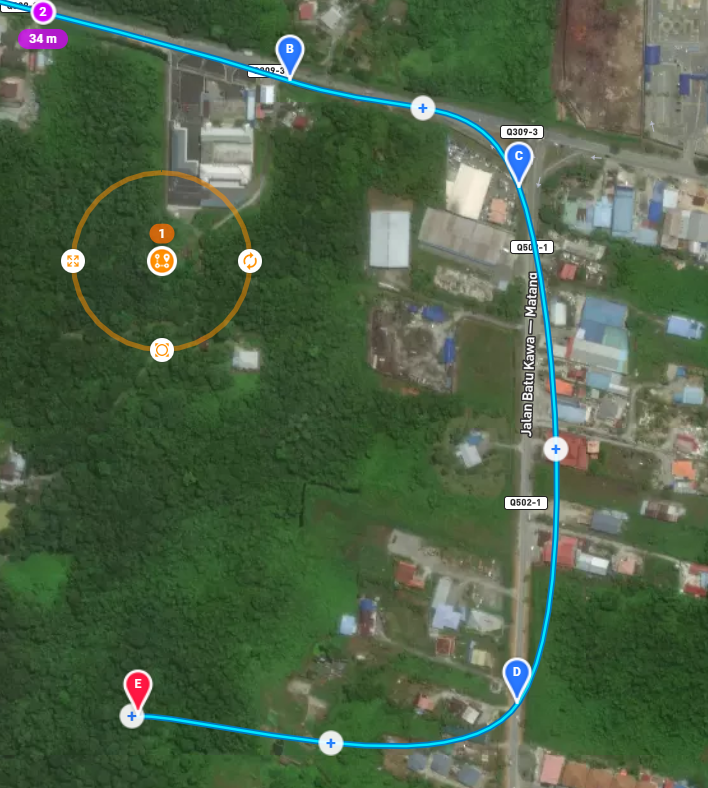
Picture attached above as example. I want the drone to fly straight from point C to D and it buldge again from point D to E. Is there a way to make the flight path from D to 3 like 90 degree turn?
Thank you.
Comments
6 comments
Change it to use straight lines
Please can you provide a link to the mission
You want the path to use straight lines instead of Bézier curves, which is the Pathing option for the component. If you're using the current release mission planner, the Pathing options are Curved and Straight, but in the new Beta app, the options are Bézier curves or rounded corners. However, the Beta seems to have a bug which I just reported on the feedback page:
Straight or cured paths can be done regardless. Doesn’t matter how you create the path. Take a Look again.
Mike (Arizona Wyyldwest): Thanks, took me quite a while to seen it.
🤙🏼
Please sign in to leave a comment.