Problem with a Litchi Import

I've imported a simple mission from Litchi as per the photo below, the point of the mission is to fly over the Loch while focusing on an island the other side of the Loch for which POI1 is set from waypoint 1, on reaching waypoint 2 the drone should fly across the front of the island staying focused on POI1 till it reaches waypoint 3 where it starts flying back across the loch to waypoint 4, during the flight back across the loch it is facing down the loch (approx 270 to path), when it it reaches waypoint 2 it then focuses on POI2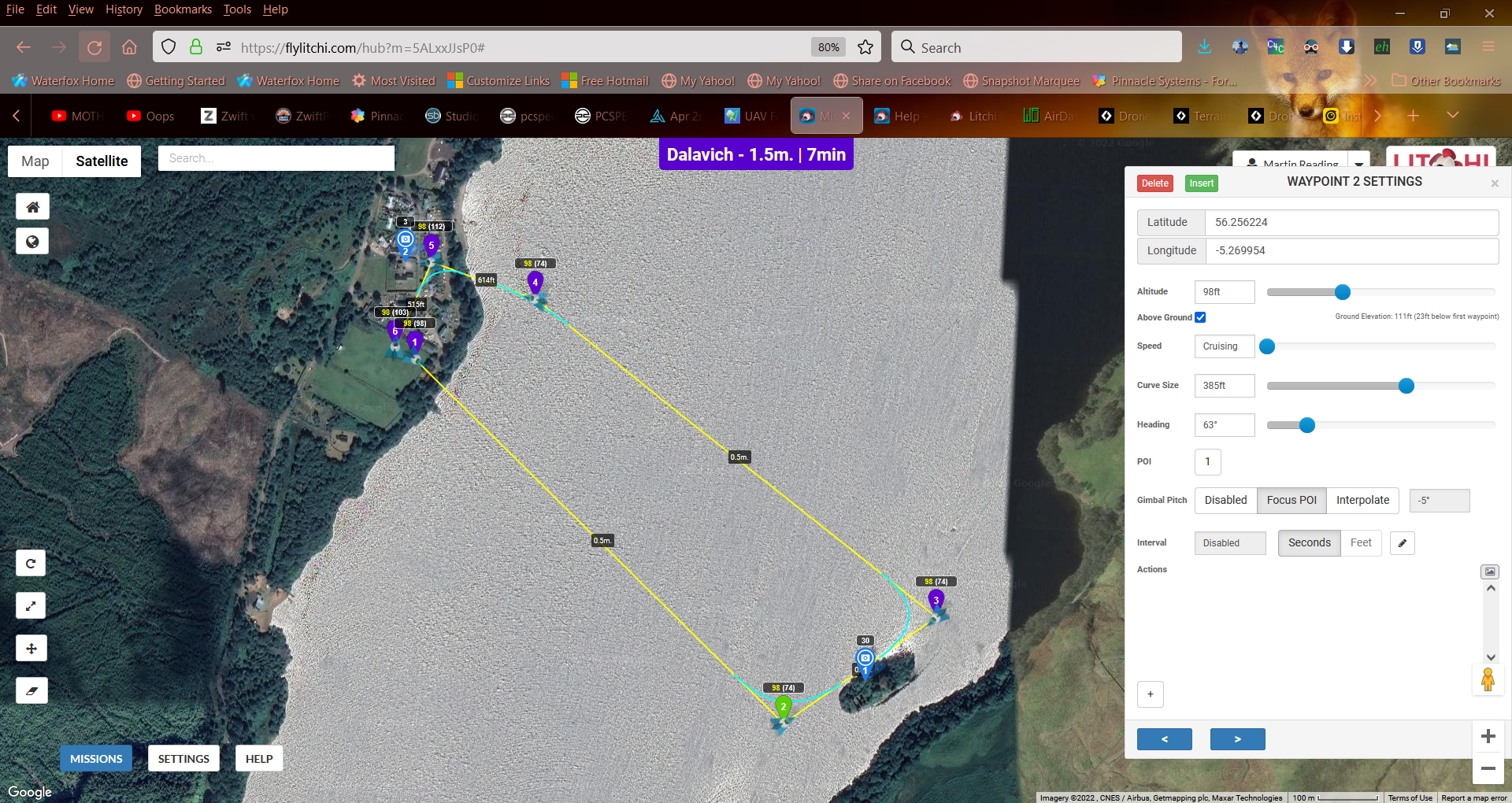
This all works fine in litchi However, in dronelink after import the drone starts of flying away from waypoint A and focused on POI1, but buy the time it gets to waypoint B its transitioned across the front of the island and is facing up the loch while rotating round to POI2, on looking at the following photo you can see that only markers 1 & 4 get a POI associated with them, even though 2 & 3 were set to POI in litchi
Links for projects:
https://app.dronelink.com/martin-reading/scotland/plan/kGQiFZ6Q3WtwbZGsXDK5
https://flylitchi.com/hub?m=5ALxxJJsP0#

Comments
3 comments
Litchi and Dronelink do not have 100% feature parity, so the importer sometimes has to make a best guess at how to import the mission. Based on your description, you need to remove the POI from marker 4, and instead set it on marker 3 and put not interpolation. I also noticed a non-interpolated altitude drop at marker 2, which seemed wrong so I turned interpolation on at that marker to make it smooth:
https://app.dronelink.com/dronelink/qa/plan/uWTwHWYh4ToDxFPiV7Ro/Mx5zcg0oEypCGSihS3Om
Cheers Jim, I'll take a look when I'm back on my computer
Thanks Jim McAndrew . that was a great help, really appreciated
Please sign in to leave a comment.