can't fly mission on dji mini 2

good day i have got the drone link app elite edition, i can plan mission but can't fly any of them . to my knowledge all my update are done and to date. are you aware and is it on the way to be fix soon . other small problem the app seam not to like my samsung S20 it double face when i try to comment or thing like that
thank
Comments
10 comments
Please provide more information like specific error messages, screenshots, and/or which mission plan you are using.
there is no specific error message i just cant fly at all whit the app , plus the plan I'm using is the one i have made call Carleton qc wharf
Can you at least provide a screenshot, screen recording, or a more detailed description than "i just cant fly at all" so we can help you?
here is a snap of it , there is no air craft and i cant see nothing from the drone but it is in the air Jim McAndrew
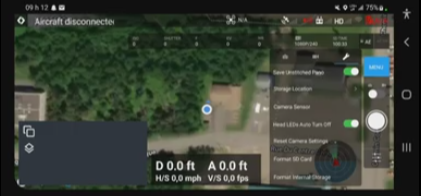
also i cant seam to take of from drone link app , only if im using dji app
Make sure you've not got the DJI fly app open even in the background
Hold the left stick down to take off. There is no dedicated button for this.
I should add, that is if you are not flying a mission. Then you should have the "Start/Run" triangle in front of the flight plan name. Use the stick if you just want to start flying with no plan.
great thanks , i did get to fly it (wanted to try the app it self no plan ) but i will have to try the fallow mode ect
I always start the motors manually whether using the DJI or DL app by pulling both sticks down and inward. Also can be down and outward. Pulling down and holding the left stick will shut them off once landed, not start them.
Also I always let the DJI Fly app load completely before opening the DL app. Allow a couple minutes for satellites to lock and make sure you have camera feed. I check all settings while waiting to ensure all the settings in the app ate set correctly, especially the RTH altitude and others. I’ve done it this way for about 1-1/2 years and always works. This may not always be needed but I’ve seen some that can’t get the camera feed working and after doing it this way their camera feed is working. Just make sure you force close the DJI app once it’s ready and and then open DL. Also male sure no other apps are running in background. Only app which should be running is the DL app to ensure no possible issues. Also make sure you granted all permissions when installing the app which all Android OS devices ask. Not sure if your Samsung S20 double face device will work but I’m sure someone else can answer that. Good luck
Please sign in to leave a comment.