"Gimble mode failed" on mission with air2s

I've tried a mission several times and keep getting the same message as it tries to adjust the gimble. I've confirmed the gimble channel is 0 only. I've confirmed I can manually move the gimble. I've tried deleting the component but it happened on the next component. I've tried making a new mission from scratch. I searched the boards. Any help would be appreciated
Comments
21 comments
Also, kernel 3.1.1 on the computer planning the mission and on the app flying the mission
Can you post the exact error message?
Gimbal Mode Failed
*Please try again by tapping the play button.
*If it happens a second time, try restarting the drone.
*If it keeps happening, you may need to reorder/remove this component or make it not required.
Gimbal Mode | Yaw Follow | Gimbal unavailable
Bump
We are currently investigating this issue, but if you share your mission plan it will help.
https://app.dronelink.com/john-pinkstaff/my-first-project/plan/Mgr125zNt9Y8qLvWYLIq/NFmjz8uSxYNsr6tFslOY
Any updates? Thanks
Can you confirm that v3.3.2 fixes the issue (available in beta)?
Sorry, I just saw this. I'm on a 24 hour shift and then I'll be heading to a conference for the weekend. I'll be able to check it next week.
Dear Jim McAndrew I just installed the beta link through iOS TestFlight, but it says the version is 4.0, not v3.3.2 as you mentioned a few days ago -- did the beta make it to 4.0 in the last few days since your previous post here?
We have multiple betas going, the one you want is under previous builds (3.3.2).
Joel, did you ever figure out how to download 3.3.2 instead of 4? It automatically downloads 4 for me (which doesn't work either) thanks.
It seems to automatically upgrade to kernel 4 with no way to stop it or back track
In iOS, TestFlight App, Open Dronelink Flight, Scroll/swipe down to "Previous Builds", tap on it, you should see several prior versions, some with several builds to choose from.
Is that what you were looking for? I'm not sure because I don't know where, or what, the Kernel 4 is....3.4.0?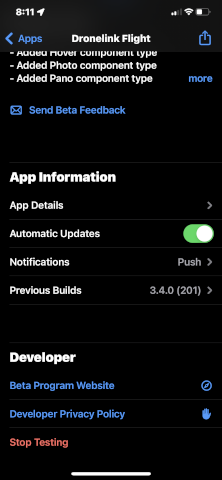
In case anyone sees this in the future, all problems were solved by upgrading the aircraft's firmware through DJI and then running dronelink. Thanks to the Dronelink team for helping, being quick to respond the whole way through, and fixing the problem. My guess is that not as many people tell you when you do a good job as when things are wrong. Keep up the good work, cheers.
Please sign in to leave a comment.