Litchi or DL?

Hey Mike,
I noticed that you are familiar with both Litchi and DL workflows. I have been a beta tester for Litchi since day one, and I am considering subscribing to DL.
What are some of the advantages of using DL over Litchi? Is it just a matter of personal preference for you, or are there specific reasons? I'm curious to know your thoughts.
I capture a lot of footage in the mountainous areas around Apache Junction, AZ, mostly immersive, terrain-following shots using my Air 3. Any input you could share would be greatly appreciated.
I, too, am retired and spend a lot of time on my aerial and landscape projects. Thanks again!
Comments
19 comments
Hi Gary. There are way too many features/ functions which DL has compared to Litchi that it would take a ton over time to go through all of them. DL is a much more powerful app. Depending on your needs another app may work for your purposes. The Air 3 which I have as well doesn’t have DJI SDK support as you probably know so it will not connect to any third party app. This means you cannot utilize any third party app to actually fly missions.
The only way to fly any missions is to use the DL web app to create your plans and then convert them to a DJI Onboard Waypoints mission and export them into the DJI app. Also when utilizing DJI Waypoints it has limitations and because of this there is only basic or limited functionality. However, you can run basic Orbits, Waypoints, or Mapping but just be aware of the limited functionality. I’ll try sending a link to the DL onboard waypoints article so you will be aware of how they work and the limitations.
https://support.dronelink.com/hc/en-us/articles/4410621290387-Onboard-DJI-Waypoint-Missions-Convert-and-Export-to-KMZ
I’ll give just a couple examples of the difference between the two apps. I’ve used DL for over 5 years but I also have the Litchi app which I’ve tried using for about 3 years. I’ve only flown several missions with Litchi because every time I have tried to set up a plan similar to any DL plan it’s nowhere as easy and had limitations. There is no benefit for me to use Litchi since I can do everything I need with DL and far more functions. There are a few features which Litchi does have that DL doesn’t but for me I’ve never needed to use any of them and most are features which a very small amount of pilots need or use. With some of the new additions Litchi has implemented recently it is a better app but still not as powerful as DL.
One example is Litchi’s mapping component which takes me more time to create and not as easy then the same plan using the DL app. Also they don’t have the ability to fly Grid Pattern mapping, just normal pattern. The Hobbyist Elite plan would be needed if you are wanting to run mapping missions with grid pattern and Oblique angles but DL has this ability.
Another example is Litchi POI’s which are horrible because you cannot select just one or two waypoints to focus on. Once you add just one POI on a waypoint the entire mission will point towards it. The only way to kind of fix this is to adjust the heading manually on each one which can be time consuming. There is no way to batch edit them and set all the other waypoints to follow path without eliminating the POI.
If you want any help with your Air 3 missions I’d be glad to help. I use an iPad which is so easy that once I save the DJI KMZ in the DL web app it literally takes only about 60 seconds to import into the DJI Waypoints folder and ready to fly. Android can be a bit more complicated with some devices. With the addition of the DL conversion tool in the Web app it’s much easier now when using a DJI controllers with screens to upload the plans directly into the connected controller. So no transferring to a PC and then to an SD card and so on. That’s some of my thoughts and opinions so I hope this will help. Enjoy.
A couple other post I sent but awaiting approval from DL.
Mike,
I really appreciate the time you took to lay out your perspective — it was thorough, practical, and clearly based on real-world flying experience. It’s rare to get feedback from someone who has spent years inside both ecosystems, so your breakdown helped me understand how you approach mission planning and why DL fits your workflow so well. Thank you for that.
I wanted to share a few of my own observations too — not to counter anything you said, but to add context from the Litchi side since I’ve spent a lot of time digging into how its mission engine works under the hood.
On Mapping:
You’re absolutely right that DL’s grid and oblique tools are more advanced, especially for pilots who need structured mapping deliverables. Litchi’s mapping module is still pretty young, and it shows. Where I’ve found Litchi useful is in missions where I want more manual control over altitude profiles, curved paths, or camera actions that aren’t strictly photogrammetry‑focused. But for pure mapping efficiency, DL is ahead — no question.
On POIs:
Your point about POIs is spot‑on. Litchi’s global POI influence is one of its longest‑standing quirks. The system was originally designed around cinematic arcs and smooth gimbal transitions, not selective waypoint‑level targeting. That’s why the “follow path” vs. “face POI” logic is so rigid. I’ve learned to work around it with heading adjustments and segmented missions, but it’s definitely not as elegant as DL’s per‑waypoint targeting.
On Workflow:
DL’s import/export pipeline is undeniably smoother, especially with the new conversion tool. Litchi’s strength has always been its simplicity and predictability once a mission is built, but DL has done a great job making the building part faster and more flexible. Your iPad workflow sounds incredibly efficient — that’s the kind of frictionless process every pilot wants.
Where Litchi Still Helps Me:
Even with its limitations, I’ve found Litchi useful for certain types of missions — especially ones that rely on curved paths, continuous gimbal motion, or complex camera actions that aren’t strictly waypoint‑to‑waypoint. But I completely understand why DL is the better fit for your needs, especially with the Air 3.
Thanks again for offering help with Air 3 missions — that means a lot. I may take you up on that as I refine some of my workflows.
Waypoint “Terrain-Follow” Project
I am in the testing phase of my “Terrain-Follow-Refinement” utility. This is a Python script that I wrote and compiled into a Win 11 executable. After testing, I will release it into the Public Domain (free). Here are my reasons for developing this tool:
Narrative: Why This Tool Needed to Be Built
DJI’s recent decision to restrict SDK access on newer airframes fundamentally changed the mission‑planning landscape. For operators who rely on deterministic, terrain‑aware waypoint missions, this “lockdown” removed capabilities that had been standard practice for years. The Air 3 is a prime example: it is a highly capable platform, yet it ships without any true terrain‑follow engine and without an SDK pathway for third‑party automation.
For pilots like me who exclusively fly structured waypoint missions, this gap is more than an inconvenience — it breaks an entire workflow philosophy. A terrain‑following profile isn’t a luxury; it’s what makes a waypoint mission feel immersive, safe, and predictable. Without native terrain‑follow, the only remaining option is to manually simulate AGL behavior using DEMs or Google’s elevation API. That process is slow, error‑prone, and fundamentally misaligned with how modern mission‑planning systems should operate.
The core problem is simple: between any two waypoints, the aircraft has no awareness of intervening terrain. If the straight‑line segment dips below the surface model, the mission designer must detect the collision, compute the required clearance, and insert intermediate waypoints by hand. Doing this repeatedly over the course of a long mission is tedious, and the cognitive load increases the likelihood of mistakes — especially when working with high‑relief terrain or long‑baseline segments. I built this tool to eliminate that burden.
By automating terrain sampling between waypoints, detecting sub‑AGL intersections, and inserting new waypoints at the correct altitude offset, the workflow becomes both faster and more reliable. The operator no longer has to manually interrogate elevation profiles or guess where the aircraft might clip a ridge. The system handles interpolation, DEM queries, collision detection, and corrective waypoint generation.
The result is a mission file that preserves the designer’s intent while ensuring terrain‑safe geometry throughout the entire route. It restores, through computation, the capability that DJI removed at the platform level.
For mission‑planning engineers, the value is straightforward:
In short, this tool exists because the ecosystem regressed. DJI removed a critical automation layer, so we rebuilt it ourselves — in a form that is transparent, deterministic, and tailored to the needs of engineers who still expect terrain‑aware autonomy from their waypoint missions.
I apologize for the lengthy dissertation. I just felt compelled to share. Here are some samples of terrain-follow missions I ran without using a real terrain-follow engine:
https://vimeo.com/manage/showcases/12219105/info
GARY HILTON, Dronelink has a very good terrain follow waypoint component, as well as terrain follow in mapping
I don’t want to get off in the weeds but DL does now have Terrain Follow as Martin stated for the path component and mapping which works great. You would need a starter or growth subscription to utilize this feature. Even when using the DJI Fly app to fly a converted mission for the Air 3 the ERSI data which is used for elevations to maintain the correct altitude is only needed during the planing stage. The only difference is when using the DL mobile app with a supported drone the elevations will be based on the actual take-off location which could be different then the reference pin you placed during the planning process. If you change the actual starting location once on site from where the reference pin was placed especially if it’s noticeably off it will need to recalculate the elevations which means you would need an internet connection so it will be accurate. When using the DJI Fly app it doesn’t have this ability but it will still fly at the altitude you set along the path. So the actual starting location won’t matter as it will fly to the first waypoint at the altitude you set based on the ERSI data during the planning stage. It will continue to fly the entire mission at the altitude you set the same as if using the DL mobile app. DL has their 3D mission preview and has recently added Google Maps so you can run the mission with a great view of what it will look like to make sure there are no issues. Terrain Follow is a Great new feature for the path component.
The only thing I’d suggest it to purchase the professional Starter plan for $24 and see how it will work for you. The pricing structure shows all the mission components, advanced mission components, advanced mapping, and much more. It’s full of features as you will see. You can purchase it for just one month and cancel or pause the subscription at any time. For that small amount you may want to try it. Hope that helps. Good luck.
https://app.dronelink.com/pricing/professional/compare
Not to be a naysayer, but Litchi allows Waypoint missions - with manual control of Drone Heading and Gimbal Pitch. This is quite powerful for routine inspection and surveillance missions plus a host of other applications. Litchi has also turbocharged new feature delivery.New functions are cascading out fast now.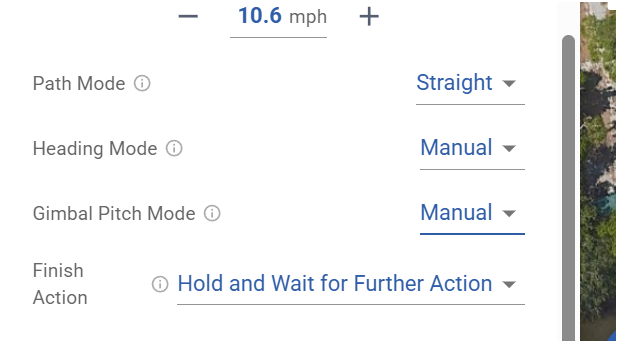
Mike, this is such great advice. Thank you! I will do exactly as you suggest and sign up for a 30-day subscription to gain a real understanding of the features you mention. I appreciate all the great input.
From my experience with three DJI drones it should trigger RTH at the first low battery warning which is at about 20%. So even with an onboard waypoint mission I’m not sure why it’s going past that first low battery warning and not triggering the RTH as the DJI Firmware controls this behavior. Maybe a DL staff member can answer if it’s different but I’m fairly sure it’s the same whether flying manually or flying a DJI Waypoints mission. It’s a safety issue so it won’t do what you say it’s doing and return to home point. I’ve never heard of this before but anything is possible.
Daniel, you are not being a naysayer whatsoever. In fact, I am a huge Litch fan, Been a beta tester since its inception many moons ago. And yes, you are correct: with the release of the Hub Mission BETA 2, they have truly reached a new level in an all-in-one mission-planning offering. One of my favorite enhancements is the ability to fly in FPV mode in Google Earth using the DJI RC/2 while dropping waypoints with the controller. It’s fantastic!
However, despite all the new capabilities, there is still no way to mimic a terrain-following mission. The best they offer (limited by DJI's restrictions due to their lack of SDK support) is the AGL (Above Ground Level) option, which is adjusted only at each waypoint. This can lead to crashes into ridges or peaks if the path between two waypoints intersects terrain.
Mike, your account of DJI's failsafe action upon the first low-battery event, which is documented to trigger an RTH, is exactly what I thought as well. Three weeks ago, I experienced exactly this, yet the RTH was never triggered. After opening a "Flyaway" support case with DJI and providing them with my entire folder of log data from my RC, they acknowledged that I experienced a manufacturing defect. They replaced my Air 3, battery, and blades all within 5 days. I could not believe it.
Here is what the support manager had to say:
So, despite their documentation of what "should" happen in these instances, I have little faith, ergo this routine I developed.
I remember seeing that thread. DJI came through one that one. 👍🏼👍🏼👍🏼
You can find my email on the DL leaderboard in the DL Web app but I’ll give it here as well. wyldwestaz@gmail.com. Enjoy.
Litch UI is simple and effective.
I like the altitude relative to ground option in waypoint missions. You see the height above ground and height above the takeoff point. Drone link flight preview is very good. Kmz export easy to use. Dronelink is the waypoint mission planner of choice.
Please sign in to leave a comment.