On the Fly Orbits and Advanced Facade Missions (Circles with Matrice 4T)

I do infrastructure inspections of circular, domed-roof concrete water tanks with very tight flying parameters. We have been flying manually, but are looking to add automation.
Parameters: Distance: 2m off the surface (wall/dome) Speed: .4m/s Side-shift: .85/m
I was able to do an on-the-fly orbit around a tank today. It worked well, and I plan to use it for shooting the domes. However, on the walls, the drone would not orbit below 3m, which I believe is a hard stop with DJI.
Question 1: Is there any way to override this? If not, are there any known workarounds without flying manually?
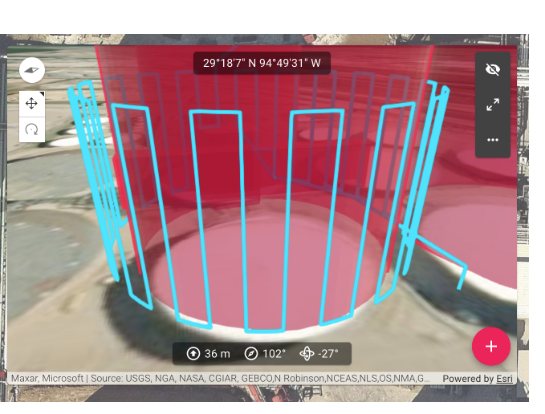
Question 2: Where can I find detailed instructions on flying an advanced facade (circle) mission like the picture below. I am looking for more info than what is described here https://support.dronelink.com/hc/en-us/articles/7082121565971-Advanced-Facades-Vertical-Mapping-Circle-Spiral-Polygon-Boundary-Faces#heading-1
The difficulty I've had with this and other software options is that it is impossible to put the poi on the center of the satellite photos for planned routes. I end up too close or too far away from the tank as the drone flies around it.
I am on the growth plan in case that impacts the possible solutions.
Comments
9 comments
Hi Levi. Someone else may be able to help further but check the Dronelink YouTube channel to see if any of their tutorial videos will help. As far as the 3m limit I’m sure it’s the drone itself which is stopping due to the bottom safety sensor which will sense the ground. You can turn off the OA but you will need to also turn off the advanced safety feature for the downward positioning vision sensor which most newer drones have. I know my Air 3 has this feature and after checking the Matrice 4 drone specs it has this feature as well. You may want to try that will help to descend further down. Hope this helps. Enjoy.
https://youtube.com/@dronelink?si=Ji50gtibbvrxUZJe
Thanks Mike. I will be testing the orbit with the downward sensor turned off. It looks like I can keep the rest of the OA on with the Matrice 4. I have been on the DL YouTube channel as well as another guy's channel that has dozens of tutorial videos, and haven't seen anything about the circular facade snake pattern. It was the sole reason I purchased the growth package, but I am wondering if that feature was moved to the elite level at some point.
I appreciate you taking the time to chime in on my post.
Update: I've turned off every OA and the downward positioning vision sensor, and still can't seem to fly below 3m. Ughh!
I’ll try to help a bit more Levi but I know others have used the On the Fly modes like the Adaptive Facade and others for things just like this. There is no way to set up a plan like this in any app with that much accuracy and close proximity and then run it. This is why DL has created the On the Fly modes for many different types of plans because they can’t be done otherwise. Once the On the Fly plan is set up manually it can be saved and then be ran fully automated. Also If any minor adjust are needed like speed, distance etc., you can go into the DL Web app and find it in your flown missions which are always saved. So If you notice something which you would like to adjust a bit it after setting it up using the On the Fly mode you can make the small adjustments in the Web app. Then you can load the mission in the DL mobile app just like any other pre planned mission and it can be flown fully automated as many times as you want. You may want to also look at converting the Facade mission into an inspection mission which may give you some more options.
The Growth plan has everything you would need so an Enterprise plan won’t make a difference. There are two ways to find out what plan features are included in your Growth plan. The pricing structure shows all the features and functions but you can also check your account in the Web app to see what features your exact plan has. Sorry I can’t help more but you should be able to use one of the On the Fly modes to meet your needs. These type of missions are used quite often by many other commercial pilots and they are the best way to set up and run them.
Also in case you were not aware, all the Professional plans have direct email support. So since your new to DL and need more detailed personal assistance on what recommended type of component you can use, actual mission plan set up, settings or configuration they can help. Using this forum is the preferred method but I think it may be better to contact them directly for something like this. More than likely there will be a lot of back and forth between you and DL staff.
https://app.dronelink.com/pricing/professional
https://support.dronelink.com/hc/en-us/articles/360053169634-Which-features-and-drones-are-included-in-my-plan
I posted a couple other comments which may help but they are pending approval which may take a bit for them to approve them.
Mike- you could win an award for being the most helpful human on the internet. I appreciate it. I emailed support yesterday, and they let me know that the 10ft hard stop is built into the DL software. The OTF Orbit is exactly what we are looking for, as it gives us the ability to tweak the flight in real time. Unfortunately, not being able to orbit below 10 ft prevents us from using it on the lower portion of the tank walls. For now, we will manually snake the bottom 11 feet and hope the hard stop will eventually be lowered.
Please sign in to leave a comment.