Dronelink DJI beta 5.2.2 (308) + DJI mini 3: frequently occurring navigation errors

This beta version was tested on 19 and 20 September 2025.
For the DJI Mini 3, the positive aspect of beta version 5.2.2 (308) is that the video stream works correctly, which is not the case with version 5.2.1 (307).
The absence of the toggle to request the display of the camera orientation (heading and gimbal tilt) made it difficult to ensure that the flight plan was proceeding correctly.
The most annoying issue was the occurrence of frequent navigation errors :
- The drone positions itself at a point more than 4 metres away from the intended location.
- Sudden acceleration of the translation speed by more than 50% of the planned speed.
- Height offset by more than 15 metres from the planned height.
Here is an example of one of these navigation problems.
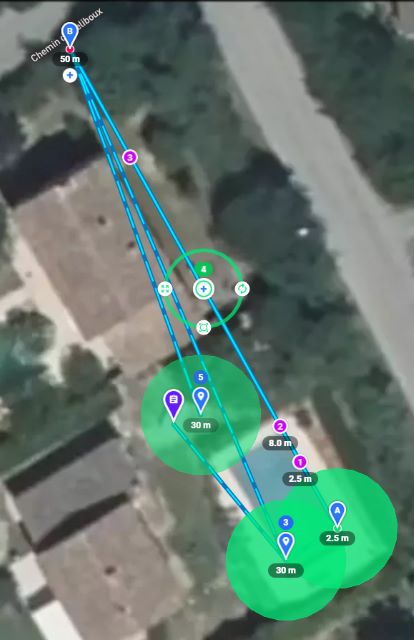
At the waypoint between Alpha and Beta, the drone moves from a height of 8 m (action 2) to a height of 50 m (point B).
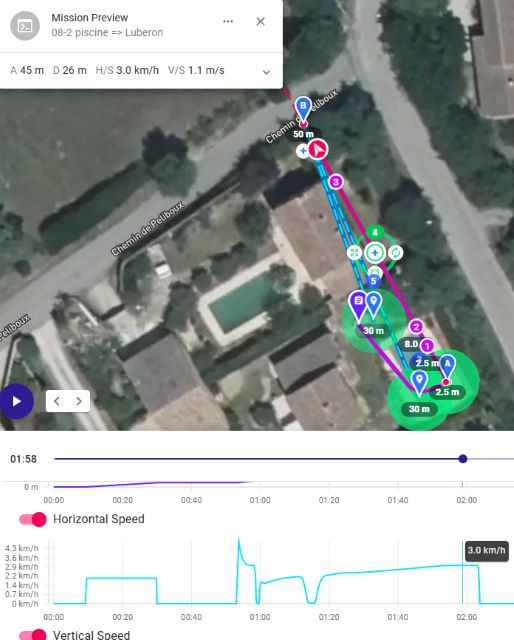
According to the simulation, the horizontal speed should not exceed 3 km/h when approaching point B.
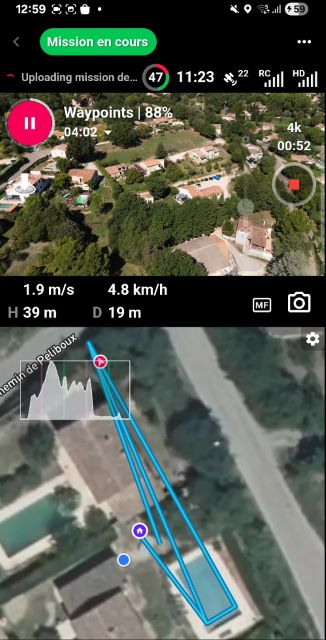
In reality, the speed suddenly increased to 4.8 km/h.
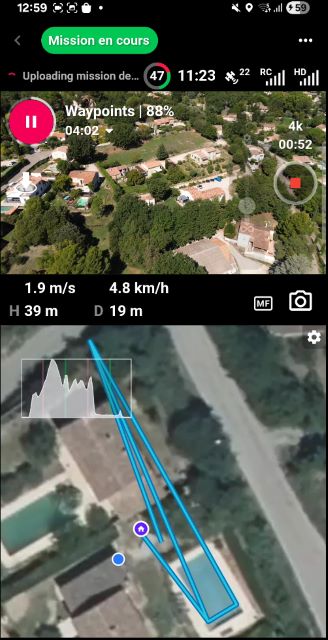
The drone's position disappears while the height and speed remain unchanged.
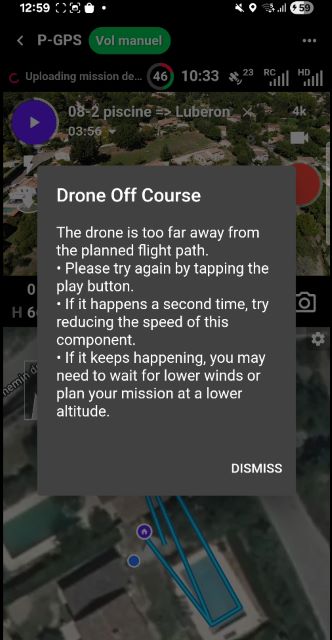
The message ‘Drone Off Course’ appears to indicate...
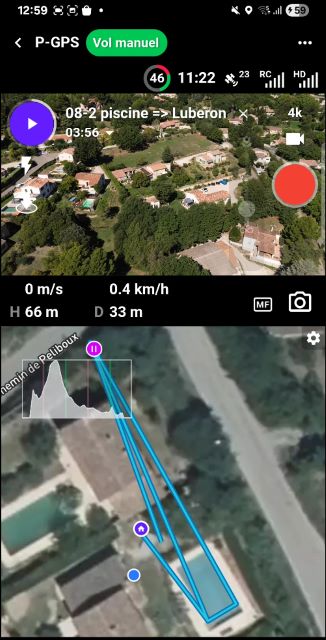
... that the drone is at a height of 66 m (instead of 50 m) and at a distance of 33 m from take-off, which is greater than the expected 29 m.
The weather conditions were fine: few clouds and winds between 15 and 25 km/h.
Have other testers of this beta version encountered this problem?
What is the solution adopted to avoid these navigation errors?
Hardware and software used
Drone DJI mini 3 ; firmware : v01.00.0500
Remote RC-N1 ; Firmware v04.16.0500
DJI Fly version 1.17.4 (avec un iPhone 11)
DroneLink DJI beta version 5.2.2 (308)
Android Smartphone :
Samsung Galaxy A34 5G (sans carte SIM) ;
Android 15 ; OneUI 7.0 ;
Comments
13 comments
I already stated that here is another massive thread tracking this issue: https://support.dronelink.com/hc/en-us/community/posts/33052990089747-DJI-Mini-3-Pro-odd-dangerous-behaviour-with-flight-plan
This bug appeared over a year ago when the DL DJI version was rolled out in August 2024.
For reference, here is a video of this bug: https://youtu.be/VS88t__kvy0
According to the link below, DJI considers that its resolution has been completed
https://sdk-forum.dji.net/hc/en-us/community/posts/39140508432409-Abandoned-drone-during-a-mission-with-Dronelink-4-9-4-295
The bug related to navigation errors appears differently. More details will be provided shortly.
If you think it is a different issue, we need the exact steps to reproduce it. For example, if you move this mission plan to a different location and it always happens with this specific plan, please share the plan so we can fly it.
Here is the link to share this mission : https://app.dronelink.com/vaclub/share-kn1yu6sibxbbxoddegr2/plan/rbmTKEBzlxpJUEezFtMY/oFG3pDAzR8hk1W9pRLv1
Here is the related video: https://youtu.be/wTmXOTuyRss
At the 44th second of this video, a navigation error bug appears.
This corresponds to action 2 of the waypoint.
Have other pilots been able to reproduce this bug?
Further comments will be provided in a future post currently being drafted.
If you look at the altitude indicator while the drone is ascending, the telemetry isn't changing, which is the exact bug / behavior that is being discussed / tracked in this thread: https://support.dronelink.com/hc/en-us/community/posts/33052990089747-DJI-Mini-3-Pro-odd-dangerous-behaviour-with-flight-plan
If you watch the video carefully, the bug appears every time one of the following messages is displayed:
- “Uploading mission de...” or
- “+2 Uploading mission...”
The other difference is that it is possible to resume the mission where it left off.
This was not the case with the bug described in this thread: https://support.dronelink.com/hc/en-us/community/posts/33052990089747-DJI-Mini-3-Pro-odd-dangerous-behaviour-with-flight-plan
In this thread, the missions could not even start.
The other difference is that Dronelink seems to automatically give back control as soon as it detects a navigation error by displaying the message “Drone Off Course.”
In my humble opinion, the solution would be to shorten the delay associated with “uploading mission...”
The thread is long, and there are multiple variations of how the bug presents, but the common thread among them all is the telemetry stops updating on the flight dashboard.
I just ran your exact mission and did not encounter the issue,
which is no surprise because I haven't been able to reproduce the issue
in the other thread for over a year.
Having said that, if you do think there is an issue with the mission data upload, you can try running your mission again with the wifi / cell service deactivated as the app won't try to upload if it knows it's offline.
While reviewing a video that was made a year ago https://www.youtube.com/watch?v=VS88t__kvy0
the message “Uploading mission de...” is permanently displayed during the behavior reported in the thread
https://support.dronelink.com/hc/en-us/community/posts/33052990089747-DJI-Mini-3-Pro-odd-dangerous-behaviour-with-flight-plan
This leads to the following questions:
Q1: What is the purpose of these mission uploads during the mission, when the mission is supposed to be loaded before being launched?
Q2: What path do the files take during this “ Uploading mission de...” when the drone is near Aix-en-Provence (France)?Depending on the geographical location of the server used by Dronelink, this could explain why this bug went unnoticed in the US, as there would be far fewer routers to pass through.
A latency time of around 100 ms can be expected when routers are wired...
Added to this is the travel time. For 9,000 km, this is approximately 30 ms. This time increases to 200 ms for a round trip via a geostationary satellite.
Q3: Why doesn't Dronelink load the entire mission before it is executed? This would avoid the display freezes observed in this video https://youtu.be/W3bhqE5w-VM
Q4: To avoid this bug, why doesn't Dronelink automatically put the smartphone into “airplane” mode when the mission is launched?
This “airplane” mode would be removed when the Dronelink returns to manual mode.
To replicate what is happening outside the US, it is suggested to use a connection to a VPN server that is close to the locations where the bug has been observed.
Q1: Dronelink has always uploaded the progress of the mission in the background and the reason is so that the mission can be resumed from the same point, even if you use a different device. We added a message several months ago so that users could understand when this was happening because some users would force quit the app after the mission paused (but before the progress could be saved) and then would complain when it wouldn’t resume correctly. To be clear, the message is informative only and doesn’t actually represent any new functionality because the app has always saved mission progress from the very beginning.
Q2: The path is irrelevant because as I already stated in the answer to Q1, the uploading has been happening since the start.
Q3: Dronelink does load the mission before it is executed. To be clear the uploading is just saving the mission progress, it has nothing to do with downloading the mission plan.
Q4: It has never been proven that putting the phone into airplane mode actually prevents the bug from occurring, and forcing user’s phones into airplane mode is not something we are interested in as a) this bug affects a tiny minority of our users and b) most users like the fact that their device remains only so they can receive notifications and sync mission progress to our servers (for the purpose of resuming correctly).
Beta version 5.2.2 (308) has just been tested in “Offline mode” (symbolized by an airplane).
Dronelink indicates this with an orange sector with an x on the right-hand side.
The missions went smoothly.
Here's the solution :
- Download the mission to be carried out by disabling “Offline mode”,
- Switch to “Offline mode” before starting the mission.
With continuous camera video stream, this beta version 5.2.2 is perfect.
In addition, the “Heading & Gimbal attitude” setting was finally found.
This was very useful for tracking the drone's rotations with different gimbal angles.
MANDA O LINK PRA ISNTALACAO DA VERSAO 308
https://support.dronelink.com/hc/en-us/community/posts/44355505437331/comments/46405596081427
Please sign in to leave a comment.