Dronelink DJI 5.2.1 (307) RC-N1 – DJI mini 3 : Absence or delay in video stream

After the connection between the drone and the radio control was turned on,
it took several tens of seconds for the video stream to appear.
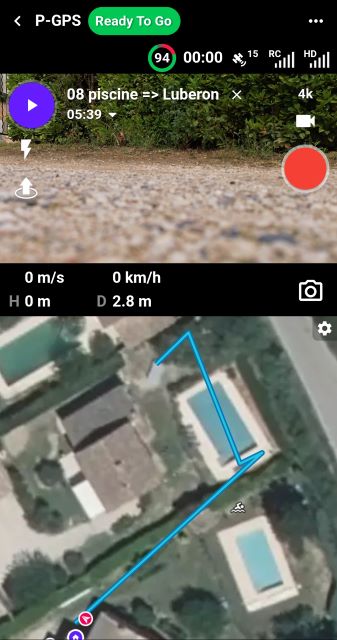
Furthermore, during the mission, the video stream disappeared, as shown in the screenshot below.
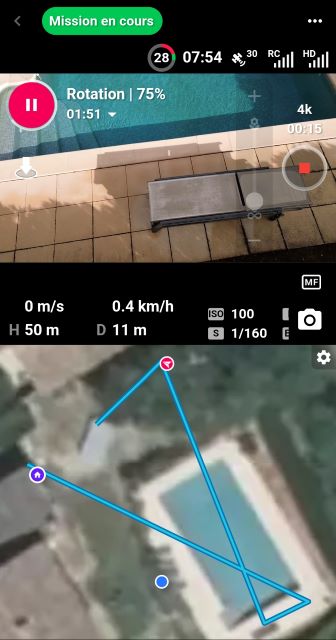
Nevertheless, the mission went smoothly and the video footage was successfully recorded on the SD card.
Back at the workshop, the Samsung smartphone requested firmware updates. Despite these updates, the same dysfunction was observed. Here is a screenshot at 10:50:59, the camera video stream is absent.
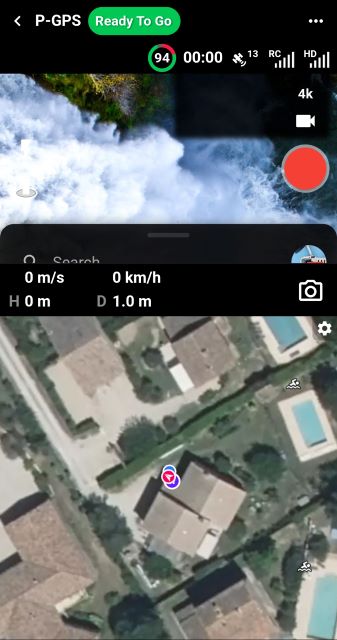
Screenshot at 10:51:22 (more than 23 seconds) the video stream finally arrives.
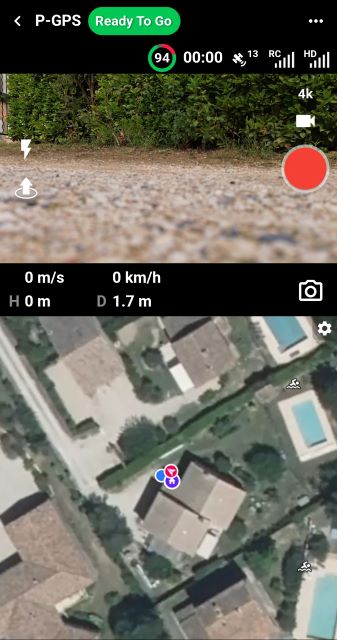
Loading a mission at 10:52:07, the video stream is missing
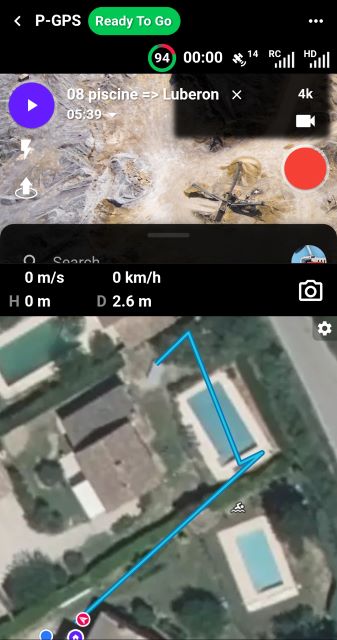
At 10:52:13 (6 seconds) the video stream appears. It was a bit faster.
With DJI Fly, there is no such problem: the video stream is displayed almost instantly.
Hardware and software used
Drone DJI mini 3 ; firmware : v01.00.0500
Remote RC-N1 ; Firmware v04.16.0500
DJI Fly version 1.17.4 (avec un iPhone 11)
DroneLink DJI version 5.2.1 (307) ; Kernel 5.2.0
Android Smartphone :
Samsung Galaxy A34 5G (sans carte SIM) ;
Android 15 ; OneUI 7.0 ;
Comments
51 comments
I am experiencing the same issue. After exactly 2 photos in a mapping mission, for example, the live view freezes and i have no way how to monitor what my drone is shooting. Please help
Not sure if it’s accurate but I read on the Litchi forum from a Litchi staff member that DJI will be sending out a fix. It was from about 8 days ago and they are still waiting. A couple pilots said they went back to a previous version of the app and it works fine. If you can roll back to previous version maybe it will work. DL usually doesn’t recommend going back to an older version but in this case if it works for now until it’s fixed at least you will have live feed. Maybe Jim can confirm whether DJI is aware of the issue and are working on it.
First I've heard of that one, but if DJI is going to release an updated SDK that fixes it, we will of course put an update out that includes it.
Well it was from Litchi. Lol…..😜
Having exactly the same issue. Downloaded the Dronelink update on my Galaxy Tab A9+ yesterday in the field. Initially the video/picture link works, then it freezes....mission still runs, etc as noted above. On RTH, change battery, reconnect, the link works, then as soon as it gets back in the air and to first waypoint, picture freezes again. will try to rollback if I can....
Can Dronelink provide any trustable source for older versions?
« How to display the video stream for Mini 3 series?
The traditional enterprise series aircrafts have multiple video stream sources and multiple video stream channels. Therefore, you need to call the startChannel to bind the video stream source with the channel. Since the Mini 3 series have only one video steam source and channel, we have binded the video stream source and channel for developers in firmware already. Therefore, the channel is already opened and you only need to create a VideoDecoder for PRIMARY_CHANNEL and then the video stream will be displayed automatically. »
Source : https://sdk-forum.dji.net/hc/en-us/articles/17654167353625-How-to-display-the-video-stream-for-Mini-3-series
It appears that version 5.2.1 (307) of DJI Dronelink does not take into account the Mini 3's unique video stream display feature, which has been known for two years.
What changes were made in version 5.2.1 (307), which had to be downloaded on August 30, 2025?
This information is not included in the table linked to at:
https://support.dronelink.com/hc/en-us/articles/360053208953-Does-Dronelink-have-Release-Notes
Apps developed with the DJI Mobile SDK may display a black screen during flight on a DJI Mini 3 aircraft.
Xia Wenlong
1 month ago Edited
By monitoring the device status and other information, it was found that each black screen was caused by LOW_RADIO_SIGNAL, and then the drone and camera were disconnected. Users flying with DJI Fly do not encounter this problem. This problem occurs on DJI Mini 3 models and affects hundreds of users.
Source : https://sdk-forum.dji.net/hc/en-us/community/posts/49394346618265-%E6%A0%B9%E6%8D%AEDJI-Mobile-SDK%E5%BC%80%E5%8F%91%E7%9A%84App-%E5%9C%A8%E5%A4%A7%E7%96%86-Mini-3-%E6%9C%BA%E5%9E%8B%E4%B8%8A%E9%A3%9E%E8%A1%8C%E8%BF%87%E7%A8%8B%E4%B8%AD%E4%BC%9A%E5%87%BA%E7%8E%B0%E9%BB%91%E5%B1%8F
Can we Mini 3 pilots get access to 5.2.0 to rollback the app? The problem is very consistent for me, link is up on first connect, goes down when flying to first way point, reconnects for first way point picture (mapping run), then loses feed for duration of mission. Feed is not black, it's just a frozen view of the first waypoint.
We don't support installing previous versions, but the latest beta (5.2.2) was built using DJI SDK 5.14.0 (previous version) if you want to try: https://support.dronelink.com/hc/en-us/articles/360033520874-How-do-I-join-and-test-the-Beta-app
Here is a video about this topic https://youtu.be/1wkb3HibfhM?
Can you confirm that the beta corrects the issue?
Good news: the beta version works just fine! Good job Dronelink.
Apparently the old SDK 5.14.0 works fine.
I tried a map mission and had video feed all the time, drone connected quickly... Big relief!
It's confirmed, with beta version 5.2.2 (308), the video stream is fine throughout the flight.
However, I am experiencing a lot of problems with the drone's positioning during missions.
When resuming a mission that was stopped because of this issue, the drone sometimes starts to ‘dance’.
Another thread will be created to explain this.
Edit of 21 September 2025
In beta version 5.2.2 (308), the toggle for displaying the camera orientation (heading and pitch) was not found.
Please don’t create a new thread: https://support.dronelink.com/hc/en-us/community/posts/33052990089747-DJI-Mini-3-Pro-odd-dangerous-behaviour-with-flight-plan
Late to the party but yes, the beta does correct the issue for me as well. My only anecdotal support for OP comment is my WebODM imports from this last run don't look nearly as uniform (GPS) as they typically would.
On build 307, does the issue only present after battery swap? If so, if you exit the flight dashboard and then open the dashboard again does the video show up?
Issue was consistent for me: worked on startup until first waypoint in mapping mission, freeze on first image taken. battery swap, video feed is back, then same behavior (without exiting flight dashboard). I can reload 307 and test if exiting flight dashboard brings the image back, vs turning the drone off/on, if that's what you're after.
I am not able to reproduce this error.
The only issue I can reproduce is the video feed doesn't show up after battery swap, but this happens at least as far back as 4.9.4 (295) so it can't be caused by the recent upgrade to DJI SDK 5.15.0. The work-around for this issue is to just exit the flight dashboard and re-open it, and then the video feed reappears.
Yesterday, I ran 5 separate missions and every one had this issue. It is concerning not knowing if the done is about to run into something while you are flying.
You should not fly if the video feed goes away. We are trying to resolve this issue but we cannot reproduce it except in the case battery swap.
Is there anything that I can provide since every mission I flew yesterday since updating had this issue?
What build are you currently testing?
Version 5.2.1 (307), kernel 5.2.0, Android 33, Samsung, r8q was the configuration with the problem.
The last time I ran a mission successfully was with Version 4.9.2, kernel 4.9.3, Android 33, Samsung, r8q
Others on this thread haved stated that the issue started with 5.2.1 (307), so we created a 5.2.2 beta based on DJI SDK 5.14.0: https://support.dronelink.com/hc/en-us/community/posts/44355505437331/comments/44767898655507
Can you please try that?
Hi, I am late to the party for this issue.
I am running a DJI Mini3 (latest firmware for drone and transmitter) with Samsung S25 Ultra with the latest Android update.
Regarding the battery change claim, that has not made a difference here nor there. With every flight after about two or three images, the live feed dies.
One thing that I might help. I have set my drone's live view to duel band in the DJI fly app. Could it possibly be that the Dronelink App cannot cope with this setting?
You can try setting it to a different mode. We are still not able to reproduce this issue.
I confirm that the 5.2.2 beta based on DJI SDK 5.14.0 fixed this issue for me.
If you install the latest beta (build 309) which is based on DJI SDK 5.16.0, does it work?
Please sign in to leave a comment.