New Native version 2.0.1

Native app on Android Dataphone still remains version 1.7.1. no updates !!!!!
I read your Email where you announce version 2.0.1.
I tought update to newer version will happens automatically.
Do I have to uninstall the old version 1.7.1 and reinstall the latest version available on Google play?
Please explain
Thank you in advance
Francis
Comments
15 comments
Not sure what you mean, Google Play lists 2.0.0 as available:
I follow your explanation:
Open app.dronelink.com in a browser on the target device, and then open the More menu by tapping the icon in the top left (hamburger button). Next, tap Native App and you will be presented with a choice to download the iOS or Android version.
I choice “Get it on Google Play”
A new screen opens with Dronelink app asking to “Remove” or “Open” this app
I select “Open”
The native app is active.
The version of the app is still 1.7.3
This is the old version
No update
Please reply to the questions of my previous Email
Thank you in advance
Francis
Not sure what else to say. It is possible that Google Play has not propagated the latest version to all app stores for each country, but when I load the google play listing it shows the above screenshot (2.0.0).
Screenshot Google Play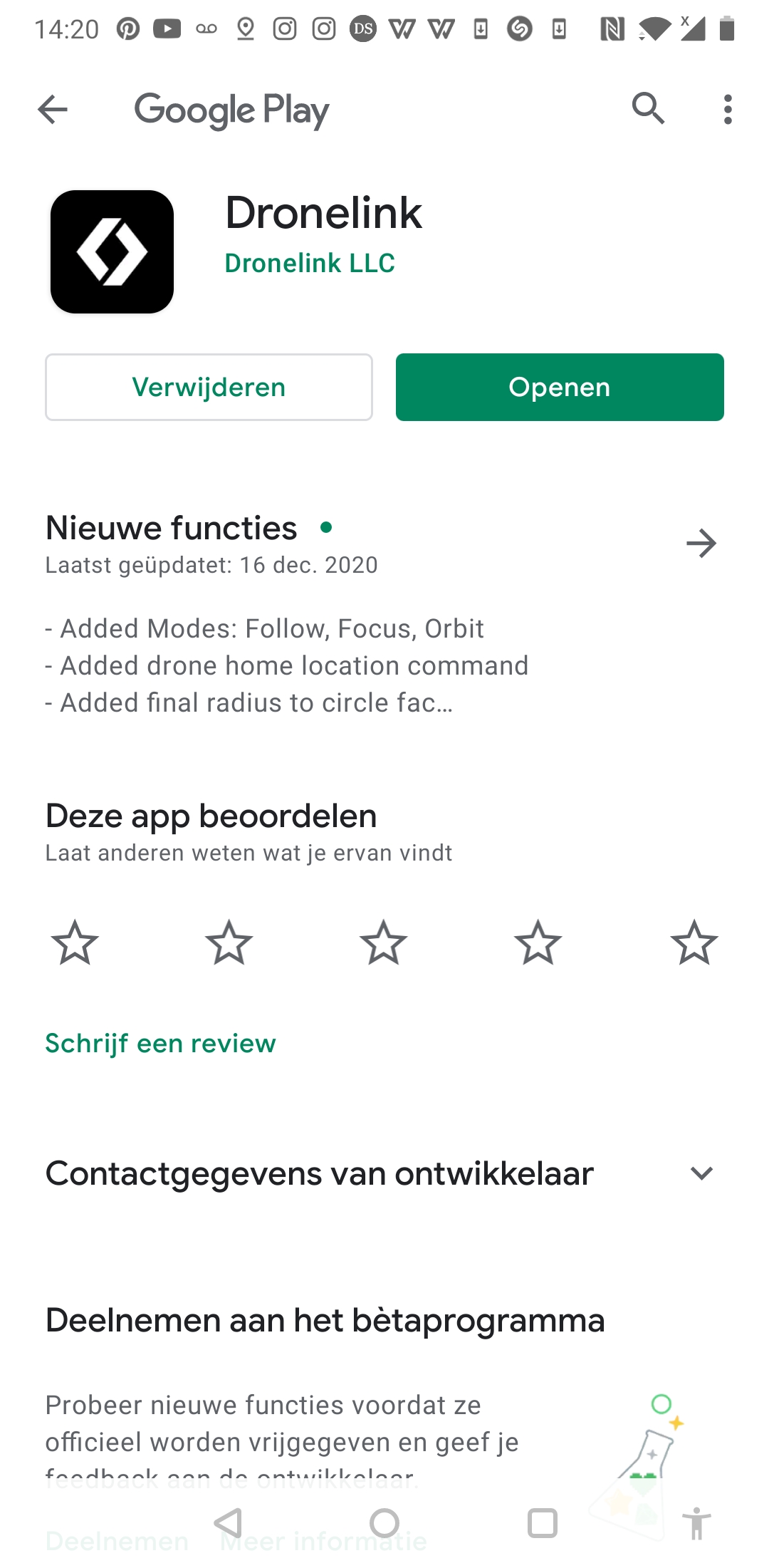
I had the same issue until I clicked on one of the "If you want to install the Android APK directly:" links and all was great!
Can not find the link "If you want to install the Android APK directly:"see previous comment.
Question to Dronelink or Jim McAndrew : can you please ask the “Google Play organization” why the Dronelink automatic update do not work.
Apparently I am not alone having this problem see new complain in General Discussion Forrum
Thank you in advance
Francis
I am confused as to what you mean but automatic update. Do you mean that you have the Google Play store set to automatically update apps, but it isn't working? If that is the case, you should probably contact Google support. If you mean that the Google Play store doesn't show you the latest version when you view the app listing when you are trying to update the app manually, can you please post a screenshot?
Refer to your Email = green:
I am confused as to what you mean but automatic update.
Do you mean that you have the Google Play store set to automatically update apps, but it isn't working? Yes, take note: all previous Dronelink updates where automatic updates without any manual intervention.
If that is the case, you should probably contact Google support. I can not do this, I do not know the Dronelink native app, I am not a programmer, I do not know the exact terminology.
If you mean that the Google Play store doesn't show you the latest version when you view the app listing when you are trying to update the app manually, can you please post a screenshot?
See screen shot in one of the previous reply’s
Can you explain how to update the app manually, thank you
By manual update I just mean go to the Google Play store listing and tap the update button. If you still don't see that for some reason, then you can always install the APK directly from the links in this article.
Italic = your message
By manual update I just mean go to the Google Play store listing and tap the update button. Unfortunately no update button, see sreencopy here under only “Geïnstalleerd” means “installed” (version 1.7.1)
If you still don't see that for some reason, then you can always install the APK directly from the links in this article.
If you click on “the links in this article” you will see the screencopy, no update button just “verwijderen” means “remove” and “open”, no update button
I still do not understand all previous Dronelink updates where ok except this last update !!!!!!
All non Dronelink automatic updates are working perfectly.
Francis
I don't know. Just install the APK directly if Google isn't playing nice.
I have the same, installation from the site helps https://support.dronelink.com/hc/en-us/articles/360035825593-How-do-I-install-the-native-app-
Refering to Jim:
Your feedback: I don't know. Just install the APK directly if Google isn't playing nice.
Francis: I do not know how to install the “APK directely”
Refering to vg1:
This is the procedure to install the app, the app is already installed see previous screen copy
I need the procedure to Update the installation.
Thank you, but problem is not solved
Francis VK
- download from this link and instal
https://drive.google.com/file/d/1Q2Fre86bxC_sv518inoJwowDD_VCAWnb/view
- The application will be overwritten, you just have to agree to installations from unknown sources. You will have the latest version. The update didn't work for me either.
Thank you a lot for this.
Francis
Please sign in to leave a comment.