Uncertainty about device performance

Hello together
I would love to fly my drones with the fantastic Dronelink.
I have an iPhone XR which I am very happy with and has a new battery built in. I can't afford a newer smartphone at the moment.
Can you explain something I don't understand?
I don't understand why the iPhone XR is on the "List of Legacy iOS Devices" and the iPad Mini 5th generation is not, even though it has exactly the same technical data. In an Excel spreadsheet, the iPad Mini 5 is even listed as a "High Performance" device (see screenshot). Although, as I said, it has exactly the same performance as the iPhone XR. So in my opinion, there is no technical difference. However, the iPhone XR is in the Legacy list and the iPad Mini 5 is not! Why is that?
I would be very happy to receive feedback on this.
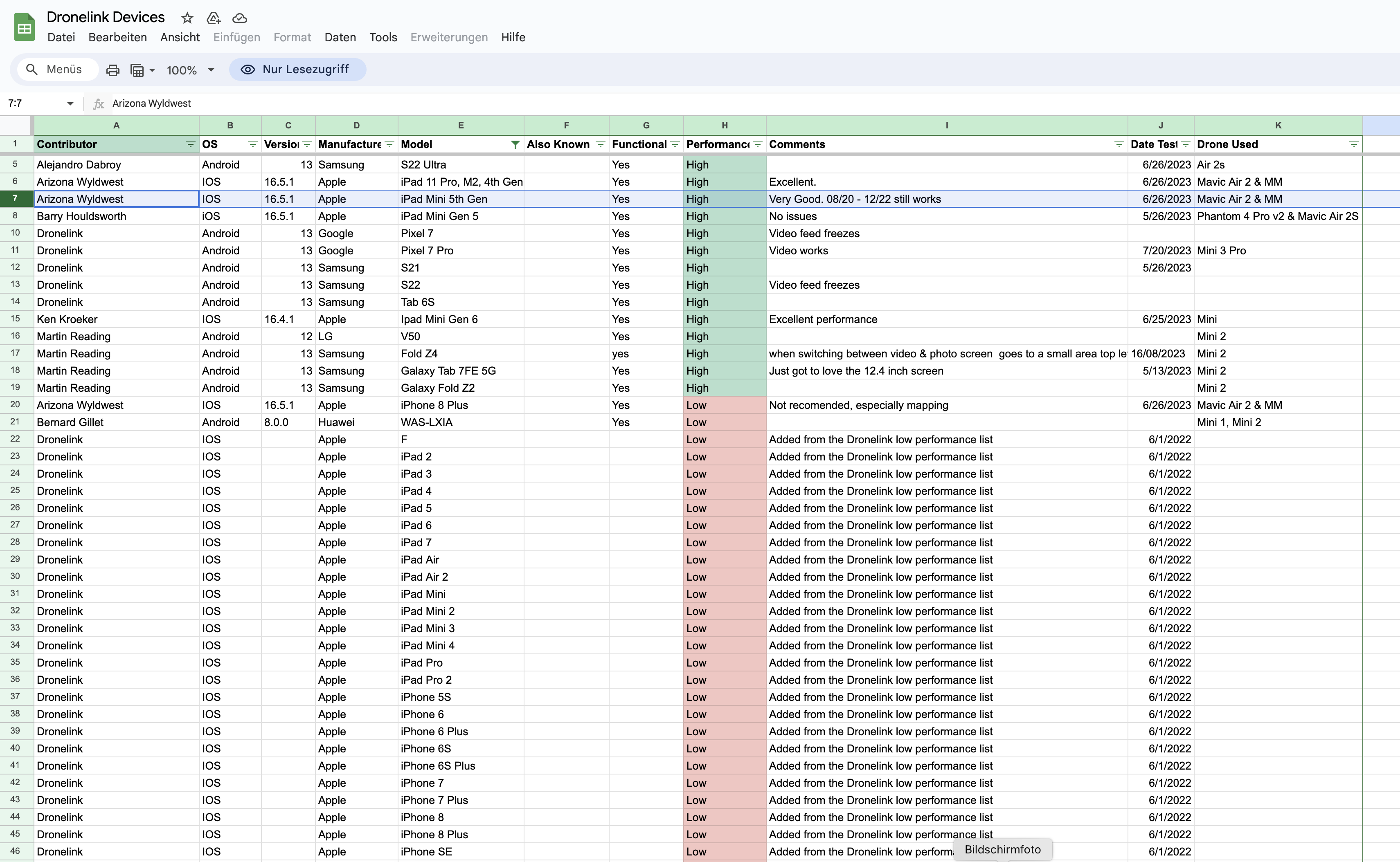
Comments
5 comments
That device will more than likely work it’s just a warning about performance. I don’t use my iPad Mini 5 anymore but it does work still without any issues so far. It does have a tad higher benchmark score then the XR so there are other aspects of those devices which can make a slight difference. I’d use it and see if it has the “Device Running Too Slow” message or missions take a really long time to load or even execute. I’m guessing it will work good but something to keep in mind and very easy to test it. I even have a very old iPhone 8 Plus and even though it takes longer to load and execute missions it still works on simple path plans and very small maps. I use a iPad 11 Pro, 4th gen with the M2 now and it is noticeable compared to my iPad Mini 5. That is my device I listed in that spreadsheet and was awhile ago so things change as the DL app gets more demanding over time. I’ll probably have them change it to a medium performance.
Remember that the spreadsheet is crowdsourced, so different people may have provided different information.
In the getting started videos there is a simple test that you can perform to see if your device should perform normally. You can see that here https://youtu.be/XXnvGNCMYtE?si=Q4I0GTm275UPPbx_&t=192
One thing you didn't say was which drone you are using. Some of the newer drones only work on Android. Check this list to see information about compatibility https://www.dronelink.com/supported-drones
Yeah I guess I presumed it was a Legacy drone since it is an Apple Device. I should have asked which drone. Also that iPad Mini 5 I put I there has the date at the time it was last used which was 12/22 so more then a year ago. However it does still work. DL has a lot of help articles so I’d check them. The link I’m sending has the requirements needed to run the DL app. Good luck.
https://support.dronelink.com/hc/en-us/articles/360025829933-What-are-the-system-requirements-Supported-drones-and-devices
It is the Mini 2
Yes, the Mini 2 can be used with an IOS device. If it’s just the low performance warning you get when opening the Dronelink app then that’s just advising you of the possible issues. As long as the “Device Running Too Slow” message doesn’t come up when actually running a mission or you have some other issues then use it and see how it works.
Please sign in to leave a comment.