Changing speeds during a Dronelink Mapper mission

I have a Dronelink Mapper license. When taking photos with my DJI Mavic Air 2, I fly at 5 MPH to get crisper pictures that I process with WebODM.
At one time, I thought I had things set up so the drone would fly at 20 MPH to get to the target area, slow down to 5 MPH while taking pictures over the target area, and then fly back to the home area at 20 MPH.
I seem to have forgotten how I did this.
I can figure out how to set the speed for the entire mission, but I can’t figure out how to change speeds during parts of the mission. Any guidance will be appreciated.
Comments
23 comments
To set the speed from launch to the start of the map, change the max speed in map start
This will give an approach speed of max 25MPH
And this will fix the max speed for the map itself to 5MPH
Martin Reading - thank you. That is what I was looking for.
Just out of curiosity, is there anything like "Map End" where I could speed up the return to home after the mission?
Once the mission has finished you're back under manual control, so once RTH has initiated (assuming you've set it to RTH on mission end), shove it in sports mode and push that right stick forward.... ;)
The RTH speed is set in the drones firmware and cannot be changed on the MA2. I have the same drone and the RTH Speed is roughly 25 mph so not slow and doesn’t take long. Other then doing what Martin said your stuck with that return speed. Also the Mapper was discontinued quite awhile ago but obviously still works for pilots who have it. Not sure if it has the ability to set a capture speed or not. That’s only available with a professional plan now so you and try to see if it was included at the time you purchased that plan. If doesn’t then you would need to upgrade.
While executing a flight plan, I noticed that the drone accelerates between two photo capture points, and when it reaches the point where the photo is taken, it stops or significantly slows down. Is there a way to make the flight plan smoother, without speed fluctuations?
It was also observed that some photos were not captured on time, resulting in an uneven distribution of images. Could this be caused by sudden changes in the drone's speed?
Can you share your mission plan please?
I should add that the first time I tried the application, I didn’t encounter such a problem.
https://app.dronelink.com/nikos/my-first-project/plan/BMltX6h1a573ecaMEYHe/hCuPLAmXUbrTrpuzrWYt
Are you able to reproduce the issue every time?
The first time I used the application, there were no issues at all — it worked perfectly. However, the same problem has occurred during the last four flights.
The two latest plans are provided below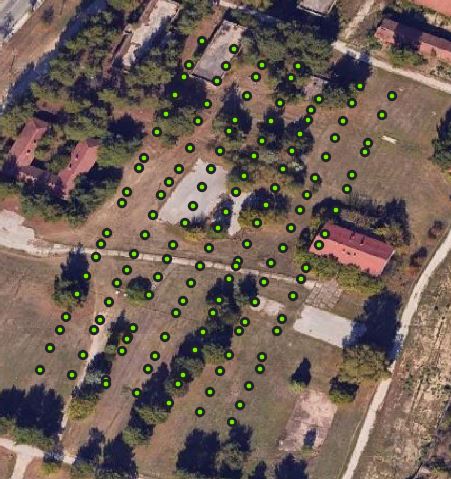
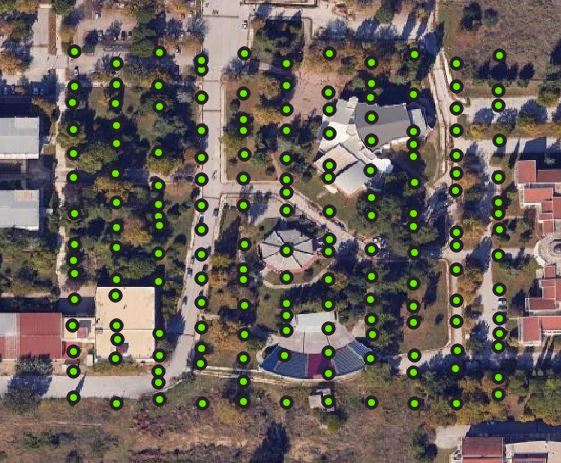
This could be due to RF interference. You also may want to switch from Distance to Time based capture priority.
There is a chance it’s a speed issue — I mean that during direction changes, the speed likely needs to be significantly reduced, and if a speed around 20 km/h has been set, the drone might be unable to reach that speed between the two images being captured. I tried with 12 km/h and the problem seemed to decrease. I would like your opinion. The flight was conducted at 40 meters, with 80% front and side overlap, and a total area of 0.6 hectares
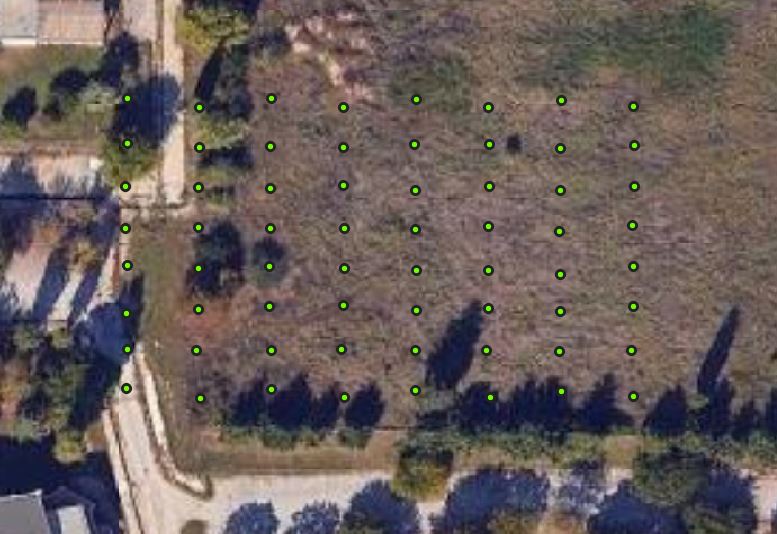
https://app.dronelink.com/nikos/my-first-project/plan/zQZ75lpm9a7786rwGKKz/9JQQdajFiHK4tTj3UqxG
When you fly with a very light drone like the Mini 3 it can be very sensitive to wind if you try to make it fly too fast.
Νικόλαος Κωτσός. A bit more info to consider. Not only should the mission be flown slower with a Mini keep in mind the lower in altitude you fly the slower the speed needs to be anyway. At 40 meters you may get some blurred photos. Most pilots fly at about double that altitude and the default altitude is set to 87 meters at a speed of 32 kph. Overall the higher you fly the faster you can run the mission and the lower you run it the slower it should be. Of course the wind speed can still affect the mission regardless of altitude.
I also noticed one of your plans has the camera selected as Mini 3 (48MP). That will not capture in high resolution unless you have a Growth plan. If you do then you will need to go down and select the Photo Type and set to High Resolution. None of the Hobbyist plans have that feature so if you select it the app will prompt you to upgrade. Just some info and suggestions. Enjoy.
Thank you for the response. However, I would like some clarifications. I noticed that during the flight plan, the drone would stop to take photos and then try to regain the set speed. This caused a lack of smoothness, resulting in difficulty maintaining overlaps. Do you think this issue is related to the speed setting, or is it a configuration problem? I prefer a constant speed without fluctuations during the flight plan.
Here is a new flight plan that I would like you to evaluate and let me know if there is a chance that I might encounter the same issue.
https://app.dronelink.com/nikos/my-first-project/plan/BMltX6h1a573ecaMEYHe/O26qWpbzinx3RaJFj25h
Which DL plan do you have and what device are you using ?
As I already stated, it is either RF interference or environmental like wind. It is not supposed to do that.
Hobbyist Plans - Premium
As Jim has already mentioned it’s more than likely one or both or those. Which device are you using ?
DJI mini 3
Which Android device, not drone.
Also as you mentioned when you ran it at a lower speed the captures were good so more then likely it’s wind. The screenshot shot indicates they were spaced well. The link is about off-course or jerky movements but the information indicates the difference between a smaller, lighter drone compared to a larger heavier and more powerful drone. The device as well as other factors still apply when running a mapping component.
https://support.dronelink.com/hc/en-us/articles/360052533153-Why-does-the-drone-fly-off-course-or-make-jerky-movements-during-certain-mission-plans
Please sign in to leave a comment.