Mini 3 suddenly disconnect and when reconnecting, I cannot control using stick

Hi there,
I am a newbie on a hobbyist plan and I am using DJI Mini 3 (non pro) with Xiaomi Poco F3 (Android 12).
Last night, I was playing around with waypoint mode. It worked great, but at the end of the waypoint, my drone suddenly stuck in the air and I could not regain control of the drone. I tried to control it using the sticks, but it was not working. I force-closed the DL app and restarted it, but it still did not work.
I then used RTH (Return to Home) and luckily the drone responded and returned to my location. However, another issue arose. I was sitting under a tree and to avoid collision, I moved the drone a bit using the sticks. However, I then lost control of the drone again. Confused by the situation, I restarted my phone and used the DJI Fly app to control the drone. Luckily, I was able to use the land function on the screen to land the drone.
I am not sure what caused these issues, but I would appreciate any advice you can give me.
Comments
8 comments
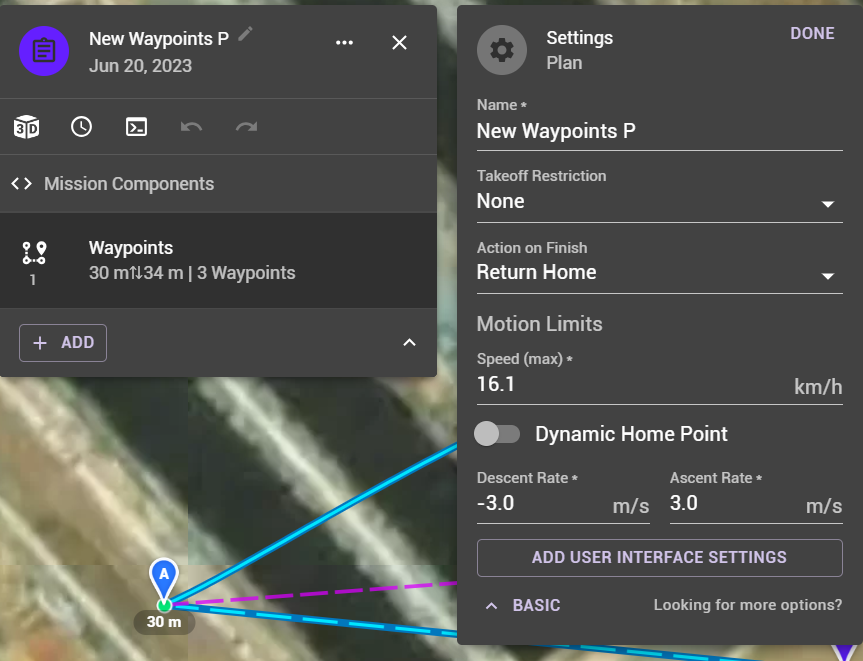
Hi adam ixa, check in your mission plan, what you have set in action on finish, there are 3 options:
Below is a screenshot showing the setting location
At any point during a mission if you want to regain manual control just slide the flight mode switch to either of the the other positions and return it to normal
Hi Martin Reading,
Thank you for taking time replying my post. I set as RTH
The action on finish can only execute if the drone stays connected. If you want to control the behavior on disconnect:
I've been running the beta on a Samsung Galaxy Tab A8 and I have experienced the app crashing during a mission, causing the mini 3 to hover, when returning to the app, drone appears to be connected, video and telemetry appear to be correct, but no response when manipulating the physical sticks on the remote. Last time this happened to me, battery happened to be very low, while fiddling with the sticks low battery RTH kicked in automatically and once RTH was active, it responded to the controls. Unrelated issue: if you set max altitude to 100, it displays RTH of 102, but when RTH is active flies at 389 (can't remember exactly). So the only way to lower RTH is to set and save it while max altitude is higher than RTH altitude setting, then you can lower max altitude after you have lowered RTH altitude.
https://support.dronelink.com/hc/en-us/community/posts/16409496589331/comments/16410305783571
When the app crashes while the drone is in virtual stick mode, the steps are the same to regain control:
https://support.dronelink.com/hc/en-us/articles/360036830214-How-do-I-take-over-control-during-a-mission-
Thank you, good to know: when app crashes and mission stops, you regain control the same way you would if the mission were still active and the drone was moving.
Jim McAndrew
I think I know the root cause of the problem. I noticed that the waypoint is still showing the play button, so I assume that the mission is not yet complete. That is why I cannot control my drone until I press the RTH button.
In the second scenario, I cannot control my drone after I moved it a bit. Perhaps the drone was trying to resume the mission. I assumed that was the reason.
Please correct me if I am wrong
The mission showing the play button just means that the mission is ready to run (either from the start, or by resuming it if you were partially complete before). The reason you have no control authority was stated previously:
Please sign in to leave a comment.