Home Page / File Management / [Move Plan] feature request

Hi Team,
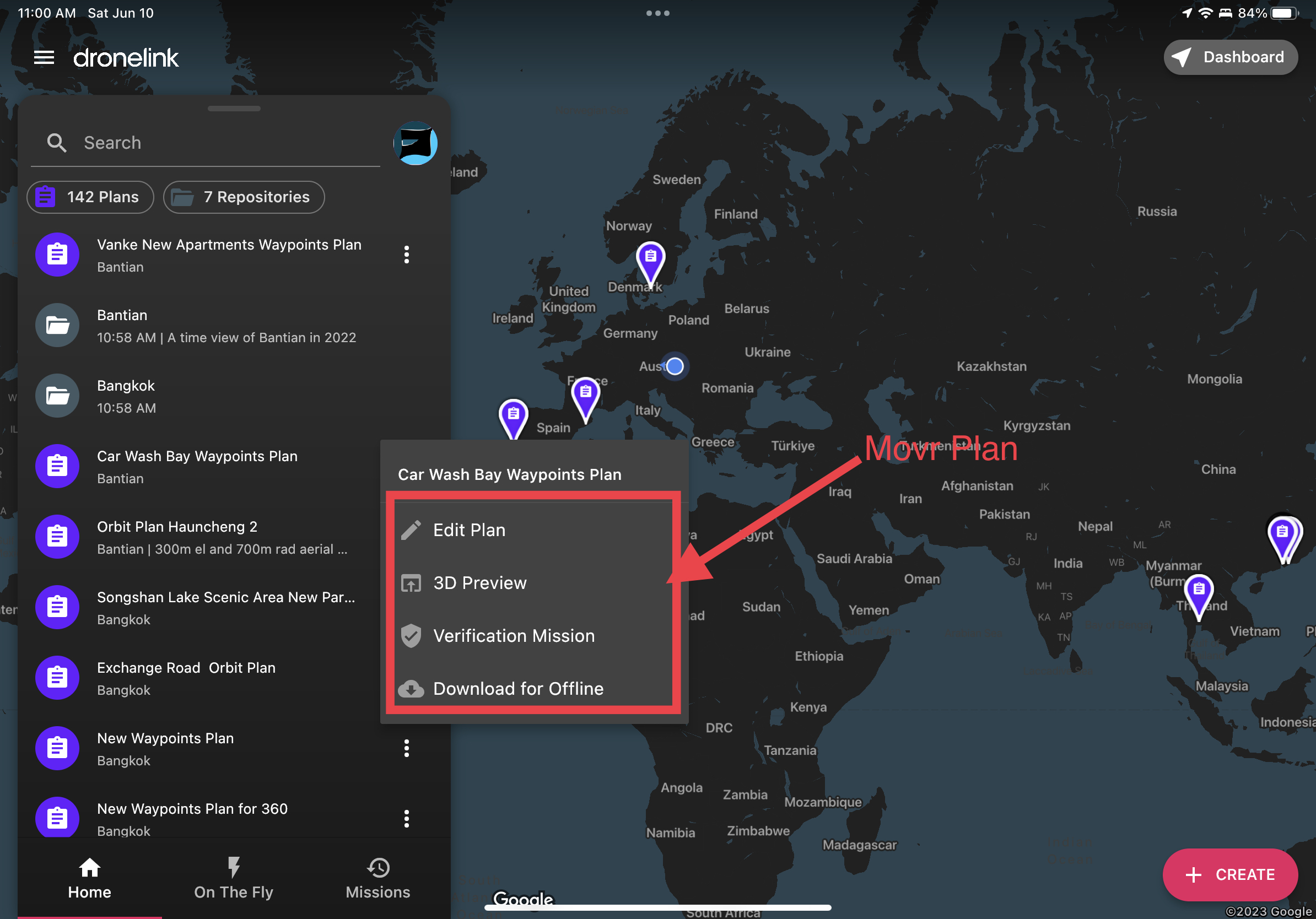
I’ve been creating missions, and sometimes in a hurry to fly a mission, forget to create missions under folders. Typically I like to fly as a hobbyist in various places, and I’d like to manage my missions into location folders. When I’ve done that I’d like to select missions in batch and move them into folders. Or alternately, use the context menu on the home page to simply iterate through the missions and move the Mission Plan to a folder. Please check the depiction below. It will be nice to have a feature to do this in the App. If there is a way to handle Mission file management in bulk, then please hint me.
Comments
2 comments
Emmanuel Otchere, your repositories are your folders, and you can easily copy or move plans between repositories
I've got a whole load of repositories, both public and private, set up for different areas
Yes! I can do this, but I’ve got more than a dozen few plans that unfortunately I must do this by opening each, and then moving them. I’d like to be able to organize missions, file management move/copy/delete/rename from the main Home page without a need to open each one first, and then moving them, returning back, select, open, move. The Feature request is to simply, from the Home page, select the missions I want to move, select them, and move them to the new folder once.
Please sign in to leave a comment.