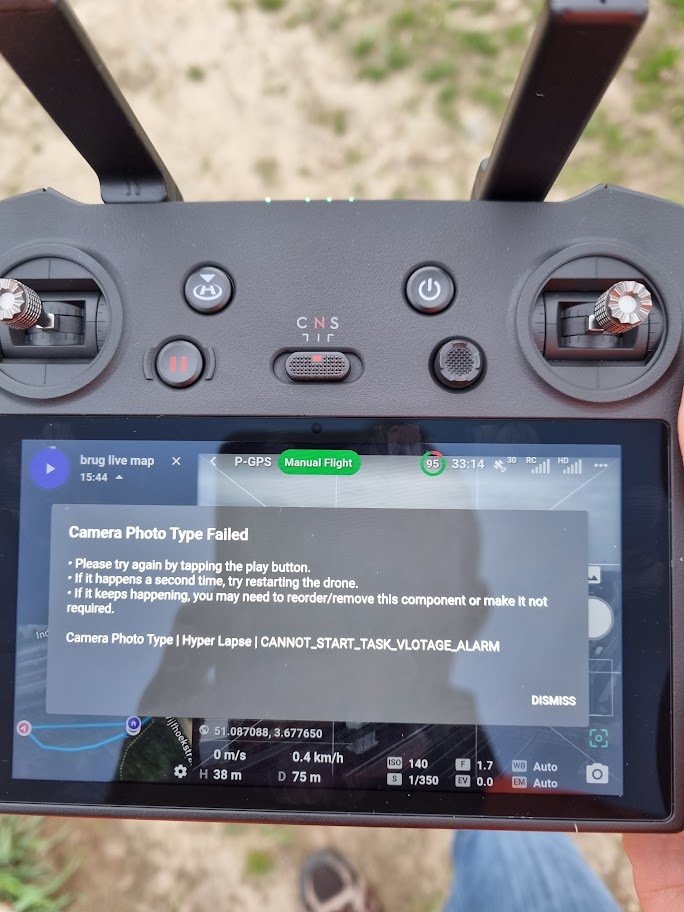
Hyperlapse error cannot_start_task_vlotage_alarm dji mini pro 3

As per title. I have set multiple waypoints as hyperlapses. When I click on start it fly's to the first waypoint and then gives the error in the title. I suspect this has to do with the battery, but it was a fully charged one. Any suggestions?
Comments
21 comments
Do you control the mini 3 with this controller ?
"Yes, the The DJI RC Pro is compatible with the Mini 3 Pro. Currently, the DJI RC Pro is compatible with DJI Mavic 3 Pro and Mavic 3 Pro Cine, DJI Mavic 3, Mavic 3 Classic, and Mavic 3 Cine, DJI Mini 3 Pro and DJI Air 2S."
stéphane GARNIER yes I do, but I use a mini 3 PRO, not the regular mini 3. I bought it so I could use dronelink without using a phone, but so far not much succes in getting dronelink to do what I want it to do. Making hyperlapse's one after the other with the dji fly app is creating issues's stictching everything together when using multiple waypoint sets. It never fly's back to the correct start point creating gaps. Which is why I want to use dronelink.
If you are wanting to set interval photos you need to make your Photo list look like this:
@jim will do but, what's the function of the hyperlapse option then?
Can i set this parameter for all waypoints in one go?
Hyperlapse is a built-in camera mode that DJI Fly uses to create hyperlapses and it isn't compatible with DL. We really just need to remove it from the list.
I tested all camera commands with my MA2 a couple years ago and several fail like Hyperlight, Hyperlapse and others. You can test any camera commands without actually launching and flying a mission. Just add any camera commands which your drone supports and then run the plan with just those camera commands. As long as there is no Motion component like orbit, map, path or other it will only load the camera commands and indicate if any errors within seconds. Only thing you should see in the plan on the map once loaded is the purple reference pin, nothing else. The motors won’t start and it can’t fly. You can test them inside your home or office. If not comfortable testing inside it then I’d remove the props for safety reasons or run outside in open area.
Also you have a couple issues with the camera list. The issue detector warns about not setting to JPEG at 2 secs or below and you have the intervals placed after the start capture. That part may still work but should set photo file format to JPEG. Hope that helps. Good luck.
Is there a way I can just set the camera settings on the first waypoint and then let it keep doing that while it fly's to all the other waypoints? If I need to set all these settings on each waypoint and maybe need to make an adjustment later on the flight, that's going to be cumbersom.
@Mike Thanks for the tip, I will try that out.
Shane Vandewalle, just put the list that Jim McAndrew posted above at the start of your mission, and a stop capture command at the end, and it will take a photo every 2 seconds during the mission, to see what its doing just look at the capture section in preview, the below is from a mapping mission hence the gaps
Here's one from a short waypoint mission https://app.dronelink.com/martin-reading/congleton/plan/s4n8QD4RKxWpm1bStRAv
Hi, thanks for the info. Will try that out. In the mean time I think I have found a bug.
If I set it to photo interval and to 2 seconds, it only takes one picture and stops (finishes the mission). When I set it to timelapse, I get the same error message as before but then it does keep taping pictures.
Is that a bug or normal?
Shane Vandewalle, can you possibly share the mission, just make sure its in a public repository, and post its a link the same way as i did above
Like Mike said:
You just need to set it to Interval Photos.
https://app.dronelink.com/shane-vandewalle/my-first-project/plan/SIllfIiAdnmMBdOZZ78U/TzUbTC1gy0WRuGPKGu04 as requested by Martin Reading
Jim McAndrew I do understand that but when I set it to interval, it takes one picture and then stops. If I set it to timelapse it sets the error message on the screen when trying to apply the setting but, then actually starts capturing every 2 seconds and doesn't stop.
Do you see the warning icon with the list of issues?
Jim McAndrew I didn't notice that. Added the camera mode and will try again tonight.
Shane Vandewalle, you need to include a component after that list, then a stop capture command after the component
Martin Reading that I know, but I was making sure the drone wouldn't take off so I could test the camera settings indoor :D
Patrick Alright, will change that but It's a night timelapse so will probably be changed when I get a good reading of the light conditions and shutter time.
Isn´t it possible to trigger the native Dji hyperlapse function ?
Here's your mission from your first post in this thread with a 5 second capture interval, assuming you're trying to capture the lights of the traffic on the highway, I've also changed the drone heading to 270deg to the path, and set the gimble to -15 to the horizon
https://app.dronelink.com/martin-reading/public-test/plan/YfMp32shV7MfCWbp7w96
No:
Please sign in to leave a comment.