Very bad circle track on orbit - Phantom 3

Hi! I am using a Phantom 3 Pro with Dronelink for a scientific research. The drone is taking onboard a small high precision GPS logger, which is very light (less than 50g) so i want to exclude right away ths possibility of this being my problem, because Phantom 3 can barely feel this extra payload.
I have 4 different missions, all composed by 2 orbits each, around one antenna, at different heights and radius.
The point is that in a mostly no wind day i expected to see reasonable circular track logs, which is important for me in this research, to keep the same radius from the center point. However, what i saw after flying are very strange shapes, with variations on radius of more than 5 meters sometimes, in the bigger orbits. I don't believe the Phantom 3 GNSS is so poorly accurate like this, so i wonder if there is something else i am doing wrong or if this is an artifact/limitation from Dronelink.
I am doing the orbits in very low speed, that could even make the things easier to the drone to keep the track, but no...
Here are some examples of "orbits" tracklogs, the gaps were GPS logger, so just look at the shape, ignore the gaps.
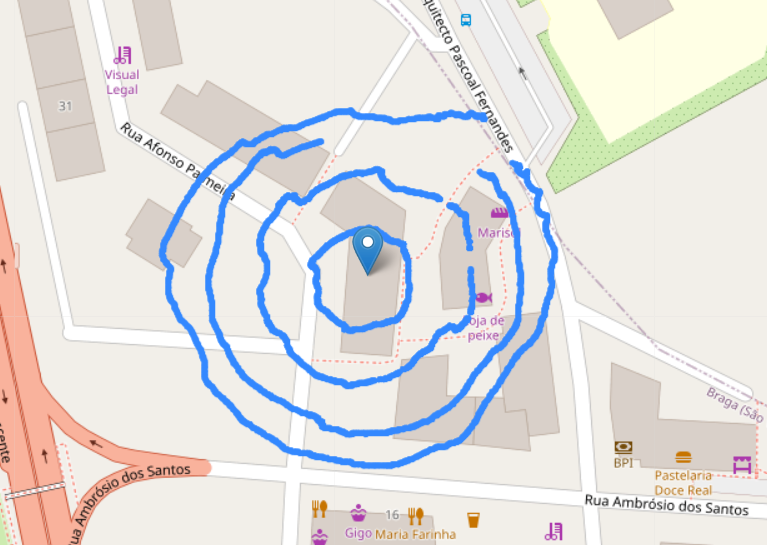
If someone has a suggestion to get the things better, i will be glad to hear.
This is one of my missions, to exemplify:
https://app.dronelink.com/pedro-silva/antenna/plan/dj4LwMKqqvdBPDFMMOIv/f4zdeFFZc3wJQN5d4dUy
Thanks!
Pedro.
Comments
5 comments
Likely the same as this:
https://support.dronelink.com/hc/en-us/community/posts/15823017923347-Drone-not-following-grid-lines
Hi Jim! I read the posts and seems to have connection, indeed. However i am not very expert on this "beta" thing. I use Android, how can i update my App to this beta that apparently solve the issue? Thanks!
https://support.dronelink.com/hc/en-us/articles/360033520874-How-do-I-join-and-test-the-Beta-app-
Tks! Will try the flights tomorrow with the Beta and give you a feedback. Just feel a little scared to use the Beta... Should i be?
Another (probably silly) question: this has nothing to do with the web interface where i prepare the mission, right? Or i need to update something there too?
Please sign in to leave a comment.