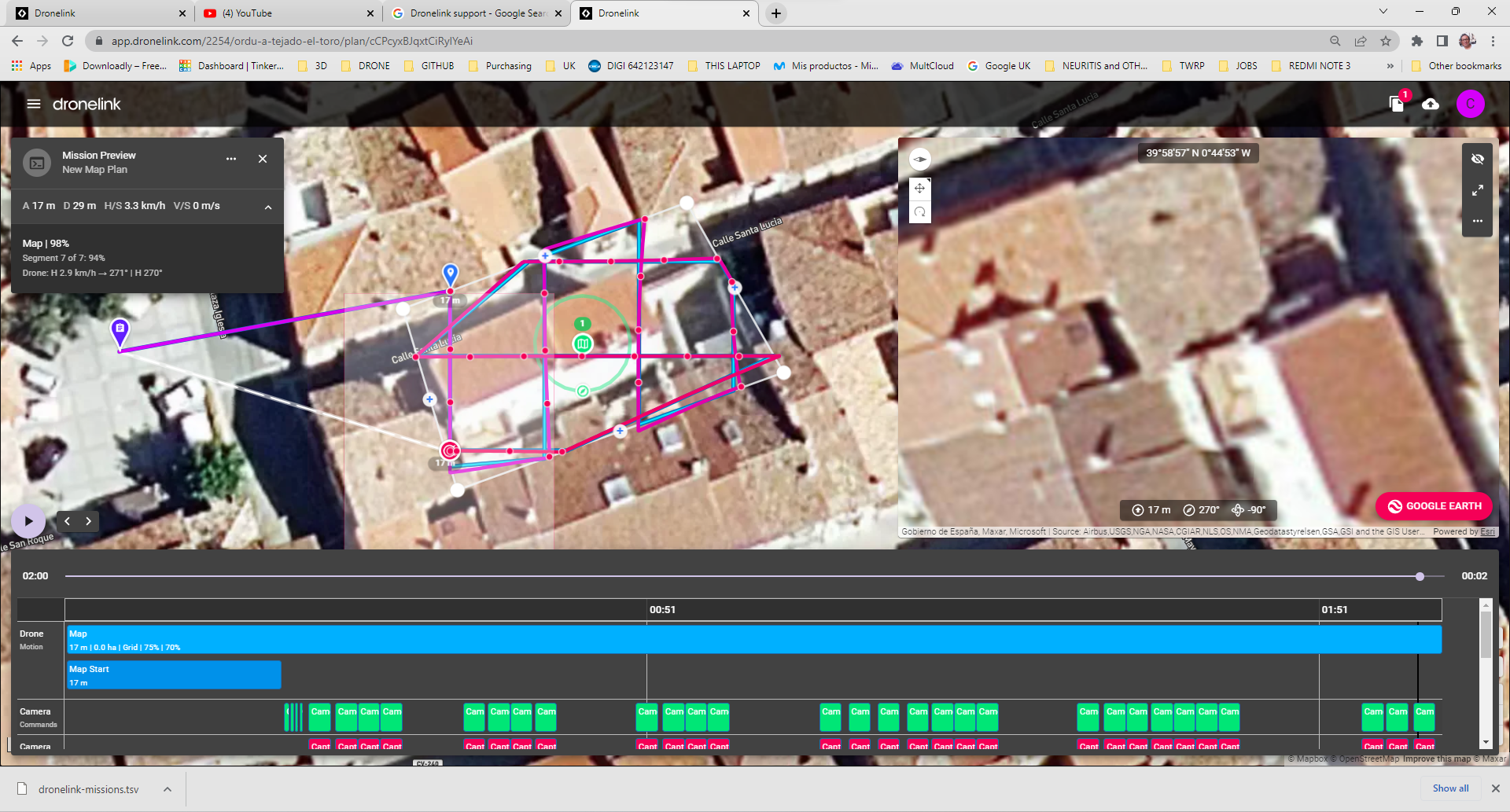
Capture markers out of grid lines and drone not following grid lines

For some reason, that did not happen before,and I also can see some erratic drone movements while it is trying to follow the path. That did not happen before..... and it gives me the feeling that the picture alignment for the Orthomosaic is failing owing to that...
Have I pressed a configuration button I should not pressed?
Is there a way to "reset" the dronelink software?
Comments
11 comments
I'm guessing it could be down to winds, what drone were you using and what were the weather conditions
DJI Air 2s
But it is not caused by the winds.... take a closer look at the preview. You can see it isnot following the bluelines and sometimes the capture markers are not in a straight line
Mapping is designed for missions that fly higher, faster, and farther than what you are doing. If you want the most precision, you can use the inspection component instead, but in the real world you are still going to be limited by the accuracy of the sensors, which is +/- 4m anyway.
Thanks very much for your answer, Jim
I was just trying to fly as near as the roof because of two reasons: (1) I would be able to zoom the image with practically no pixeling, and (2) the rules in populated areas only let you fly at a max. of 20m high AGL.
Anyway, I will do the same exercise at a higher height and will see the results...
As for the inspection components, and as I am using the elite plan, I guess I will be able to try to give the right commands, but still do not understand the reason why I can get more precision using the inspection components... An explanation would be highly appreciated.
Thanks
The inspection component causes the drone to come to a complete stop at each picture, so it flies much slower and waits until the exact coordinate to start the capture.
That sounds perfect, but for getting that I would have to get the Growth Proffessional Plan, which would cost me aroud USD 480, and believe me, I do not normally find myself in a position of spenkding that amount of manoey for 2 or 3 projects I can get...
So do you mean with this that the MAP feature is useless unless I spend more money?
You are welcome to try using the map component for your use case, but if you are doing commercial work with it you will need to upgrade to a professional plan anyway (learn more). To be clear, the more expensive plans do not / can not 100% mitigate the lack of accuracy of the underlying sensors - for that you would need to upgrade to a drone with RTK.
I have been using the map feature with my mini2, and it appears to me that the behaviour was a lot better..... or perhaps I have a hardware problem with the drone?
But first of all, If I want to use this feature for professional purposes, first of all I will have to be 100% sure it works OK
I just flew a mission that I have flown numerous times and the drone was all over the place. I don't even know if the overlaps will work!! flying a double grid and orbit and the P4P was doing an 's' turn down the paths. Any idea?? I have flown many drone link missions and have never had this happen! Thx
https://support.dronelink.com/hc/en-us/community/posts/15823017923347
Please sign in to leave a comment.