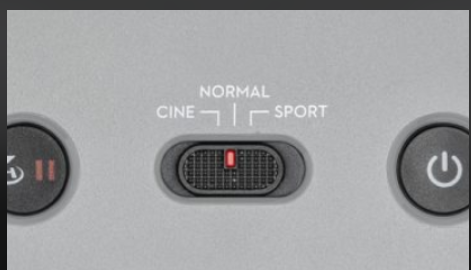
Will setting the RC controller to "Cine" mode have any effect on the Dronelink mission smoothness? Any Documentation?

One question I have not found an answer for. Will setting the RC controller to "Cine" mode have any effect on the Dronelink mission smoothness? I think it will smooth out the flight motion in the same way the Sport mode will turn off the Collision avoidance settings in Dronelink. So it seems these 3 settings override or at least take precedent over the Dronelink mission parameters? Can someone please explain or locate (create?) the documentation for this?
Comments
6 comments
The DJI SDK requires that the drone be in P-GPS mode for virtual stick control as documented here.
While on that subject though. I had a strange one yesterday using the Air 2S. I got an error saying I had to be in P-GPS mode and...I was. I tried again with the same result.
So I switched to Cine and then back to Normal and then it worked. ???
Barry. I’ve had that happen a several times. Sometimes it’s when I have Obstacle Avoidance enable for Bypass/ Fly around and it will indicate APAS. All I do is wait about 10 seconds and resume without any issue. It is rare though.
All. I mostly fly an Air 2S and I get the infamous "P-GPS" mode all the time (majority of missions). It usually happens 2 or 3 times at the start of each mission. I have to hit start mission after waiting a few seconds too. I would love to get rid of it.
Also, back to the original question - SDK or not, The mission does execute on the Air2s controller in CINE mode. The mission does not execute on the M2Pro in non standard mode. Slight difference but worth noting.
Hey Daniel. It’s been 8 days and no further update whether it’s working or not now so I thought I’d make a suggestion. Since it works in Cine/Tripod mode I’m guessing it’s because the APAS, fly around can’t be enabled in Cine-mode. Check the normal mode setting to see if you have bypass enabled. If so switch to brake only. That’s the only time it happens with my MA2 and as I stated it’s very rare. When set to brake it’s never happened. I understand the Obstacle Avoidance should work the same with DL but for some reason it occasionally gives that error. As Jim has stated, the selector should always be in Normal mode. I’ve forgotten to switch to Normal mode from Tripod/Cine mode several times when I used DL. It did work and fly and I’ve never seen any difference with the missions. I didn’t even realize until later it was in the wrong Mode. I’m not a software tech or programmer but I’m guessing it’s all controlled by the flight controller which DL app is telling what to do. As always I could be wrong but I don’t believe changing the selector will make a difference. Hope it’s all working bow but if not maybe some of this will help. Good luck..😄
Daniel Snyder
I recently added an Air 2S to the stable. I had the same situation - constantly getting the P-GPS message.
I turned off APAS and immediately the problems stopped. You can still leave the obstacle avoidance on but it can't be in stop and not avoid mode.
Hope that helps.
Please sign in to leave a comment.