Partial Orbit Endpoint

Is there any way of finding the end point of a partial Orbit, the coordinates of the center of the orbit are displayed in the Orbit settings, and the coordinates of the start point of of the Orbit can be found in the Orbit Start settings, however nowhere are the coordinates of the end point.
The reason I'm asking about this is I was making a mission that has a partial arc at both ends of the field i fly on these partial arcs are then joined by 2 sets of waypoints as shown in the screenshot below
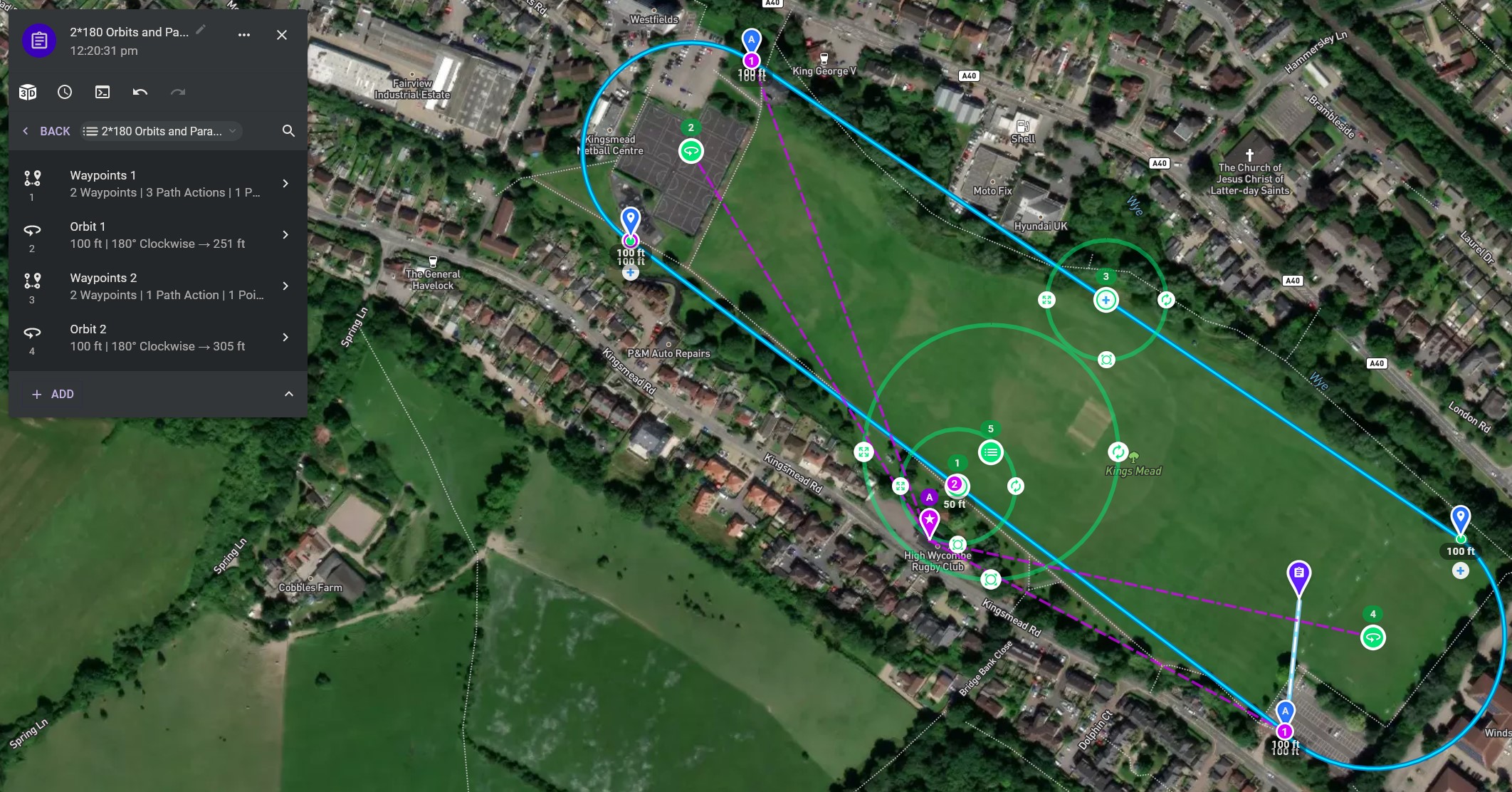
Basically why i want this is to make a smooth transition between the end point of Orbit 1 and Waypoints 2, in both cases Waypoint B of the relevant waypoints component is identical to the start point of the appropriate Orbit
The mission can be viewed here https://app.dronelink.com/martin-reading/kingsmead/plan/8qQ7W5DNoNxdfZsVvzxu/4df9NUiEthE9PKaKQYl6
Comments
7 comments
Could you not get basically the same result just adding waypoints with curves?
Yeah I suppose that would be another option
Just tried, and nowhere near as clean a curve
OK - worth a shot - it looks like it should work and avoid the transition between two components.
Barry Houldsworth, I had another play and this is what I came up with, note radius on the rounded corners
Mission is here https://app.dronelink.com/martin-reading/kingsmead/plan/nY0WhkLF7okgW1EnXGn1
Nice - have you tried it out yet?
Before I switched to Dronelink I used Litchi. The orbit function on that didn't allow for a radius that was big enough for my needs so I basically did the same thing there - creating a few points with huge corner radius settings. It wasn't as good as orbit, but it got the job done.
No not tried it yet, to do it I actually put a pair of partial orbits in first and basically used them as a template to fit the curves to
Please sign in to leave a comment.