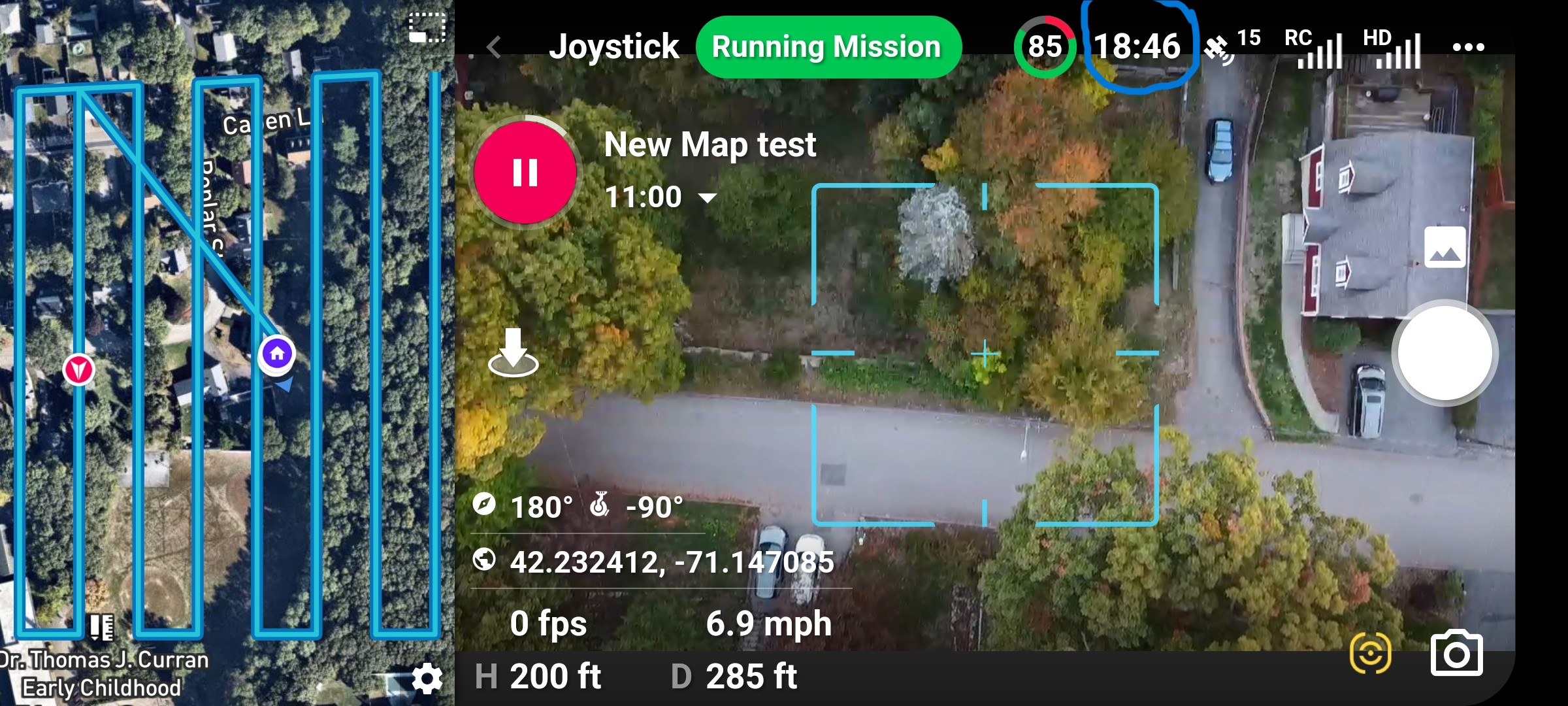
Sorry - I missed that in my video. That is the calculated flight time remaining on the battery. If you watch it will vary up and down depending on the load the drone is experiencing - for example, it will drop noticeably when climbing straight up.
Very useful, I wish I knew that a few days ago as I had experienced a near fatal blow away. I was flying a mission at 400 feet and I dropped to 20% and RTH was activated but the drone was blown 200 or more feet from home base. If I had been watching those numbers I would have known that more power was being used than expected. I did get it home because I did what you are supposed to do and dropped the altitude and made it with 8%. I did test it and as the battery hit 0% so did your numbers. While testing those numbers I experienced something for the second time in just a few days, that I can't explain. The Dronelink program just shut off and my view went to the regular phone screen. This time I was able to just turn Dronelink back on and I was back to the correct screen. Before it went off and would not turn back on so I was flying blind. Hitting the RTH button did return the drone home but I could not see elevation or distance and I could not see a map of where the drone was. What is even stranger is that I tried to turn DJI Fly on and it too would not come on saying that connection to the aircraft was not available. I was only 200 feet away and 150 feet high. Why did the program just shut itself off?
Something I never thought I would say, but the remote control vibrating when high winds are detected might be useful. I know it scrolls on the top but many times I am trying to watch the drone not the screen so if it vibrated like DJI Fly I would have been alerted to the high winds. But, I also used to curse the DJI program because it would vibrate constantly because where I live there always wind bursts and they don't usually cause much problems.
Particularly with smaller drones, I would recommend setting the RTH battery percentage to no lower than 25%.
If you drone has the option for "smart return to home", turn that on. That way, if the battery is still above your RTH battery but the drone is far away it will automatically RTH if it thinks you need more battery to get safely home.
If flying in windy conditions, always add on a buffer and bring it back early.
Never drain a battery to zero - it is very bad for it.
Any program can just shut down. Even the DJI apps will crash and close periodically. This happens less when you have plenty of memory, and a tablet that isn't too hot or too cold. I've had it happen with lots of apps. I don't even really worry about it these days. RTH still works and if you are not touching the sticks then the drone will stop and wait for you to reconnect. If you take too long doing that then the low battery RTH will kick in.
I don't know why your drone would not reconnect but since that happened with the DJI Fly app also you may have been encountering some interference, or there is something wrong with the cable.
If the wind was high I'm surprised you were not getting messages at the top of the screen telling you that the wind is high - I get them all the time and find them annoying because...I know the wind is high LOL
I experienced something for the second time in just a few days, that I can't explain. The Dronelink program just shut off and my view went to the regular phone screen. This time I was able to just turn Dronelink back on and I was back to the correct screen.
I haven't had this happen when using Dronelink (Android) but it does happen frequently when using DJIFly.
I don't believe the mini has the ability for smart return or changing the % of battery. As far as the high wind message, I do get it in Dronelink but not the vibration like DJI. If you are not watching the screen and watching the drone you miss it, unlike DJI with a vibration. I have to admit it though, I ignore the msg most times because it happens all the time. With over 4,500 minutes of flight time it's the first time happening to me.
Hi Bob. You are correct. The DJI fly app doesn’t have a setting to change the battery percentage like some of the other DJI apps. Default is at 20% for the Fly app but you can change it by adding a drone command in DL and set to the percentage to 25% or higher.
The DJI Fly app also doesn’t have a Smart Return Home enable/ disable switch like other DJI Apps. However, it still has the feature built into the app just as the battery percentage and should work automatically to return as Barry stated. Not sure if adding that command would change it or not since it should already be enabled.
One possible reason why the DJI App would not connect is if the DL app was still connected because it wasn’t force closed. I had an issue once awhile ago with DL closing and I switched the the DJI Fly app and it would not work. I checked and realized I didn’t force close the DL app so I believe it was still connected. Once I force closed DL I was able to get the Fly app working. That may not have been the issue but just a thought. Can’t be connected with one app and use the other. Enjoy Bob. 4500 minutes. I’ll never catch you. Lol…..
Also On a very, very rare occasion I’ve had the DL App close. It does happen and I just send a crash report. It should have a pop up message to send one.
I have only experienced DL shutting down twice and it was back to back flights, strange! I did not see any pop up to report it. You are right though, the first time that I tried to start DJI I didn't shut down DL,I usually use "shut down all ". The second time I restarted DL without a problem.
As far as the near blow away, only the first time and it was because I was flying a mission too high with a storm coming in. A stupid move.
I would recommend using an app called UAVForecast - it provides information on the weather in an area but allows you to say at what altitude you expect to fly. Given that wind speeds can be different as you gain altitude, this is a very handy tool.
Yeah, the Fly app doesn’t have some of the settings adjustments as others but it still has the same functions in the firmware. Smart Return Home, Low battery warnings and triggers with RTH etc. The smart return home function still works the same just can’t turn it off which I would not do anyway. Im guessing DJI didn’t add it to the newer Fly app along with the battery percentage because too many pilots who disabled or set too low would blame DJI when the drone didn’t make it back or crashed. Too many people don’t take responsibility for their actions. They set to 10% or maybe 5% and when it doesn’t make it back from a long distance it’s DJI’s fault, again. Some people just need to have some control taken away. Lol…..
Barry I am quite happy with the mini but it is the cheapest of the DJI drones, and besides the toy drones, it's the only drone I have had. So I don't have a lot of expectation. I don't really fly with the DJI program, I use mostly Dronelink, I think it is a great program.
I have had a lot of issues with DJI, from Hardware to software. I have had 7 drones in 3 years, most replaced under warranty. I have had problems with the RTH and other software issues that DJI admitted to having problems and issued updates based on many complaints. I still have an active investigation (or at least they never reported a reason for problem) in which my drone went into auto land when I had 92% battery power. Drone almost landed on some people and I had almost no control of it. Flight records showed that it went into emergency land mode with 92 % battery and DJI could not explain why. So I have history with DJI's RTH and battery reporting which is why I automatically thought I had another RTH problem. I will check out the program you recommend. Thanks.
The mini is a great little drone - especially for the price. But I can see how such a small/light drone is going to struggle with the wind.
Sorry that you have had so many issues.
It seems that DJI has been doing some strange things the past few years where they are taking what could be amazing drones and hobbling them. Things that spring to mind are the lack of SDKs for some later models, the removal of features from the Fly app that were there before, and the lack of onboard components for anything after the Mavic 2.
I think Mike probably nailed it though with his thinking on why they have done that. Maybe they will put those back into the Enterprise versions, now that they seem to be moving to separate development paths. Who knows?

Comments
12 comments
Sorry - I missed that in my video. That is the calculated flight time remaining on the battery. If you watch it will vary up and down depending on the load the drone is experiencing - for example, it will drop noticeably when climbing straight up.
Very useful, I wish I knew that a few days ago as I had experienced a near fatal blow away. I was flying a mission at 400 feet and I dropped to 20% and RTH was activated but the drone was blown 200 or more feet from home base. If I had been watching those numbers I would have known that more power was being used than expected. I did get it home because I did what you are supposed to do and dropped the altitude and made it with 8%. I did test it and as the battery hit 0% so did your numbers. While testing those numbers I experienced something for the second time in just a few days, that I can't explain. The Dronelink program just shut off and my view went to the regular phone screen. This time I was able to just turn Dronelink back on and I was back to the correct screen. Before it went off and would not turn back on so I was flying blind. Hitting the RTH button did return the drone home but I could not see elevation or distance and I could not see a map of where the drone was. What is even stranger is that I tried to turn DJI Fly on and it too would not come on saying that connection to the aircraft was not available. I was only 200 feet away and 150 feet high. Why did the program just shut itself off?
Something I never thought I would say, but the remote control vibrating when high winds are detected might be useful. I know it scrolls on the top but many times I am trying to watch the drone not the screen so if it vibrated like DJI Fly I would have been alerted to the high winds. But, I also used to curse the DJI program because it would vibrate constantly because where I live there always wind bursts and they don't usually cause much problems.
Hi Bob.
Glad you made it back OK.
A few suggestions that I would make.
I haven't had this happen when using Dronelink (Android) but it does happen frequently when using DJIFly.
I don't believe the mini has the ability for smart return or changing the % of battery. As far as the high wind message, I do get it in Dronelink but not the vibration like DJI. If you are not watching the screen and watching the drone you miss it, unlike DJI with a vibration. I have to admit it though, I ignore the msg most times because it happens all the time. With over 4,500 minutes of flight time it's the first time happening to me.
Hi Bob. You are correct. The DJI fly app doesn’t have a setting to change the battery percentage like some of the other DJI apps. Default is at 20% for the Fly app but you can change it by adding a drone command in DL and set to the percentage to 25% or higher.
The DJI Fly app also doesn’t have a Smart Return Home enable/ disable switch like other DJI Apps. However, it still has the feature built into the app just as the battery percentage and should work automatically to return as Barry stated. Not sure if adding that command would change it or not since it should already be enabled.
One possible reason why the DJI App would not connect is if the DL app was still connected because it wasn’t force closed. I had an issue once awhile ago with DL closing and I switched the the DJI Fly app and it would not work. I checked and realized I didn’t force close the DL app so I believe it was still connected. Once I force closed DL I was able to get the Fly app working. That may not have been the issue but just a thought. Can’t be connected with one app and use the other. Enjoy Bob. 4500 minutes. I’ll never catch you. Lol…..
Also On a very, very rare occasion I’ve had the DL App close. It does happen and I just send a crash report. It should have a pop up message to send one.
I have only experienced DL shutting down twice and it was back to back flights, strange! I did not see any pop up to report it. You are right though, the first time that I tried to start DJI I didn't shut down DL,I usually use "shut down all ". The second time I restarted DL without a problem.
As far as the near blow away, only the first time and it was because I was flying a mission too high with a storm coming in. A stupid move.
Given what I have heard about the limitations of the DJI Fly app - I think I'm glad I don't own any drones that use that!
Bob Scheffler
I would recommend using an app called UAVForecast - it provides information on the weather in an area but allows you to say at what altitude you expect to fly. Given that wind speeds can be different as you gain altitude, this is a very handy tool.
Yeah, the Fly app doesn’t have some of the settings adjustments as others but it still has the same functions in the firmware. Smart Return Home, Low battery warnings and triggers with RTH etc. The smart return home function still works the same just can’t turn it off which I would not do anyway. Im guessing DJI didn’t add it to the newer Fly app along with the battery percentage because too many pilots who disabled or set too low would blame DJI when the drone didn’t make it back or crashed. Too many people don’t take responsibility for their actions. They set to 10% or maybe 5% and when it doesn’t make it back from a long distance it’s DJI’s fault, again. Some people just need to have some control taken away. Lol…..
Barry I am quite happy with the mini but it is the cheapest of the DJI drones, and besides the toy drones, it's the only drone I have had. So I don't have a lot of expectation. I don't really fly with the DJI program, I use mostly Dronelink, I think it is a great program.
I have had a lot of issues with DJI, from Hardware to software. I have had 7 drones in 3 years, most replaced under warranty. I have had problems with the RTH and other software issues that DJI admitted to having problems and issued updates based on many complaints. I still have an active investigation (or at least they never reported a reason for problem) in which my drone went into auto land when I had 92% battery power. Drone almost landed on some people and I had almost no control of it. Flight records showed that it went into emergency land mode with 92 % battery and DJI could not explain why. So I have history with DJI's RTH and battery reporting which is why I automatically thought I had another RTH problem. I will check out the program you recommend. Thanks.
Bob,
The mini is a great little drone - especially for the price. But I can see how such a small/light drone is going to struggle with the wind.
Sorry that you have had so many issues.
It seems that DJI has been doing some strange things the past few years where they are taking what could be amazing drones and hobbling them. Things that spring to mind are the lack of SDKs for some later models, the removal of features from the Fly app that were there before, and the lack of onboard components for anything after the Mavic 2.
I think Mike probably nailed it though with his thinking on why they have done that. Maybe they will put those back into the Enterprise versions, now that they seem to be moving to separate development paths. Who knows?
Please sign in to leave a comment.