problems with the application

Aid.
I have used the application several times without inconvenience, the following problem was worse yesterday, when using dronelink for a map, and starting a mission after a couple of minutes an error appears indicating "Aircraft Encoder error: Solution: Please subtract aircraft, .. .
restart the drone and still the same,
If I restart the mission despite the error, the mission continues but a popup appears indicating
"weak signal.
please point the RC antennas toward the drone
If the signal does not improve, try moving closer to the drone.
if the signal still does not improve, move to an area with fewer obstacles or RF interference. "
at this moment it has full RC signal and 21 satellites, I got an image
When this happened, the drone was at a distance of 200 meters and at a height of 70 meters.
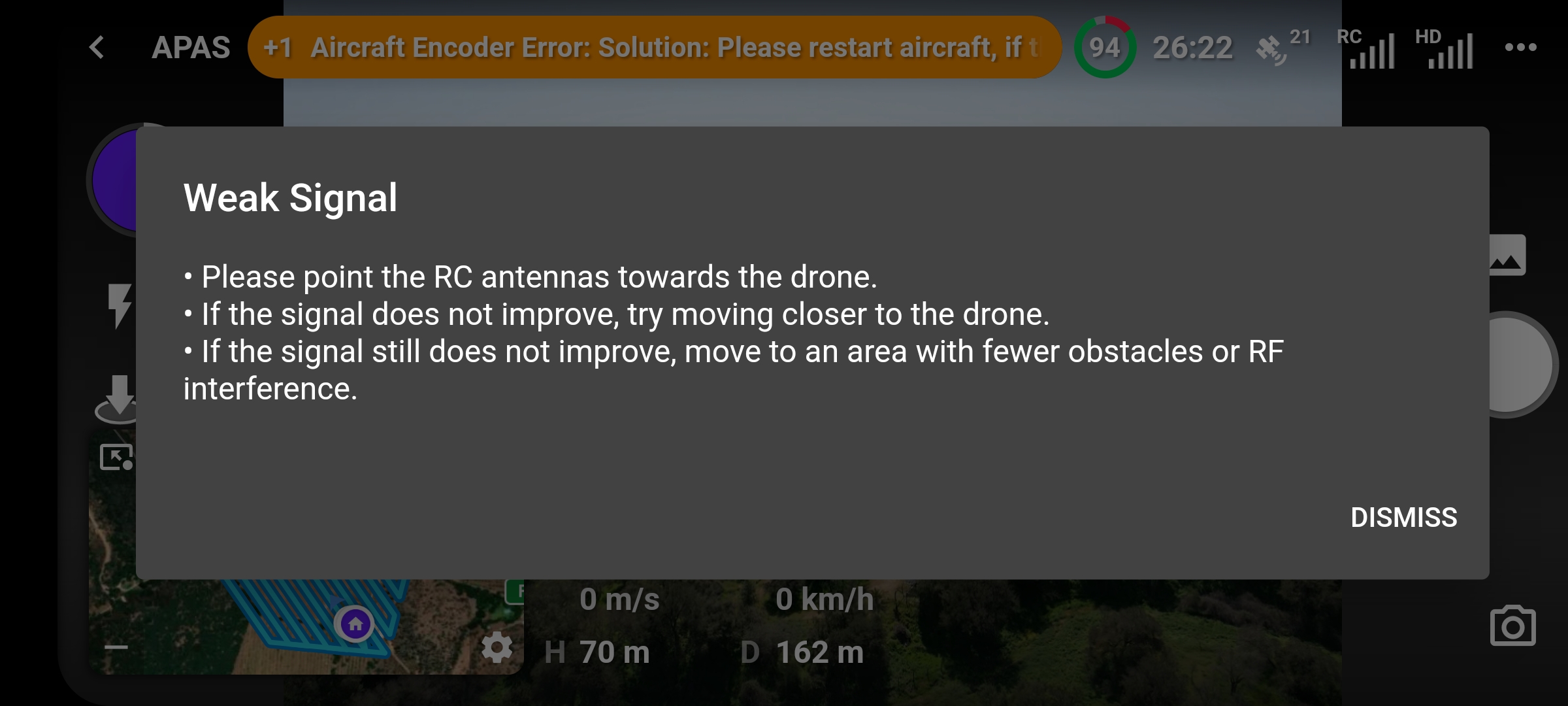
If I use DJI's own application for 20 minutes , there are no errors .
can someone help me to solve this problem?
thanks
carlos
Comments
16 comments
What drone and device are you using, is all firmware up to date, and could you possibly share the mission this happened on
This is one of many errors that the DJI SDK reports that may not actually be true. The next version (4.1.0) allows you to permanently hide certain status messages if you know they are false.
This can happen even if there was a very brief signal interference. If it keeps happening at that location, you can test the same mission plan at a different location (or share the mission plan so we can) to make sure it isn’t something else.
Hi Martin..
Drone Air 2s, firmware aircraft 02.04.2190 , firmware RC 04.12.0056 Firmware aplication DJI Fly 1.7.5
Phone Galaxy S20FE ( SMG780F), One UI 4.1, Android 12, kernel 4.19.87-24839851
I have used the mission on other occasions in the same place without problems, just change the camera angle from -90 degrees to -45, there is no problem in sharing the mission, I have created a public repository "test" and copied the mission to it.
Hi Jim,
What you indicate about the following version seems excellent to me, but reviewing both the desktop and the application, I observe that the version I have of Dronelink is verion 4.1.0 an kernel 4.1.0
once again thank you both for the support
Hi Carlos. I believe Jim is Indicating the next Beta version of 4.1.0 will have the ability to hide those incorrect messages. Those are released with the new additions before going to production version. Don’t know if your using Beta or not but the current Beta is 4.1.0 build (226). So maybe build Beta build (227) or whatever is next will give that option. You can signup to use the Beta if not already using it. Pilots choice but with your issues it may be something you want sooner rather then later. Good luck and Stay tuned.
Don’t see any Public Repo Test but maybe I’m missing it. May be easier to share your mission.
https://support.dronelink.com/hc/en-us/articles/360033520874-How-do-I-join-and-test-the-Beta-app-
Thanks, Mike.
Indeed, today an update appeared in the application, which I already loaded.
I will travel the weekend to carry out the specific test of the mission
Here I share the link of the mission
https://app.dronelink.com/carlos-cisternas/test/plan/LY43TiPpxDlzgZEL7FJ1/svPmOjOFJuw37PM4bb0P
thanks again everyone for the help
Hi everyone,
I did tests with the update of the application, in the first instance, there were no weak signal alarms, and the flight plan was executed correctly, however the warning " aircraft Encoder Error " continues to appear and that requires reboot.
In a second test in another zone, when starting the mapping during aircraft takeoff, (< 5 mt distance) a signal disconnection occurs again and the process is stopped, the zone was a little more complex (zone of forest), so I had to abort the mission.
best regard
Carlos
We added a "hide permanently" option for DJI SDK errors that you know to be false.
My hesitancy to hide an error notice is largely due to my not knowing if there are more issues than one causing Dronelink to show the Aircraft Encoder Error. So far, I haven't read anything which explains the problem beyond the many errors that the DJI SDK reports. Beyond the simple caused by the SDK, what is this encoder issue related to? For example, is the false(?) alarm tied to the rolling shutter behavior(s)? Or some other facet?
As Carlos noted above, and as I have reported earlier, running DJI Fly beforehand of running Dronelink, the Aircraft Encoder Error doesn't appear.
We don't know. All we can say is that after years of testing, ignoring this error message seems to have no effect on anything.
Muchas gracias por el soporte , como puedo compartirles mi plan de vuelo?
Buenas tardes ya hize publico el plan de vuelo
https://app.dronelink.com/jos--david-barrientos-arias-5CHtDenvkembg0avEwrb/finca-ganadera-lyl/plan/v7sC3H6Vtzyem1eZaghR
Buenas noches estimadas les comparto la misión.
Did you mean to share this mission in another thread? This thread is about the aircraft encoder error.
Si señor , hoy hice un plan de vuelo en una zona cerca de mi casa, me dio el mismo error,.lo oculte y pude terminar la mision .
Sin embargo , la.ubucacion de la casa tambien me dio el mismo error. Al final reinicie el drine y oude terminar
Pudo revisar el olan de vuelo que le comparti??
Saludos
The aircraft encoder error (if that is what you are seeing) is not mission dependent. We stand by our previous statement on this:
All we can say is that after years of testing, ignoring this error message seems to have no effect on anything.
Please sign in to leave a comment.