V3.4.0 - how to debug an error inside a DL component?

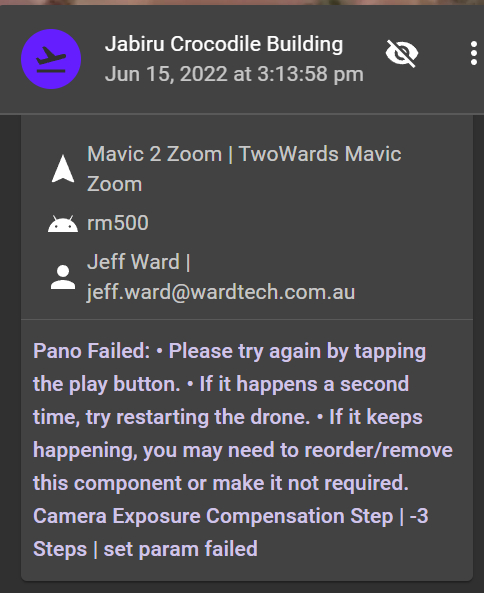
boomer4208@gmail.com support ID = jeff.ward@wardtech.com.au Dronelink ID
Hi Jim
Flew a pano mission yesterday using the latest PC browser & Smart Controller v3.4.0. Mostly great ! here is the post processed result - https://kuula.co/post/NTv46
However the mission failed right at the end with an exposure parameter command (see screen snap above) - I guess my Mavic Pro Zoom does not support the command or range..... but I cannot see inside the Pano component to debug it.
How can I see the elements in the pano component to change or remove the offending command? I'd like to resolve this because, although the photography worked well, failed missions are not up loaded to Airdata etc.
Thanks again
Jeff
Comments
1 comment
You can't change Dronelink components because the code is in the kernel. This is the reason we started with the user defined 360 photo component, but most people found that building up higher order components from low level components was too confusing. So the option is, use the old component and have control / flexibility, or use the new component and get what you get without having to think too much.
Having said that, we will check to see if there is a bug but we ran many tests with the new component and did not see this error. Does it happen every time or just this once?
This is not true. The DJI SDK generates flights while the drone is in the air independently of any Dronelink missions running. Dronelink detects when the props turn off after landing and uploads said logs, regardless of missions that were run or not, and what their status was.
Please sign in to leave a comment.