Strange error! Drone Too Far Off Course: A X.X m

I just ran a few different tests of the Vertical path, some succeeded, some failed, and for these failed missions, the error message was "Drone Too Far Off Course: A X.X m".
It seems to be ok when Descent Rate and Ascend Rate set to -3.0m/s and 3.0m/s.
But, it will always have the error when the Descent Rate and Ascend Rate set to -4.0m/s and 4.0m/s.
Why?
Aircraft: DJI Air 2S with latest firmware
Dronelink Kernerl: 3.3.1
What are the reasons for such similar two missions to have so different results: one succeeds and the other fails?
The one which just stuck in the air and failed to complete. And it shown "Drone Too Far Off Course: A 8.0 m"

The one which was completed without any issue.
You can see the path of the two missions is almost identical. Since that, It is hard to explain why it shows "Drone Too Far Off Course: A 8.0 m" error.
Environmental factors can be ruled out, as these tests were all conducted in the same location and in calm conditions (no wind).
By the way, I've already done the test of increasing the motion error tolerance and it does not help. You can find it in the following attached picture.
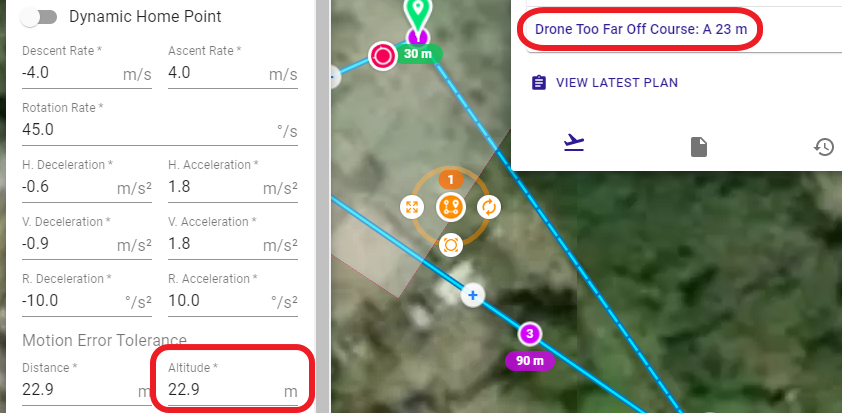
So, please help and take a check and fix the issue.
Comments
8 comments
Short answer: you are trying to use the system in a way that it wasn't really designed for. My guess is you will have to spread the markers out further (which will result in not a perfectly straight vertical path).
It could be that with no forward motion the drone limits the decent rate.
https://pilotinstitute.com/vortex-ring-state/
Similar to the last post you had. Looks like Jim has confirmed. Maybe try a destination component at the end and see if that works. 😳
Jim McAndrew
The error happens on Descend/Ascend Rate set to -4/4 m/s and it is ok when the Descend/Ascend Rate is set back to -3/3 m/s.
This does not make sense and it is more like a bug but not much related to the distance between the markers.
Please take a little time to investigate the issue.
Mike (Arizona Wyldwest)
Thank you for commenting.
I've done many careful tests and this is new finding.
It is not related to the distance of the markers but the descend/ascend rate value.
It does not make sense and indicates there are some unknown bugs.
I have spent so much time finding out the issue's cause and If you have DJI Air 2S, you can reproduce the same error everytime, too.
Mike (Arizona Wyldwest) Jim McAndrew
What I use are all basic Dronelink functions so I can not understand what means "not really designed for....".
I am a busy man and have no time arguing the "really or not really" but just hope you can take some little time to investigate the issue which might be a bug that takes me a lot of time to find out.
And, if you have extra time, please also check Barry's latest sharing in the Dronelink's official facebook group, too.
https://www.facebook.com/groups/2407615826214037/posts/2810075849301364/
Ray Kao
Ray - thanks for digging into that.
I had actually copied your plan and was hoping to find time to test it in a similar way to figure out what the issue was, but I've been super busy of late. It seems you beat me to it so, thank you for that.
That is an interesting observation. I added a link to this thread as a reference to the FB post in case others had a similar issue.
Thanks for taking the time to investigate the issue! We are very busy too and our product roadmap has a million things on it as you might imagine. I agree that it doesn’t really matter if you want to call it a bug or if I want to say it is a new feature because you are using it beyond the original design parameters, in the end you can’t do what you want with the system and something needs to be changed for this use case.
I am not saying it won’t ever happen, but it isn’t going to happen any time soon, so until we have time to look into it, I would suggest that you use ascent and descent rates that you know work, or if you don’t actually need rotation during the vertical motion (the whole point of Barry’s video), then just create an altitude marker with interpolation set to none.
Please sign in to leave a comment.