Camera Photo Interval Failed - Mini 2

I am attempting to set the 'Camera Photo Interval' to 3 seconds, to which there are no alerts when constructing the missions plan. As follows:
- Camera Stop Capture
- Camera Mode (Photo)
- Camera Photo Interval
- Path
The error is: 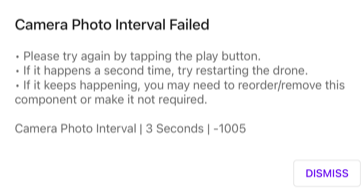
Note: This error/failure occurs during a DJI Mini 2 flight. However, the exact same mission run on a DJI Mini works perfectly.
Thanks!
Comments
10 comments
If you are saving both JPEG & RAW which the M2 can perform then that may be the issue. Takes longer to process so try increasing interval time. Or change to JPEG only.
You may want to share your mission with this failure.
I will be attempting another flight shortly, once I have done so I will let you know the results.
Thanks!
i have same issue on mini 3 pro & RC PRO
https://app.dronelink.com/helio-vasconcelos-da-silva/meu-repositorio-mini-3-pro/plan/FpNYZ3d24ISqKh8dNT6J
https://drive.google.com/file/d/1u9B3h3Z3m2aY_woJo9MyBuss20Yx7fbG/view?usp=sharing
HELIO VASCONCELOS DA SILVA
Intervals can only be captured at what the drone is capable of. Check the Mini 3 specs for what intervals will work. You have it set to 8 seconds and the drone is not capable of that interval so need to change it. Also the grey triangle warning at top advises you to add a Camera Photo Type command. The addition of the Checkpoint isn’t needed but overall looks good other than those to camera issues. Only what works while using the DJI app will work with DL as well.
I noticed today that in my dji fly app the camera settings were set to “single shot” and not “timed” and Dronelink showed the error . after I changed it to timed shooting , with 10 seconds , the Dronelink did not give an error , although in the Dronelink it was 8 seconds
https://youtu.be/EOrMv_xOJ8U
Yes. All settings do stick across apps so the last settings you used will be what is applied with the plan. However, Since you added photo commands to the plan those will be used instead. Any camera commands if added properly will set the camera to those settings. There is no need to set in DJI App first to intervals if done correctly. As I mentioned before, you just need to change the interval and add photo type. No need to change anything in DJI app for DL to work.
Here is your plan with only the two changes. Added Camera Photo Type “interval” and changed 8 secs to 10 secs.
Enjoy.
https://app.dronelink.com/wyldwestaz/temp-shkvmnasvusantu7229d/plan/4AVyT9pVOUitY1b4Im5R/IpWxY1hmoMXJVPgbYDvY
you are to be congratulated on the dronelink.
I love this APP.
I noticed today, that I can choose parameter that doesn't exist in DJI FLY.
Today I put 25s of interval to test (I know that there is no such interval in DJI FLY), so the dronelink took my 4 photos.
https://app.dronelink.com/helio-vasconcelos-da-silva/meu-repositorio-mini-3-pro/plan/HofqVoeRuz6JKlqpW1wi
https://app.dronelink.com/helio-vasconcelos-da-silva/meu-repositorio-mini-3-pro/plan/HofqVoeRuz6JKlqpW1wi
Sometimes if you set the interval to a value which the drone doesn’t support it will default to the intervals but at the last value which was used. In this case the 10 seconds and can be seen on the shutter button so it captured in 10 sec intervals. The DL web app has a ton of settings which can be set but it doesn’t mean it will work on all drones so you need to know what your drones specs are and use only them. It will not take at 25 second intervals due to the drones firmware limitation. Also the mission preview may show at what intervals they will be taken but it will not work in the real world. I’d stick with the drones capabilities or you may have future issues when actually running the mission and possible failures. A lot less headaches if you stick to what works. 👍🏼
Tried your mission at 25 second intervals and it flew. However, it didn’t take at that interval. It took a couple at 2 seconds which is what the drones firmware is set to in DJI App and for some strange reason it took a couple at 4 seconds. I’m just guessing but the incorrect 25 second interval probably caused it to not take all of them at 2 seconds. I’d stick to what the drones capabilities are. Otherwise as I mentioned in previous post it may fail or run but not take proper photo intervals. Stick to the basics and use only what we know works. Enjoy….
Please sign in to leave a comment.