Gimbal Pitch Advice

Hi
I have created the following mission: https://app.dronelink.com/keith-logan/mission-speed-test/plan/gFPwTsUD6BFNwUb3qt1h
When the drone arrives near the point of interest it automatically starts to tilt down which looks great. At the start of the mission, I would like to have the horizon more in the up 3rd of the frame. I've tried adding a marker to the path and then adding the -15 to gimbal pitch to the marker but that then changes the gimbal from automatically changing as it approaches the point of interest.
Is it possible to do both?
Cheers
Comments
13 comments
Your POI is more than 1,300 feet from the start of your mission where you are only 15ft ATV when locked onto the POI. This means your gimbal pitch will only be negative a degree or so. If you need a different pitch make manual control or probably just remove the POI. What is the purpose of that distant POI?
The idea of the POI is to keep the camera gimbal locked onto POI, so if you increase altitude the gimbal will appropriated go down; this also happens as you approach the POI and camera remains locked onto the POI both horizontally and vertically.
Just move the POI marker much farther down path. Then adjust the interpolation for how you want to look. This way the -15 gimbal marker will work and and stay at that pitch until it gets close to the POI marker.
To simplify everything here is your plan slightly altered.
https://app.dronelink.com/wyldwestaz/forum-missions/plan/ESA9ckyL9EIiEZ0GPwCW/MfY9zIanjJ5UTKI8xA2S
Hi David the purpose of the POI is the golf green is the focal point of the footage. If I want to use manual control of the gimbal, I am not sure how to override that? Thanks
Hi Mike, thanks for sharing the altered plan. When I run your mission the drone makes an awkward move / change of direction at Marker 3, why is that? Cheers
Keith Logan
It looks like...
Mike moved the old Marker 1 to the Marker 3's location and this delayed the POI behavior as you wished.
Mike also added a new Marker 1 to send a GImbal pitch -15deg and it made the gimbal pitch down a little bit from the beginning of the path.
Keith Logan
You can't combine manual gimbal or heading control while using POI. So, you choose POI or manual.
Here's what I would do. First, get rid of POI for now. Set your first marker for your desired gimbal pitch and drone heading so the drone faces the golf green. As you move along the path the heading won't change much, but set a marker around mid course to adjust the heading. Make sure to set all changes to curved so DL will make smooth adjustments. Make any further maker adjustment as you get closer to the green. When you want the POI to take control of both pitch and heading set another marker with the POI.
Next, run the preview and take note of the gimbal pitch when the POI takes control. Now, set a new marker just before the POI and set the gimbal pitch to that which the POI showed on the preview. Setting the new gimbal pitch moments before the POI will help make the change smooth. I've used that method for my own plans. It make take a couple previews to get the right pitch before POI.
Hi David, thanks for that. I've created a sample mission: https://app.dronelink.com/keith-logan/mission-speed-test/plan/NDQLO2KGAIFxpQmx2VaS
It is thought to get the drone to smoothly change with a jerk ..
Hi Keith. Your question: When I run your mission the drone makes an awkward move / change of direction at Marker 3, why is that?
All I did was slide the POI marker down the path and changed nothing else. Simple fix without all the other stuff. You can move the POI marker wherever you want on the path to get the effect you are trying to accomplish. Farther back or closer to POI depending on your preference. Any awkward movement is due to the placement of the marker which you can adjust by moving the POI marker on the path and the actual POI. It’s a really simple plan that doesn’t need a ton of changes or much time on it.
There are a lot of ways to set up a plan and it’s up to the pilot to decide what works best for them. Just remember when you set a POI marker and then place another marker along the path after it, the POI will be affected by what is set in that marker. That’s why it went to a -15 gimbal pitch on the path because you had that marker after the POI marker on original plan.
The new plan is different but looks good to me. The altitude of 200 feet changes everything. Good luck Keith. Enjoy.
Keith. I forgot about your other question: If I want to use manual control of the gimbal, I am not sure how to override that?
You can manually control the gimbal at any time while running a mission. DL changed this awhile back. Just remember if you are manually controlling the gimbal then don’t place a gimbal command in the plan until you don’t want to manually control anymore. Otherwise the command will be used and you will be fighting against it.
Hi Mike, many thanks for all this great info! As a newbie, this really helps :)
I've modified my original mission with the tip you provided, see below. I am still getting a jump / jerk and not sure why at around 01:14. Not sure why? Cheers
https://app.dronelink.com/keith-logan/mission-speed-test/plan/uBPnw2zrOAqU3LNsMNjo
Hi Keith. Sorry this took so long. I actually didn’t see this until now. You have marker 1 starting the POI at the very beginning which is fine. However, you then placed marker 2 right after with a gimbal pitch at -15. So remove marker 2 otherwise it will go to that pitch until it gets to marker 4 POI and then go back onto the POI again. Also you don’t need the POI “B”. It’s connected to nothing.
I only removed the -15 gimbal marker and POI “B” which wasn’t needed. Hope this helps.
https://app.dronelink.com/wyldwestaz/forum-missions/plan/uqGZBG8uzJvycBvm3ET6/GXP9E9CYmTFsZAxNeenu
Hi Mike,
No worries at all, thanks for taking the time to reply.
I added marker 2 with a gimbal pitch of -15 as the camera position shows too much sky. In your edited version, the horizon sits in the middle of the frame. The footage would be better with less sky. Not sure how to achieve that?
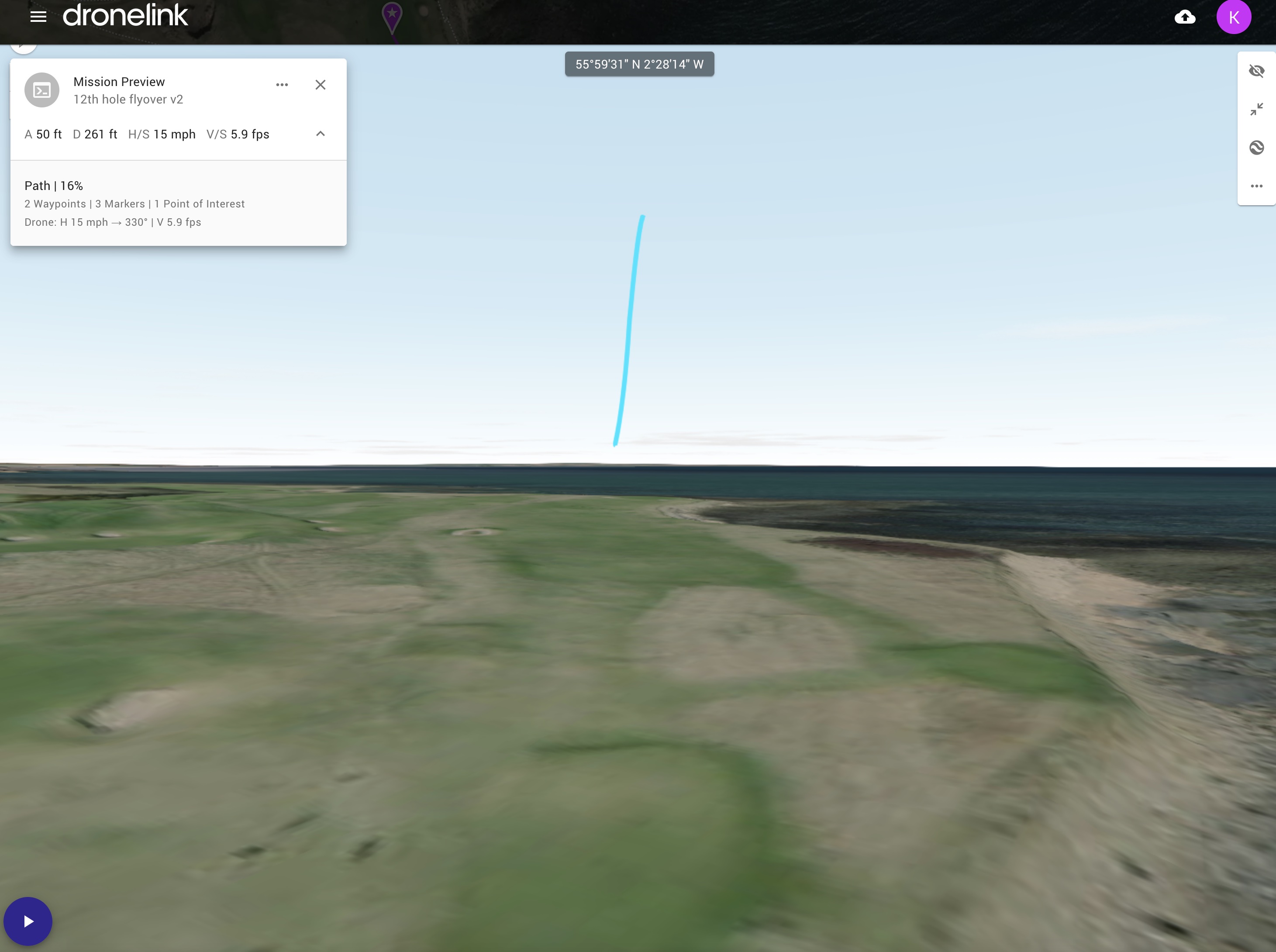
Cheers
Then I’d remove the -15 gimbal pitch and go into the POI and add altitude offset amount. You can also just move marker 1 POI down the path just a little which will correct the horizon also. Doesn’t need to be moved a lot but a but a bit closer to the 75’ marker may fix that. That marker at 75’ going up from only 15’ altitude changes things too. So many ways to set up a plan it comes down to what effect you want.
Please sign in to leave a comment.