Google Earth 3D and 3D Mission Preview are differents.....

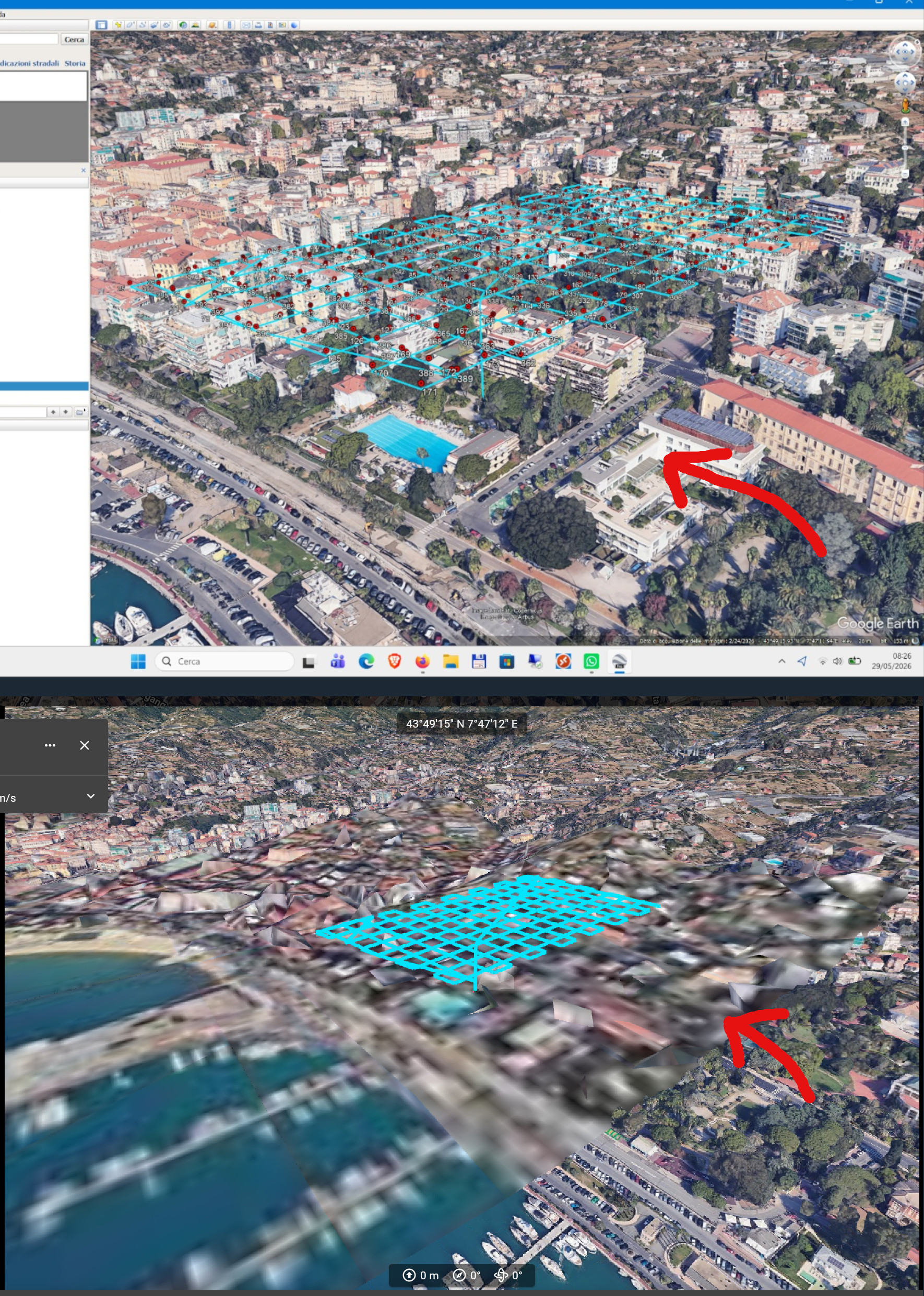
I set up a test mission in an area where the Google Earth 3D map is complete with buildings (photo 1). If I preview the same area, there's a section where the buildings aren't loaded (photo 2). Why?
In the images below, I've included the 3D view from Google Earth Pro and a screenshot of the Dronelink preview.
Comments
5 comments
Can you share the mission plan please?
I’m sure if it’s something with the DL app Jim will figure it out. However, I’m fairly sure it’s a Google issue, not the DL app. Google uses the same imagery data for both Google Earth & Google Maps software. However, Google Maps which is used primarily for navigation may not look as good with the latest captured data as the previous. So an example is if the most current captured images for a specific area had clouds blocking the ground it’s pretty much unusable for navigation. In this case they use older data and even possibly use different layers to get a specific area looking as good as they can. The Google Earth software has the ability to change the historical imagery by date so you can select the best imagery for your purposes. Google Maps does not so they need to use the data which looks the best. I’m guessing for whatever reason that specific area doesn’t look the same as Google Earth due to one or more reasons. It’s very obvious how sharp the image is next to that area you want to use which is completely unusable. I ‘m fairly certain this points to a Google issue. The bottom line, imagery on both pieces of software are not always the same for reasons mentioned.
This is the mission.
https://app.dronelink.com/pulir--aurelio/lavori-studio/plan/aRFUGKNNOK2DnmJ6HaF5/8QtUUWxqPPSvQqATNkFp
This is just a test mission I created to show you the problem. I don't understand if the app uses a different database than the one Google Earth uses. As you can see, it's a rectangular area where 3D isn't reconstructed. It's not a big problem, I just wanted to understand why.
Thank you both for your replies.
Thanks for sharing the plan — I was able to dig into this, and Mike is correct: it's a Google data issue, not a Dronelink bug.
Google Earth Pro and Dronelink's 3D preview don't read the same 3D data, even though both are "Google." Earth Pro renders from Google's internal 3D mesh, while Dronelink's preview uses Google's public Photorealistic 3D Tiles service. These are two separate products with different coverage, and the public one Dronelink relies on is published area-by-area in a tiled grid.
That's why the missing section is a clean rectangle: it lines up exactly with a tile in the public dataset where Google hasn't published the detailed 3D buildings yet. Where the mesh isn't available, the view falls back to flat imagery draped over the terrain — which is the blurry rectangular patch you're seeing.
Okay, that's what I thought. Thanks
Please sign in to leave a comment.