Mini 4 Pro - Capture Priority Time

Hi,
When trying to carryout a mapping mission with 'Capture Priority' set to 'Time', I get the error shown in the image below. I've tried changing the 'Min Capture Interval' but I still get the error and the mapping flight doesn't start. Does anyone know a workaround for this (apart from using Distance for Capture Priority). Thanks.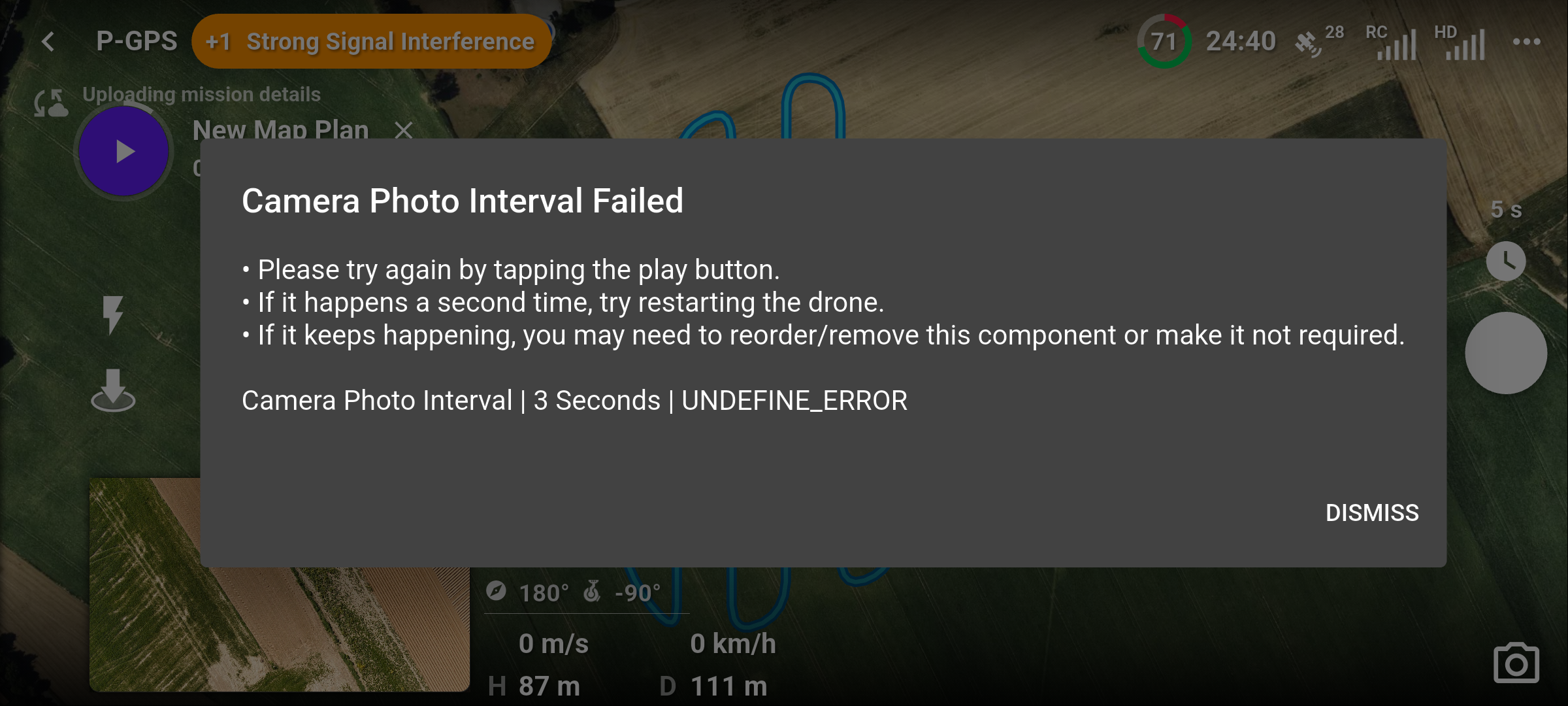 Rich
Rich
Comments
10 comments
This typically indicates that the photos has not finished writing to the SD card before the next photo is taken. Since the interval says 3 seconds the most likely scenario is either
a) You are capturing RAW photos instead of just JPEG. Those take a long time to write to the card - this video covers more about that https://youtu.be/yhb6XmoKlbk
b) you have a low quality SD card. Switch to a higher quality card - e.g. one that says V30 or better.
Hopefully that helps!
Hi,
Thanks for the advice, but I've checked and it's not recording raw and my SD card seemd good enough.
I think the drone must be limited to a capture interval of no faster than 5 seconds, because if I try to go less than 5 seconds I get a 'Undefined Error' in Dronelink app.
When I go to the DJI app, it's not possible to select < 5 seconds.
Rich
I agree with Barry on those two possible issues. One thing I noticed is the photo interval you have set in the DL app indicates 5 secs. So somewhere in the plan you must have a command to change to the 3 secs and there may be an issue with the way you set up the commands. Certain commands need to be in the proper order otherwise it can fail to capture. Also there needs a stop capture added as the first command before adding any other commands whether capturing photos or video. If you still cannot get it to work then share the mission so someone can look at it.
Hi,
The reason for my thinking that the drone cannot go lower than 5 sec, is that in the DJI app it's not possible. I've checked the SD card, I think it's ok and it's not on RAW. For info I ran the same mission, just on distance for 'Min Capture Interval', then when I change to Time, I get the error.
I'll share the mission and see if someone else has any ideas.
Rich
That's not it. I use the Mini 4 pro with a 2 second capture time with no issues. But you have set it to record 48MP photos and that is basically as much data as raw. If you are mapping then you get almost zero benefit from that - it does not change your GSD. Frankly, IMHO, it's a marketing gimmick.
Change it to the 12mp photos size and I would bet you will have no issues.
Cheers Barry!
I'll give it a try, I'm just wanting to see if it shortens capture time compared to stop - turn - go on the corners, or if keeping a bit more speed is better.
As Barry mentioned there is no noticeable benefit using 48mp so that’s the issue with trying to use 3 secs as the firmware doesn’t allow it. Also unless you have a professional plan you cannot capture in 48MP so that could also be part of the issue with the failure. Remember that regardless of what functions or features the DL app has not all apply to all drones. The only functions which will work are what the DJI firmware allows. So the DL app cannot force a function which isn’t allowed.
Hi Mike, as I mentioned all settings were the same for the mission that completed successfully in distance mode, including using 48mp.
I understand but when capturing with time based it relies on time capture at that interval every 3 and using 48MP takes more time to read and write to the SD card so if it’s not possible then it won’t work. Distance based is probably capturing at a bit longer time between captures so it’s enough time between each capture to finish before the next one can start capture so it will work. As Barry mentioned if you use 12MP I’m sure it will work. Most professional pilots don’t even use 48MP because the difference is minimal and not noticeable. Also when stitching all those photos which may be let’s say around 200 to 500 or more photos it will take a very long time. An example is with 400 12MP Photos which may take around 3 or 5 hours, 400 48MP can take 20 hours or more depending how powerful you PC is. Pilots choice but you will not see any noticeable difference. It’s been tested many times over the years. Enjoy.
Thanks Mike. I’m familiar with the processing side (currently working through ~15,000 M4E images on Azure), so this was really just me trying out the Mini 4 Pro and seeing what it can do.
Please sign in to leave a comment.