5.3.0 (313) UI Bug - Status Bar Icons Unreadable in Portrait Mode (Light Theme)

In the Android version of Dronelink (Samsung One UI), when using the Light Theme, the status bar icons (clock, battery, signal) remain black even when the background of the app's top bar is dark. This makes the system information completely unreadable in portrait orientation.
Observed Behavior:
-
Light Mode: The app forces SYSTEM_UI_FLAG_LIGHT_STATUS_BAR (dark icons), but the background at the top of the screen is too dark to provide enough contrast.
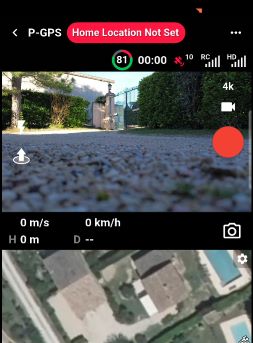
-
Dark Mode: Switching the app to Dark Mode correctly changes the icons to white, resolving the visibility issue.
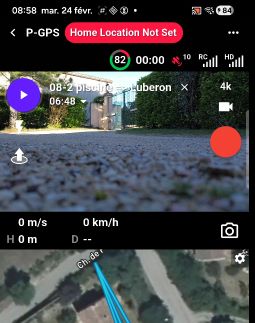
Technical Details:
- Device: Samsung Galaxy A34 5G
- OS: Android 16 / One UI 8.0
- App Orientation: Portrait
Suggested Fix :
Please ensure the Status Bar Style is dynamically updated or set to Light Content (white icons) when the top UI elements are dark, even in Light Mode.
Alternatively, ensure the Light Mode background at the top of the screen provides sufficient contrast for black icons.
Comments
2 comments
This will be corrected in the next build.
It has been noted that this minor defect has been corrected in beta version 5.3.0 (build 314).
Please sign in to leave a comment.