Movement not smooth issue while using waypoints. DJI Controller Settings problem?

Hi,
I know I am not the first one talking about this issue, but I couldn't found any post related with controller settings.
- I am flying a DJI Mavic Air 2 {Firmware: 01.01-0720}
- Using Dronelink {Version: 3.4.0(188), Kernel: 3.4.0}
- To control it, I use a fully charged Samsung Galaxy Tab Active 3 {Model: SM-T575, CPU: Octa-core (4x2.7 GHz Mongoose M3 & 4x1.7 GHz Cortex-A55), OS: Android 11}
Today, I managed to do some test on waypoint missions and found that under high angular speeds the gimbal starts "jumping" instead of doing an smooth interpolated rotations.
This also happened on a second flight, where while orbiting, some heading corrections where not smooth.
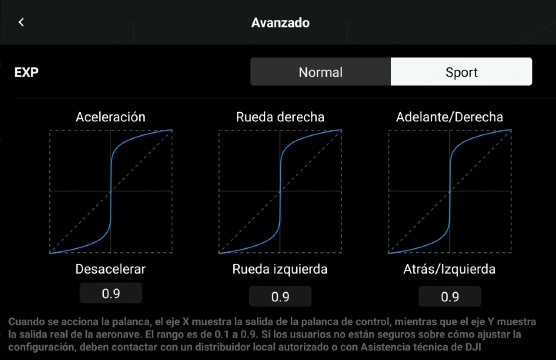
I am suspecting that changing the default settings on controller might have some influence on this behavior. I have changed gimbal speeds and also controller sensibility before this two flights.
If needed, I can upload new logs tomorrow. (Today's ones are a total mess, they are not clear).
Anyways, I have some videos that shows the issue.
https://youtu.be/uxGKBD1JUZY
And the flightplans on a public repo:
https://app.dronelink.com/cemape/not-smooth-issue
I cant remember which flight mode I was using (tripod, normal, sport). I will try to test it with each one.
So I wish to ask:
- Is Dronelink using a PID to handle the interactions with the drone? Is it adjusted to certain settings?
- Can this custom settings on gimbal and controller be a problem with Dronelink?
- Any way to avoid them?
Controller settings: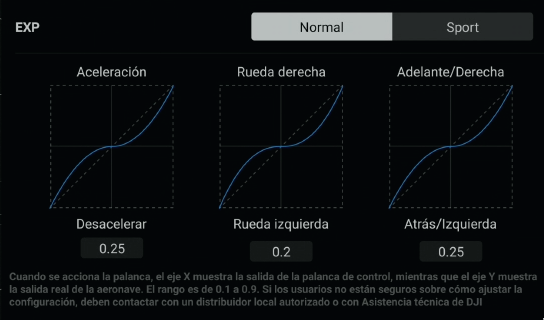
Thanks.
Comments
5 comments
I am not responding to threads on this issue anymore. Here is the definitive thread:
https://support.dronelink.com/hc/en-us/community/posts/360051985554-smoother-
The gimbal issue while performing paths is something I’ve never experienced but I understand it could be happening with others due to several factors.
As Jim stated in the linked thread, the Orbit issues have been there and basically the same with other apps as was tested. With that said, I’ve had good results overall with my MA2, using iPad Mini 5. I’ve slowed down the rotation rates, lowered speed to about 7 mph max and don’t do Orbits in actual measured wind speeds of 10 mph or more. Winds, drone model/ size and device can make a difference. I understand individual results will vary but I believe it will never perfect. I’ve tested at my home location with same winds and drone using DJI Fly app using POI Orbit. Even with the POI locked on it still yaws off center a bit and is not perfect at about 6 to 7 mph but works well. It’s noticeably worse at higher speeds. The slower the speed the smoother it is without question based on my testing. Also I’ve noticed with smaller/ tighter Orbit’s, faster speeds and winds it is more difficult to keep smooth. All you can do is test several of the settings as mentioned in the other thread along with slower speed, larger Orbits, and very light winds.
Here is an Orbit which I did with DL and actual measured wind speeds about 3 to 7 mph during the flight. To me it looks really good but maybe others won’t believe it is good enough. It was 120’ diameter Orbit, 6 mph speed at 75’ altitude. I understand Jim’s frustration about this issues. This is for anyone who may want to spend the time and test with many different settings to try and get the drone to perform Orbits as well as possible. Good luck.
https://youtu.be/2ej7MbLCK2o
One clarification, the linked thread may be focused on Orbit, but Path and all the other components use the same underlying code to perform manuevers, so it is not specific to Orbit.
Understood. Orbits seem to be the biggest complaint overall so I thought I’d highlight that issue which is obvious to most. Nothing is ever perfect but seems like I’ve got mine to work really well overall as video shows. So many factors to consider and I know you have put plenty of time into trying to get it to work better. Appreciate the hard work.
The cold, hard reality is that the same code operates perfectly on the larger drones from DJI and drones from other vendors such as Autel - pretty incontrovertible evidence that this a firmware issue in the smaller, virtual stick only drones from DJI.
Please sign in to leave a comment.