Failed to Add New Component - Import KMZ

V. Kelly Bellis

Issue present in both Firefox and Chrome
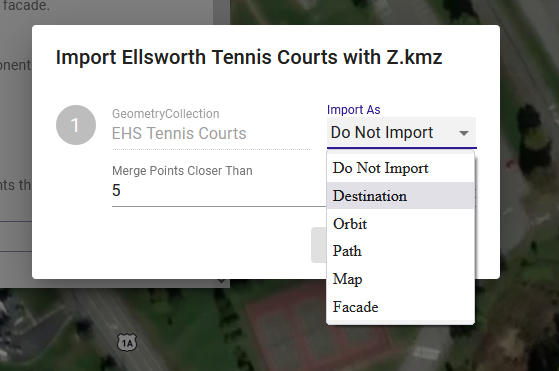
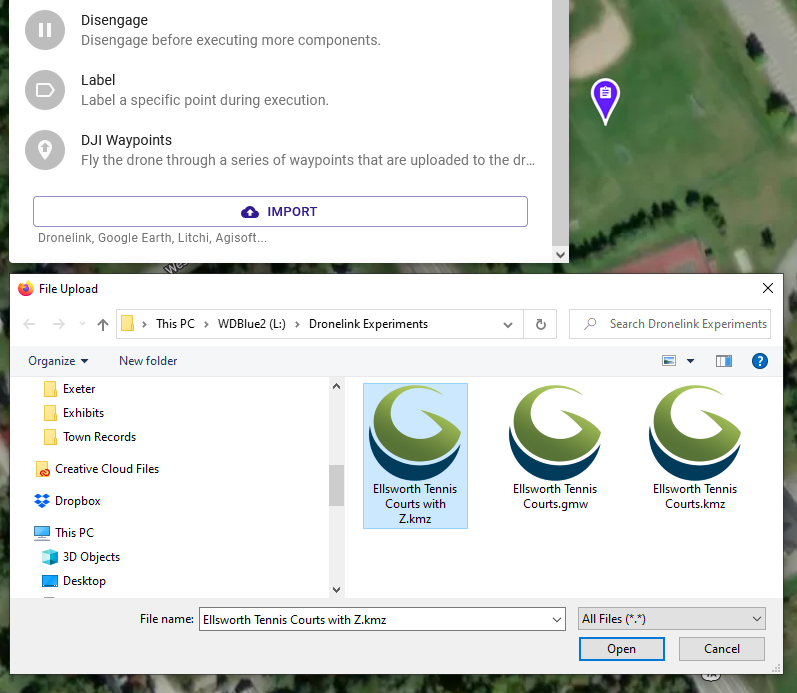
New Project, New Component, Import, selected kmz fails to load Import as Destination, Path, or Map.

Tried using both terrain and elevated kmz files produced from Global Mapper Pro v23.1 (b030822), with the last iteration having the following settings at the time of export from Global Mapper:
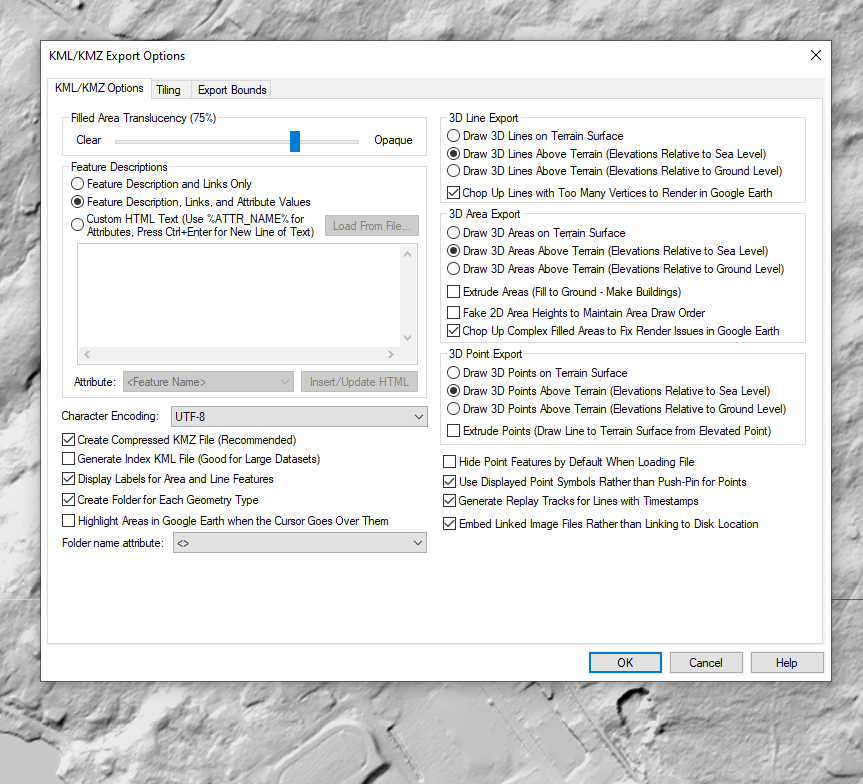
Not sure what I should try next.

Also, there wasn't any clear means of attaching the sample .kmz files - is this forum interface the only means of providing bug report feedback?


0

Comments

12 comments

  • Comment author
    V. Kelly Bellis

    FWIW, these kmz files load in Google Earth Pro without issue.

    0
  • Comment author
    V. Kelly Bellis
    • Edited

    Still not seeing the .kmz file showing on the web browser interface; however, note that the user entered description suggests otherwise.

    0
  • Comment author
    V. Kelly Bellis


    Interestingly, I was able to load kmz files (both area and line features) into the browser's workspace without issue using the ADD LAYER, however, they're impotent in terms of being recognized as a NEW COMPONENT.


    0
  • Comment author
    Jim McAndrew Dronelink Staff

    Can you provide a link to the KMZ file on Dropbox or similar?

    0
  • Comment author
    V. Kelly Bellis

    Thank you for your quick reply Jim.

    There are (3) separate kmz files with polygon and line features in the folder here:

    https://drive.google.com/drive/folders/1PXH6UfbnpmD0KHB-P4TQ_Fj3p0w3yPhR?usp=sharing

    Let me know if there's any issue with their formatting.

    FWIW - I'm totally new to Dronelink & its web interface and these files were my first attempted Component uploads. While I expect I screwed up somehow on my end, I thought it still worth the time and bother to pass along this feedback.

    0
  • Comment author
    Jim McAndrew Dronelink Staff

    The features in the KMZ need to be one of these:

    0
  • Comment author
    V. Kelly Bellis
    • Edited

    Point features weren't included in any of the (3) shared kmz files; however, polygon and line features were included. If you open the (3) files in any GIS applications or Google Earth, you'll see that.

    0
  • Comment author
    Jim McAndrew Dronelink Staff

    The issue is you have it inside of a MultiGeometry node, which the code does not handle:

    This version works:

    0
  • Comment author
    V. Kelly Bellis

    Thank you for looking into this Jim.

    I'm no coder, but shouldn't the <MultiGeometetry> object (as defined in KML Version 2.2) be allowed by Dronelink?

    0
  • Comment author
    V. Kelly Bellis

    In the mean time, should Dronelink users only use kml files that are produced by Google Earth?

    0
  • Comment author
    Jim McAndrew Dronelink Staff

    shouldn't

    Maybe, I am just pointing out that the code isn't written to handle it right now, so moving this to feature requests.

    should Dronelink users only use kml files that are produced by Google Earth

    That was our primary test case, but as long as you produce KML files that our code handles, it doesn't matter where they come from.

    0
  • Comment author
    V. Kelly Bellis

    I'm just glad you figured out what the issue was. Thank you!!

    The work around that I proposed works, BTW:

    <?xml version="1.0" encoding="UTF-8"?>
    <kml xmlns="http://www.opengis.net/kml/2.2" xmlns:gx="http://www.google.com/kml/ext/2.2" xmlns:kml="http://www.opengis.net/kml/2.2" xmlns:atom="http://www.w3.org/2005/Atom">
    <Document>
        <name>Lot Brown Cemetery.kmz</name>
        <Style id="s_ylw-pushpin_hl">
            <IconStyle>
                <scale>1.3</scale>
                <Icon>
                    <href>http://maps.google.com/mapfiles/kml/pushpin/ylw-pushpin.png</href>
                </Icon>
                <hotSpot x="20" y="2" xunits="pixels" yunits="pixels"/>
            </IconStyle>
            <PolyStyle>
                <fill>0</fill>
            </PolyStyle>
        </Style>
        <Style id="s_ylw-pushpin">
            <IconStyle>
                <scale>1.1</scale>
                <Icon>
                    <href>http://maps.google.com/mapfiles/kml/pushpin/ylw-pushpin.png</href>
                </Icon>
                <hotSpot x="20" y="2" xunits="pixels" yunits="pixels"/>
            </IconStyle>
            <PolyStyle>
                <fill>0</fill>
            </PolyStyle>
        </Style>
        <StyleMap id="m_ylw-pushpin">
            <Pair>
                <key>normal</key>
                <styleUrl>#s_ylw-pushpin</styleUrl>
            </Pair>
            <Pair>
                <key>highlight</key>
                <styleUrl>#s_ylw-pushpin_hl</styleUrl>
            </Pair>
        </StyleMap>
        <Placemark>
            <name>Lot Brown Cemetery</name>
            <styleUrl>#m_ylw-pushpin</styleUrl>
            <Polygon>
                <tessellate>1</tessellate>
                <outerBoundaryIs>
                    <LinearRing>
                        <coordinates>
                            -69.12290923402657,44.94289455942991,0 -69.12291119802751,44.94236110684261,0 -69.12203947420068,44.94235971342483,0 -69.12203946917363,44.94289316574712,0 -69.12290923402657,44.94289455942991,0 
                        </coordinates>
                    </LinearRing>
                </outerBoundaryIs>
            </Polygon>
        </Placemark>
    </Document>
    </kml>
    0

Please sign in to leave a comment.