Waypoints path not smooth

Hi folks,
I'm trying to fly on the side of a mountain. Currently I'm using waypoints to define the fly path and markers to set the elevation. I'm also using curved fitting mode to make sure that the transitions are smooth.
I have noticed that at each waypoint location there is a discontinuity in the slope that kills the smooth drop. Does anybody know how to fix this?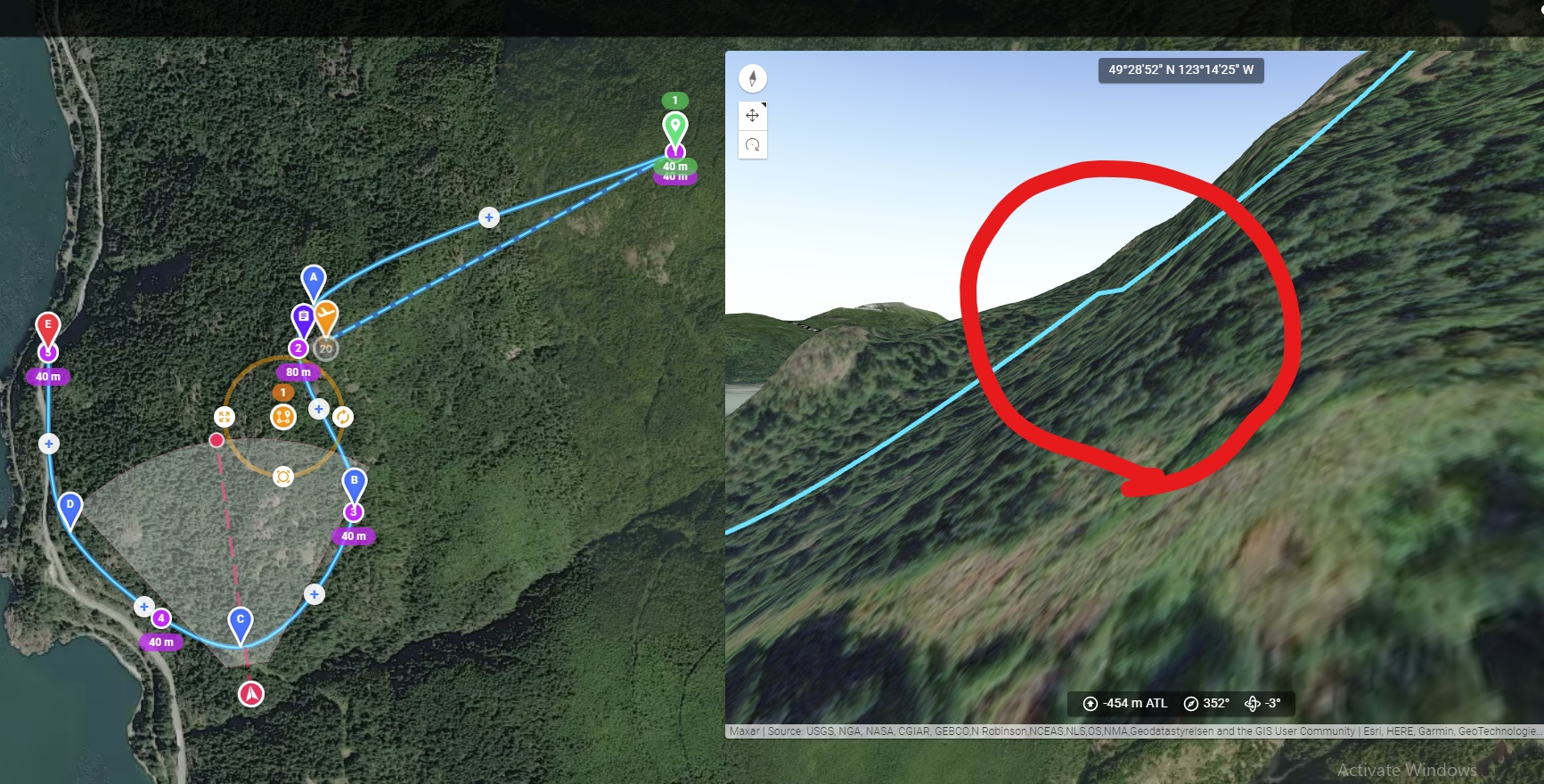
Comments
9 comments
My assumption is that there is a problem with the interpolation mode. However, the best bet would be for you to share a link to the site (make it as a viewer) and then someone can take a look.
It is just an issue in the 3D preview. Have you actually seen this in the real world?
Hi Barry Houldsworth and thanks for taking time and looking into this. Here is the link to the project:
https://app.dronelink.com/babak-samareh/public/plan/BYbuS0mahos9MLo11zxp/KRNM1eU7AxUTqGZK7egT
Hi Jim McAndrew, thanks for your help, I haven't tried the actual mission. I'm in Toronto and planning this for my visit to Vancouver :)
While on the topic, I have a question for you, is there any other software where you can design your fly path in and them import to DL? Or, is there any way to modify the path created in DL and make it more smooth?
DL is perfect as long as it's dealing with straight forward geometries, but when it comes to following the train, it's a little bit inconvenient.
Babak Samareh
Here is where I think you will find the problems - change the interpolation from None to one of the other values.
This video will cover it for you
https://vimeo.com/514729532
Thanks a lot Barry Houldsworth
The only market that does not have the interpolation is the first one, because I wanted to set the pitch to follow the path immediately. The rest of the markers are going to interpolation. But still I have the discontinuity at waypoint D.
Google earth / KML import, but my guess is it won’t be as good as just planning it in DL directly.
Do you mean just getting rid of the discontinuity at the waypoints or is there some other issues you are referring to? If just the thing at the waypoints, like I said, I believe this is only a rendering issue and when you fly it for real you won’t see it.
I did try Google earth, it's easy to draw paths and it follows the train, then I imported the points cloud into DL and started modifying it there.
I have realized that smoothing for elevation is applied to each segment and it is NOT a continuous function. For example, for the linear mode, each segment between markers is a straight line, and for curved, it's a predefined shape that is applied to each piece, right? Please see the example below (it's the elevation profile)
However, for the path itself, in the way path settings there is an option called "Pathing" that passes a smooth curve through all the waypoints. Is it possible to do the same thing for the elevation curve as well, e.g., the elevation curve above should look like:
Correct
Possible yes, but not without adding a new feature to the kernel. You can post feature requests here.
Please sign in to leave a comment.