Yam + Gimbal pitch down | Spiral Reveal

I want to make an effect, it is a combination of Yaw + Gimbal Pitch Down (Fixed ATL & Fixed location), it can be set, but the result on the simulation test is failed.
The reason seems to be that it is a fixed point, and the current function does not support fixed-point & fixed-height motion operations.
But, it is just Yam + Gimbal Pitch (2 motions). Hope to support in the future.
This effect is often used as sports camera movement. It's like the active spotlight, but the active spotlight will always keep the subject in the middle of the frame, I don't want that, I want to do my own camera movement and framing.
I know there is a rotation function, but it has two limitations:
1. The speed of rotation is fixed and cannot be adjusted. I will more need it to be like the marker's interpolation. Yawing smoothly between action points.
2. Although there is rotation, this technique requires two joystick's motions of yam + gimbal pitch together, I am not sure that only rotation can do it
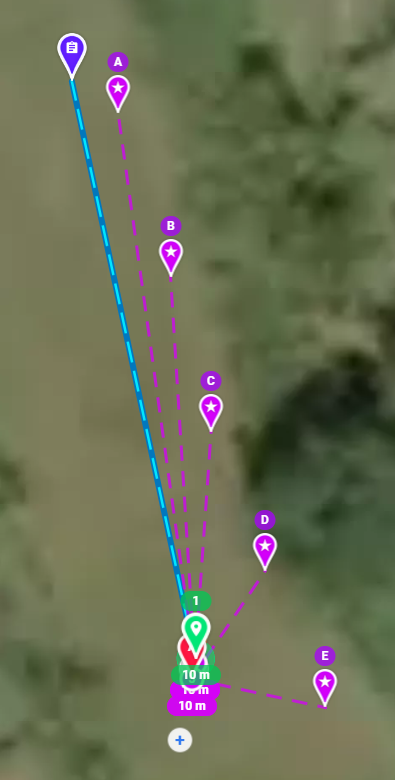
Here is a sample. It can be set but does work at all.
Comments
4 comments
I don't understand what you want.
I’d like to see that plan if you can share it. Placing markers really close together like that may be difficult to transition between each point. Once it gets to the first marker it will start interpolating to the next one and so on.
Jim McAndrew Mike (Arizona Wyldwest)
The request's need is simple and I hope to do a combination stick movements:
Stick action (Mode 2)
1. Right stick: no any action
2. Left stick: Yaw right or left (only)
3. Gimbal pitch: move down or up
Why is it needed? Where to use the skill?
Please let me know what other information you need to help understand.
------------------------------
The flight samples (current state)
#1: The sample is used to demonstrate the expected effect. (Base line sample) https://app.dronelink.com/skycyclist/archived/plan/Yfad71bH8dzpyrSJ8kQ9/SLPbyzp4a0pO3I6TuVYq
#2: The yaw will rotate too fast if the markers are overlapped. The gimbal pitch movement is a little bit too fast. It will be more cool if it is revealing up slowly (But, at least, it works)
https://app.dronelink.com/skycyclist/archived/plan/O7hjKsi5ZRqbIwpIIKP5/OaNlBFI4YYCb3nzxXINa
#3: What I really want is doing is this. This is used to do "spiral reveal" effect. It is often needed. As you can see it now, it does not work at all.
https://app.dronelink.com/skycyclist/archived/plan/o65u7X1G5EcEXR5nRdoZ/KaRTbN4HPEk0vEGP9x01
I hope it can just simulate:
Stick action (Mode 2)
1. Right stick: no any action <<<<<<<<<<<<<<<
2. Left stick: Yaw right or left (only) <<<<<<<<< Controlable
3. Gimbal pitch: move down or up <<<<<<<<<< Controlable
Mike (Arizona Wyldwest)
Does it seem to be too easy and too basic for dronelink to work?
It is only a two-stick action simulation.
Spiral Reveal is very often used.
The Path component is not designed to ever come to a complete horizontal stop right now except for the special case of a non-interpolated altitude change marker, and as you know, the other parameters do not interpolate well during altitude changes like that. If I understand you correctly (you want to control the speed of the yaw / gimbal motion), then you need to set slow speeds for the markers, but not zero, and space them out to get the appropriate timing. Obviously this will still cause some horizontal motion, but again, just trying to make suggestions based on the current functionality:
https://app.dronelink.com/dronelink/support/plan/5q36SB2gXnnQcHgApTHS/NOIhVYgqHtMFLWqVivTf
Please sign in to leave a comment.