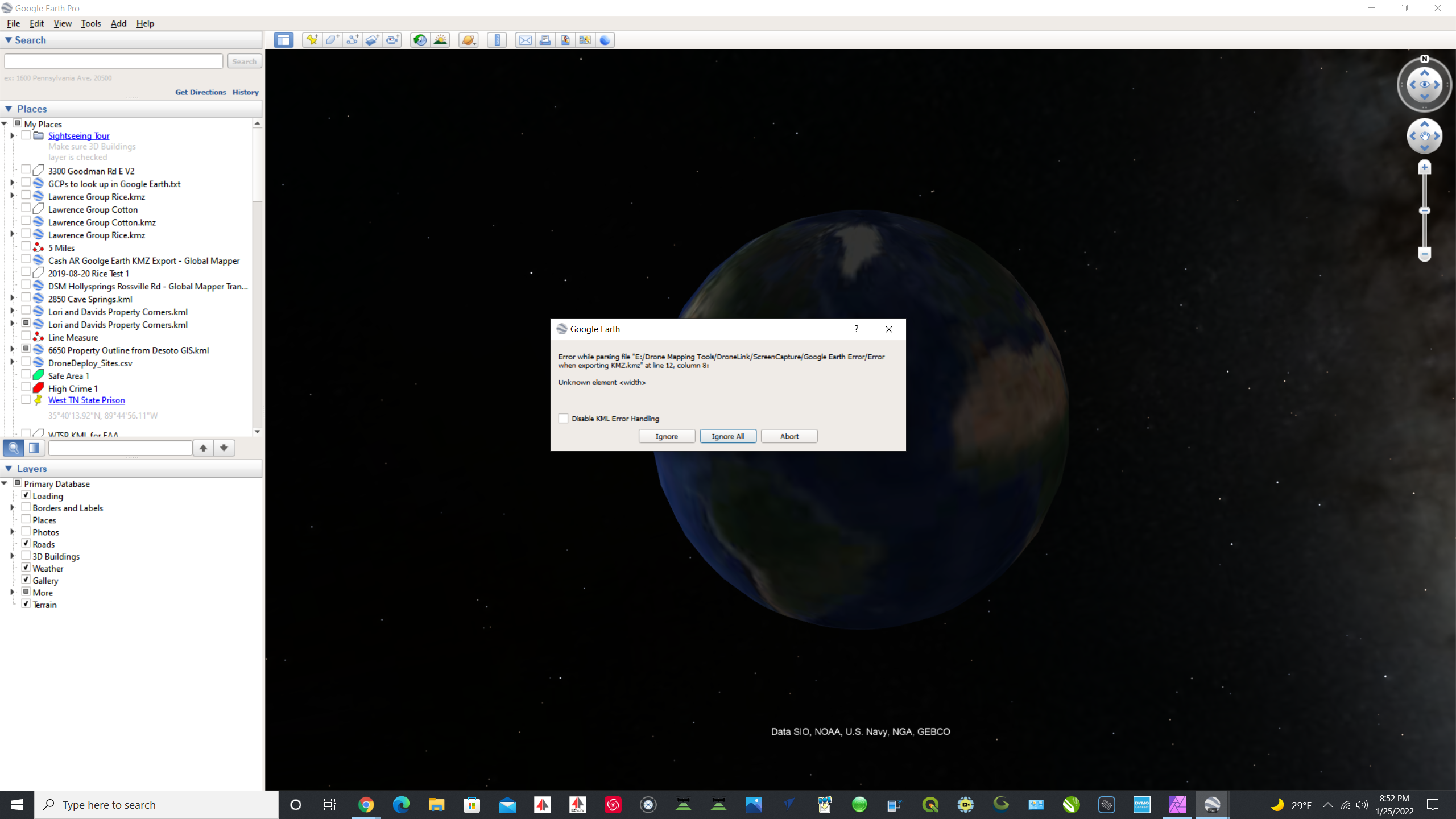
Any Google Earth export will throw an error message in Google Earth when you open it (invalid Width)

Any plan that is exported to a KML file, when you open the KML file you will get an error message on the screen. You can click "Ignore" and then it will let you see the mission.
Below is the message that you will receive for any mission that is exported.
Comments
7 comments
Export works fine for me.
Has worked for me too for over a year. Maybe check in the settings to see if there is something in there. A lot of Google Earth settings which may be causing this.
Please share your mission plan.
Here you go. I flew today so I will look forward to seeing how the lidar overlap did.
https://drive.google.com/drive/folders/1MwTuX2sHvBjlhndRo_1ugS5vlZ3rSFC5?usp=sharing
Arizona, I guess I could just turn off Error checking. I just wanted to pass it on in case there was a simple fix so it did not throw the error. I have no idea what settings could cause it. If you send me a KML export from yours, then I will see if the same error pops up. It still imports into Google Earth after I click on "ignore".
I don't get that error message when I export your mission and open it in Google Earth.
I will just disable the error handling. It seems crazy that my Google Earth would be the only one throwing and error about an unknown element width. But if it imports and all I have to do is disable error handling, then that is what I shall do.
Please sign in to leave a comment.