
Popular Resources
-
<% blocks.forEach(function(block, index) { %>
-
<% if (imageHeight) { %>
<% } %>
<% if (block.name) { %><% if (block.html_url) { %> <%= block.name %> <% } else { %> <%= block.name %> <% } %>
<% } %> <% if (block.description) { %><%= block.description %>
<% } %>
<% }) %>
Comments
11 comments
Please share you mission plan.
This sounds like it may be related to my issue:
https://support.dronelink.com/hc/en-us/community/posts/4416243493779-Mission-Preview-Drone-Too-Far-Off-Course
The other day I was playing around and this happened. I think the overlap was very high and it previewed only part of the mission. I assumed it was calculating that the battery would run out at that point. When I decreased the overlap, it played further into the mission. But I don't think it was calculating the battery life correctly. I was just doing some planning testing so it was not a real life issue for me.
Hi Brad,
Not sure if related. I had no error message.
I came back and retested to see what might cause the issue and here is a breakdown.
I've made a path of apx 3 km with 7 Waypoints, 9 Markers and 4 Points of Interest. I've tested the "Mission Preview" and it shows a path in violet-red that is the equivalent of the duration. The mission duration estimate was about 9 to 10 minutes yet the preview was made for the duration of 4 min 57sec.
I have scaled down the path size and made another Mission Preview, yet I had a similar result. This time tough the duration of the preview increased to 5min 17sec and the violet-red trajectory line was at about 70%.
I have scaled down once more and this time it worked completely.
It seems this is somehow related with the scale of the path, although if I check the range is well within what the drone can handle.
Given the fact that there is no warning sign or mention of any such limitation, I can only presume this is a bug.
Would gladly provide more details.
Link to fight plan:
https://app.dronelink.com/claudiu-curin/my-first-project/plan/hgcfMjSFK4RkjlLJjagA/BmY9UqgdnqIRUtQhsqzv
Please share the version that reproduces the issue.
Hi Jim,
Worked on the same version when I did the resize.
I have created another one for testing purposes.
The estimated duration is 8 minutes 22 sec:
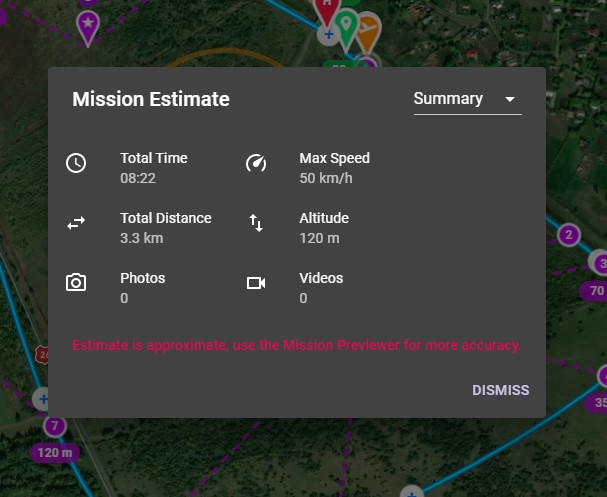
The Mission Preview is generated for 5 min 38 sec:
Link to same version as presented in the screenshots:
https://app.dronelink.com/claudiu-curin/my-first-project/plan/hgcfMjSFK4RkjlLJjagA/aNNAY0zmyWZjBPVfPWpJ
I ran it on my iPad Mini 5 with Firefox and Chrome with no issues. It may be whatever device or browser your using. Can you use another browser and/ or device to see if it still happens.
Edited: I just ran it on my iPhone 8 which has a slower processor then my iPad and it ran fine. My guess is the device your using but anything is possible.
Hi. I'm Running it on Chrome. I'll try to clear cache & cookies and also another browser. I'll also try it on my phone (Samsung S10+).
Here I tested is 100% success.
(Windows 11/Chrome)
https://app.dronelink.com/claudiu-curin/my-first-project/plan/hgcfMjSFK4RkjlLJjagA/aNNAY0zmyWZjBPVfPWpJ
FYI
Hi. Issue is solved. I have tested succefully the same mission on Opera Browser and on the Android App on my Samsung S10+ (Android 12). After clearing cache & cookies I no longer have this issue in Chrome either. Thanks everyone. Feel blessed for such a helpful community. :D
Sometimes it’s the simplest things. Enjoy…
Please sign in to leave a comment.