support on basic command

Hello,
Newbie here.
I created this first and very simple example (link below).
How is it possible to remove camera stop/start commands ?
Need is just to fly the scenario w/o any camera recording.
Thanks.
Hello,
Newbie here.
I created this first and very simple example (link below).
How is it possible to remove camera stop/start commands ?
Need is just to fly the scenario w/o any camera recording.
Thanks.
<%= block.description %>
<% } %>
Comments
4 comments
Go on the Path settings, scroll down and delete the "Camera Capture" called Video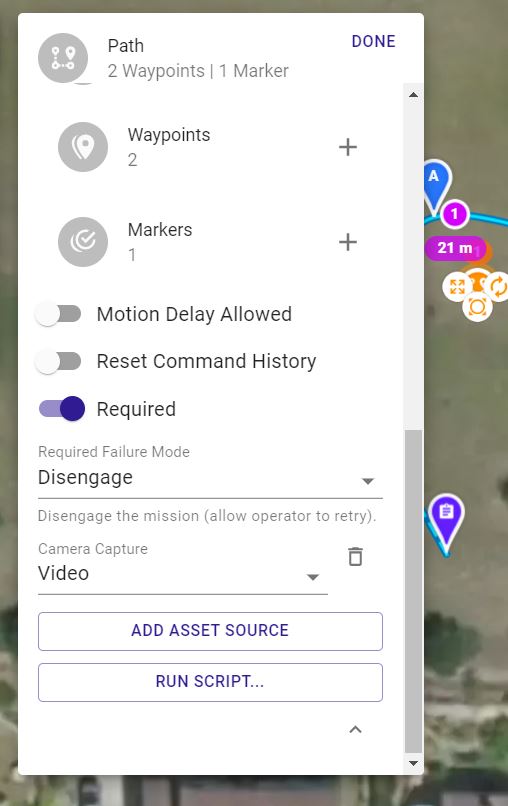
Thank you Raffaello.
Seems easy now, not so obvious at the beginning to take the right component for modification. Rgds.
FWIW: You can also "test" run a mission without executing any included video or photo commands by simply running a Verification Mission. I do this routinely especially if you have a concern about objects in your path. It is also handy if you are Beta testing a new release and you just want to make sure the mission will run as expected!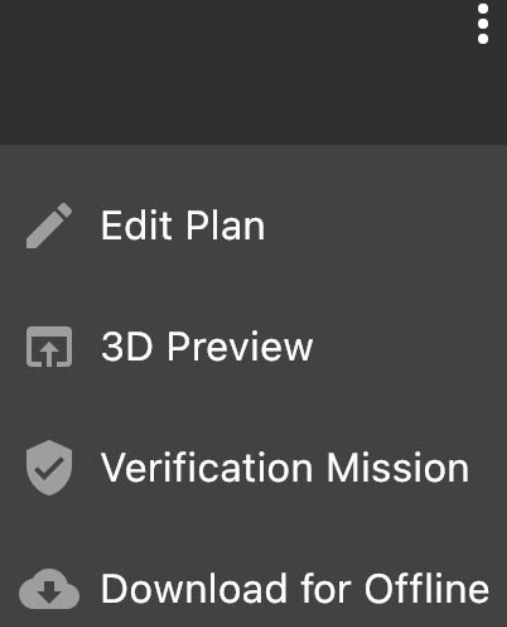
Yes David.
I saw the video on DL channel explaining that the verification (pre)mission is commonly used to check that the route is safe. Thanks for your feedback.
Please sign in to leave a comment.