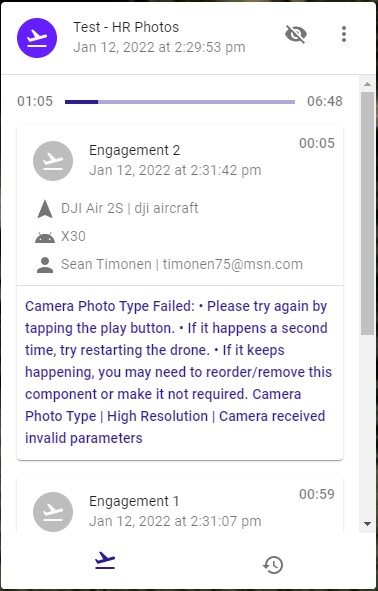
Camera Photo Type Failed

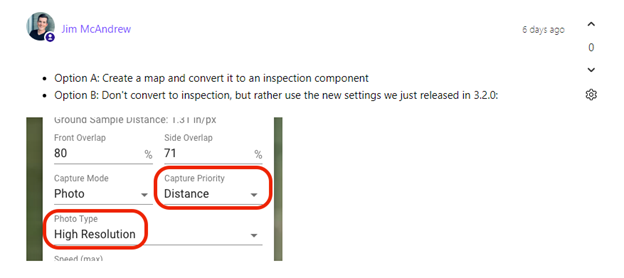
Afternoon, I purchased the Growth account today for the mapping functionality primarily to leverage the 48MP capability of my Air 2S. I did download the beta version 3.2.0. as Jim noted in a response to a question I posed last week. I used the settings as highlighted and kept getting the following error(?). Both considerations are below.
I acknowledge my greenhorn status. Any push in the right direction to capture High Resolution images would be immensely appreciate!
Comments
9 comments
I have the MA2 which has the same 48MP photo capability. Setting the camera to high resolution should work. Since this is a newer released drone it may be an issue but if you can share the plan it may help to see if there is something in the plans setup. EG: Camera type, order of components etc.
Thanks for the reply AZ! I would be happy to share the plan. If it's not too much trouble could you provide guidance on how to do so? Many thanks!
Sure. We all were once new at this so glad to assist. Open the plan you want to share then click on the three little dots for the settings in the top area. A list will pop-up with Share. Click on it and select “new share” then “viewer.” Click ok and you should be able to paste it here. Hopefully it’s something simple but it could be a number of things due to a newer released drone. I had similar issues with camera components when the MA2 was added and I believe it was the DJI SDK if I’m not mistaken.
Mike……..
Thanks Mike, appreciate the instructions. Below is the link. Any insights are greatly appreciated!
https://app.dronelink.com/bsh-dl/my-first-project/plan/h1G7Sdel8cFgUIgUjoeP/0Pra7bc4r3bnkbzZ7u4h
Apologies if I misread your original post. I don't think the Air 2S has the 48mp option, it was just on the original Air 2 (which didn't have the 1 inch sensor so DJI was doing some "magic", i.e. stitching behind the scenes, to get a 48mp image). Email support@dronelink.com if you need a refund.
Thanks Jim, I appreciate the clarification and the option to revert back to Elite package. I'm really excited to start digging in the capabilities! From all the tutorials I have watched, it looks like a powerful application. Many thanks.
I forgot about the A2S not having the 48mp photo ability. It shots 20MP only. The MA2 can shoot 12mp or 48mp due to it having the 1/2” Quad Bayer sensor.
In the future you can test any camera commands by creating a new plan only with just the take-of pin, “no destination or path.” Then add only camera commands as usual which you would like to test. You can then start up the drone and DL app as usual run the plan to see if they work. Since the plan has no destination or path it will not fly and just execute the camera commands and let you know if they work with your drone. Great way to test them without flying it. I suggest to remove the quick release props just to safe but since it has no path it should not fly. You can test inside your home this way really quick.
Enjoy, Mike…..
I have the same error on my DJI mini 2 too, Should I use other settings too ?
Good to learn that it is possible to test settings without flying.
Each drone model will only take the same type photos which it is capable of shooting. Same as what works in the DJI app. Many different photo and video types, resolutions, frame rates etc, which won’t work on all drones. Best way is to look at the drones camera specs and see what it is capable of.
Yes, Running just the photo or video components as posted above is a great way to test all the ones your particular drone can perform. At least this way you know for sure they are working correctly before flying a mission. 😃
Please sign in to leave a comment.